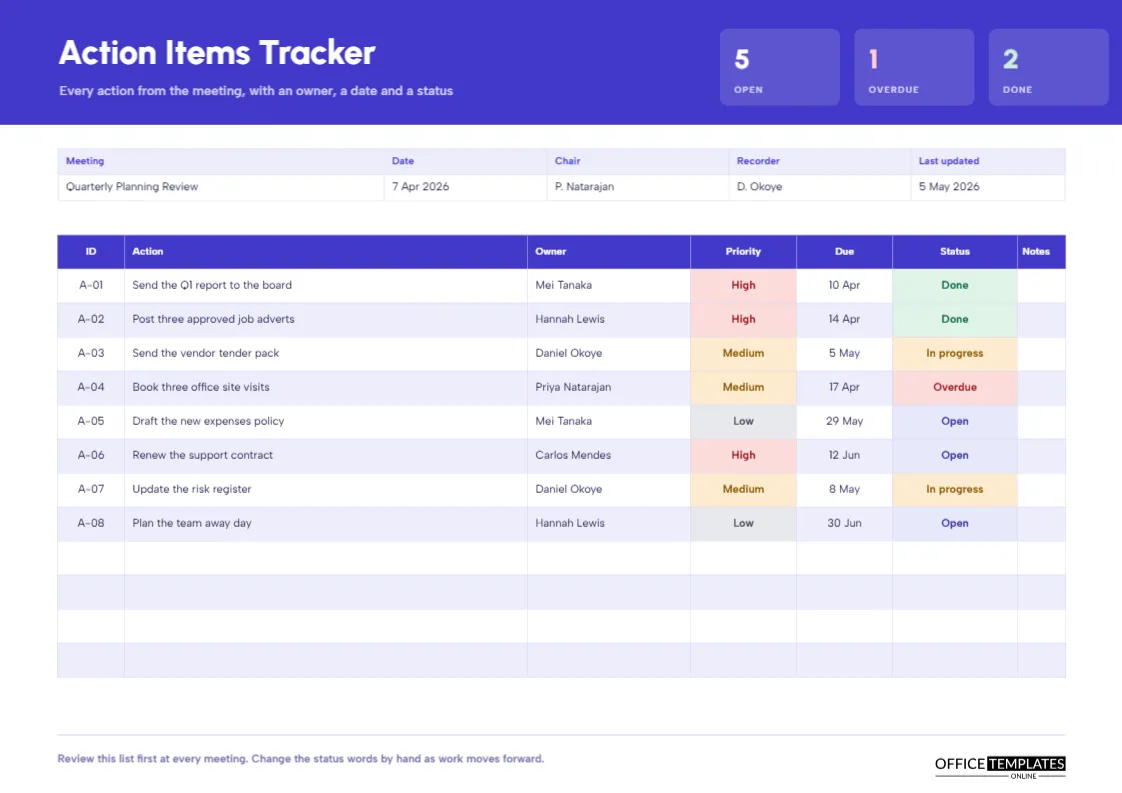
Meetings produce actions, and actions disappear unless somebody keeps them in view. The usual solution is a list kept in a spreadsheet or in the back of someone’s notebook, and neither is much use in the meeting where the list needs to be reviewed. This tracker is a single landscape page you can print or show on screen. It counts open, overdue, and done actions in three tiles at the top, and it lists every action in a wide table with room for notes.
Why Landscape Suits a Tracker
A tracker has many columns: an identifier, the action, the owner, a priority, a due date, a status, and notes. In portrait, the text would be cramped. On the landscape page of 297 by 210 millimetres, each column has room to breathe, and the action description can be a full sentence. The sheet also prints well on a single page, so you can review it at the start of every meeting.
Three Counting Tiles
At the top right of an indigo band, three translucent tiles show Open, Overdue and Done. In the sample, they read five, one, and two. Open includes the actions in progress as well as those not yet started. The tiles give the number a meeting needs in the first ten seconds: how much is outstanding and how much is late. Update them by retyping after you change the table.
Counting the Tiles From the Table
| Tile | How the sample counts it | Sample result |
|---|---|---|
| Open | Actions marked Open or In progress | 5 |
| Overdue | Actions marked Overdue | 1 |
| Done | Actions marked Done | 2 |
Because the table holds typed text, nothing updates itself. Recount and retype after each review.
Indigo, Amber and Urbanist Type
The header is solid indigo with the title Action Items Tracker in heavy Urbanist and a subtitle explaining the purpose. The table headers repeat the indigo, and alternate rows have a pale lavender tint. Albert Sans carries the table text. The page is bright but orderly, which encourages people to look at it.
Columns of the Tracker
The table has seven columns: ID, action, owner, priority, due, status, and notes. IDs such as A-01 let you refer to actions in conversation and in other documents. Owners are named individuals, not teams, because shared ownership often means no ownership. The notes column is left blank in the sample for you to use.
Priority and Status as Coloured Cells
Priority cells are tinted red for High, amber for Medium, and grey for Low. Status cells are green for Done, amber for In progress, lavender for Open and red for Overdue. The colours let you scan the page from across the room. A column of red status cells is a signal that the meeting should start with those actions.
Reviewing the Tracker at the Start of Every Meeting
The footer advises reviewing the list first at each meeting. A useful sequence is to read the overdue items aloud, ask for a new date or a reason, mark done items as done, and then move on to new business. Spend no more than five minutes. If the review takes longer, the list is too long, or the actions are too vague.
Writing Actions That Can Be Tracked
A trackable action starts with a verb, names an object, and has one owner and one date. Send the Q1 report to the board is trackable. Look into reporting is not. If an action is large, split it into steps with separate rows and dates. This keeps statuses meaningful and prevents the same item from sitting in progress for months.
Dealing With Overdue Actions Honestly
An overdue action deserves a conversation, not a blame session. Ask whether the action is still needed, whether the owner has what they need, and whether the date was realistic. Then change the due date, record the reason in the notes column, and change the status back to open. If an action is no longer needed, mark it as closed with a note.
Combining the Tracker With Minutes
Many teams copy new actions from the minutes into the tracker after each meeting and give them the next ID. Others keep the tracker as the only action list, with minutes pointing to it by ID. Whichever you choose, avoid keeping two lists that drift apart.
Editing and Extending the Table
The table has twelve rows, with the last four blank. Use Edit Table Data to retype cells and Add Row to extend it, remembering that the page is limited in height. Change cell fills for priority and status, and retype the tiles.
Printing the Landscape Page
Print on A4 in landscape orientation. The indigo band uses a fair amount of ink, so for a working copy you might change its fill to a light tint.
Balancing the Number of Actions in the Tracker
A long list of actions is a warning sign. If the tracker has forty open items, the team is probably overcommitted, and some of the actions will never be done. Use the review at the start of each meeting to close or drop actions that are no longer relevant. A tracker with ten live items that are actually completed is more useful than a list of fifty that everyone ignores.
Sharing the Tracker With People Outside the Meeting
Many actions depend on people who were not at the meeting. Send the tracker, or the rows that concern them, within a day. A short message, for example Please confirm the date in row A-06, makes it clear what you need. Keeping the owner’s name in the table makes the request easy to understand and gives them a reference to quote when they reply.
Tracking Dependencies Between Actions
Sometimes one action cannot start until another finishes. Mention the dependency in the notes column, for example, waiting for A-03. When you review the page, look at the notes for blocked rows and ask whether the first action is on time. This simple habit prevents the common situation where a late action quietly delays several others.
Tracker Questions
Can I use it for a project instead of a meeting?
Yes. Change the heading and the meeting details to the project name.
Should every action have a priority?
It helps. If you prefer, remove the column and widen the action column.