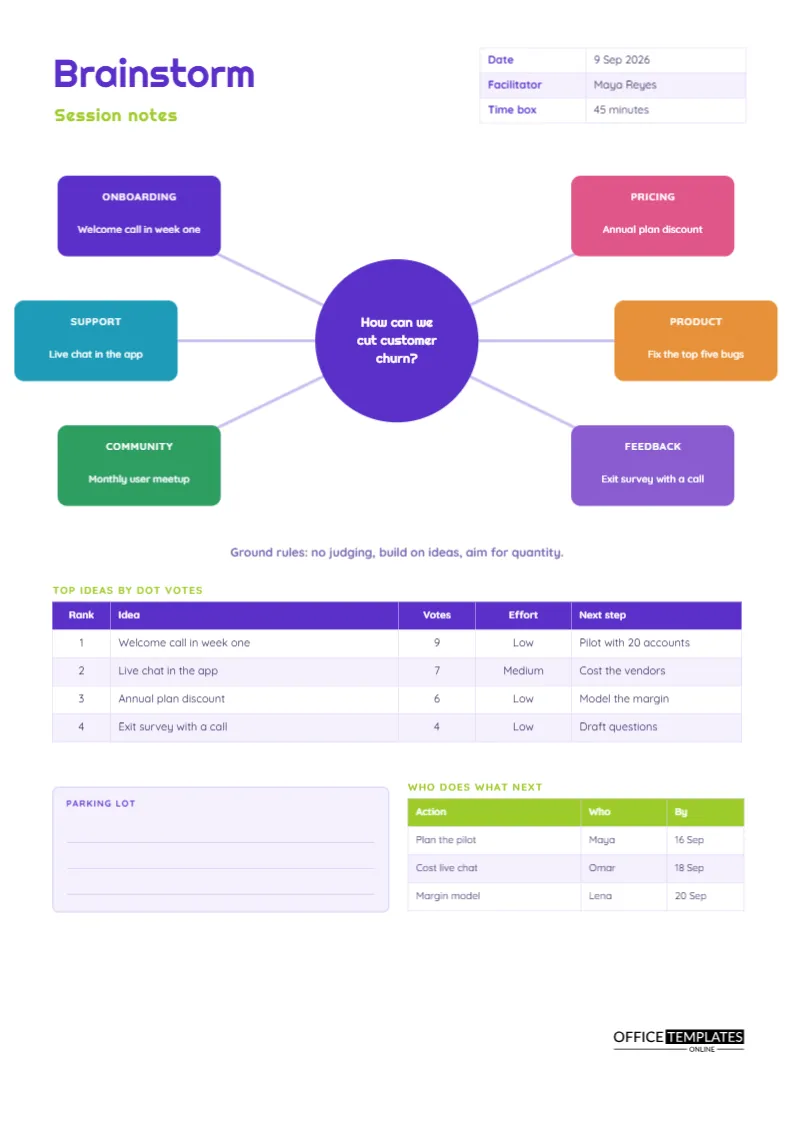
A brainstorm produces a lot of ideas and, too often, very little else. Sticky notes get photographed and forgotten, and the best suggestion is the one the loudest person liked. These notes are meant to be the opposite of that. The page shows a central question with six branches that hold ideas by theme, then moves on to a ranked list of the top ideas by votes, and finally to who will do what next.
One Question in the Middle
A large violet circle sits at the centre of the page. In the sample, it holds the question: How can we cut customer churn? A good brainstorm question is open, specific, and phrased as how can we. Avoid yes or no questions, and avoid questions that include a solution. Write the question in the circle before the session, so everyone sees it from the first minute and returns to it whenever the talk wanders.
Six Branches, Six Themes
Six rounded boxes in different colours connect to the centre by thin lines. Each carries a theme heading in capitals and a short idea. The sample themes are onboarding, pricing, support, product, community and feedback. Grouping ideas by theme as they appear is called affinity mapping, and it reveals patterns that a flat list hides. If a branch fills quickly, the group has found a rich area. If a branch stays empty, ask whether it matters or whether people just did not think of it.
An Idea Map at a Glance
| Branch | Idea in the sample | Likely effort |
|---|---|---|
| Onboarding | Welcome call in week one | Low |
| Pricing | Annual plan discount | Low |
| Support | Live chat in the app | Medium |
| Product | Fix the top five bugs | High |
Ground Rules Printed on the Page
Under the map, a single line reads: no judging, build on ideas, aim for quantity. These three rules come from long experience of creative sessions. Judging too early shuts people down, building on others’ ideas makes them stronger, and quantity gives the group room to find something unexpected. Read the rules aloud at the start and point to the line whenever someone says that will never work.
Time Boxing a Forty-Five Minute Session
The header table includes a time box field, set to forty-five minutes in the sample. Divide the time roughly as follows: five minutes to explain the question, fifteen to generate ideas silently and in pairs, ten to group them on the map, ten to vote, and five to agree on next steps. A visible time limit makes people write faster and speak more briefly.
Voting With Dots and Ranking the Results
After generation, give each participant a small number of dot votes, often three to five. They place the dots on the ideas they would most like to try. The ranking table records the rank, the idea, the vote count, a rough effort rating, and the next step. In the sample, a welcome call in week one gets nine votes and a pilot with twenty accounts as its next step. Ranking by votes and effort together points you to ideas that are popular and cheap, which are often the best place to start.
The Parking Lot for Good but Off-Topic Ideas
Creative sessions throw up ideas that are valuable but belong elsewhere. A pale violet box with ruled lines holds them. Writing an idea down in the parking lot tells the person it was heard, and it protects the main question from drifting.
Who Does What Next
The lime-headed table at the lower right lists three follow-up actions with owners and dates. Every brainstorm should end with at least one, or it was a conversation, not a working session. In the sample, one person plans the pilot, another costs live chat, and a third builds a margin model for the annual discount.
Facilitating When the Room Goes Quiet
Silence is normal. If the group stalls, change the angle: ask what the worst idea would be and then flip it, or ask what a competitor would do. You can also ask people to write in pairs for two minutes, then share. The branches on the page are another prompt. Point at an empty branch and ask what might sit there.
Brainstorming Online
For a remote session, share the page on screen and type ideas into the branch boxes as people speak, or let them post in a chat and move the best ones in. The ranking table works the same way, with votes collected by a quick poll.
Editing the Map
The centre circle and the six boxes are plain shapes with text boxes, so you can retype them, change the colours, or add a seventh branch by copying one and drawing a new connecting line. The ranking and action tables are real Table objects with Edit Table Data and Add Row.
Printing the Idea Map on A4
A4 portrait with generous white space around the map. Colours print vividly, and the branch headings keep the structure in black and white.
Choosing Between Ideas That Score the Same
Votes will sometimes tie. Instead of voting again, add a second filter such as effort or risk. The ranking table already has an Effort column, so prefer the cheaper idea when votes are equal, or the one that tests the biggest assumption. You can also run a small experiment on both. The point of the table is to make a decision visible, not to calculate a winner, and a short conversation after the vote usually settles ties quickly.
Following Up a Brainstorm in the Week After
A brainstorm only matters if something happens next. Send the page to every participant within a day, with the next steps highlighted. A week later, ask the owners for a one-line update. If the top idea has no progress, decide whether it was a good idea or just a popular one. This light follow-up turns a single workshop into a working habit of testing ideas, and it shows participants that their time was valued.
Brainstorming Questions
How many people should join?
Five to eight is a comfortable size. Larger groups work better when split into pairs first.
Should I record who suggested what?
Usually not. Anonymous ideas are judged on merit.