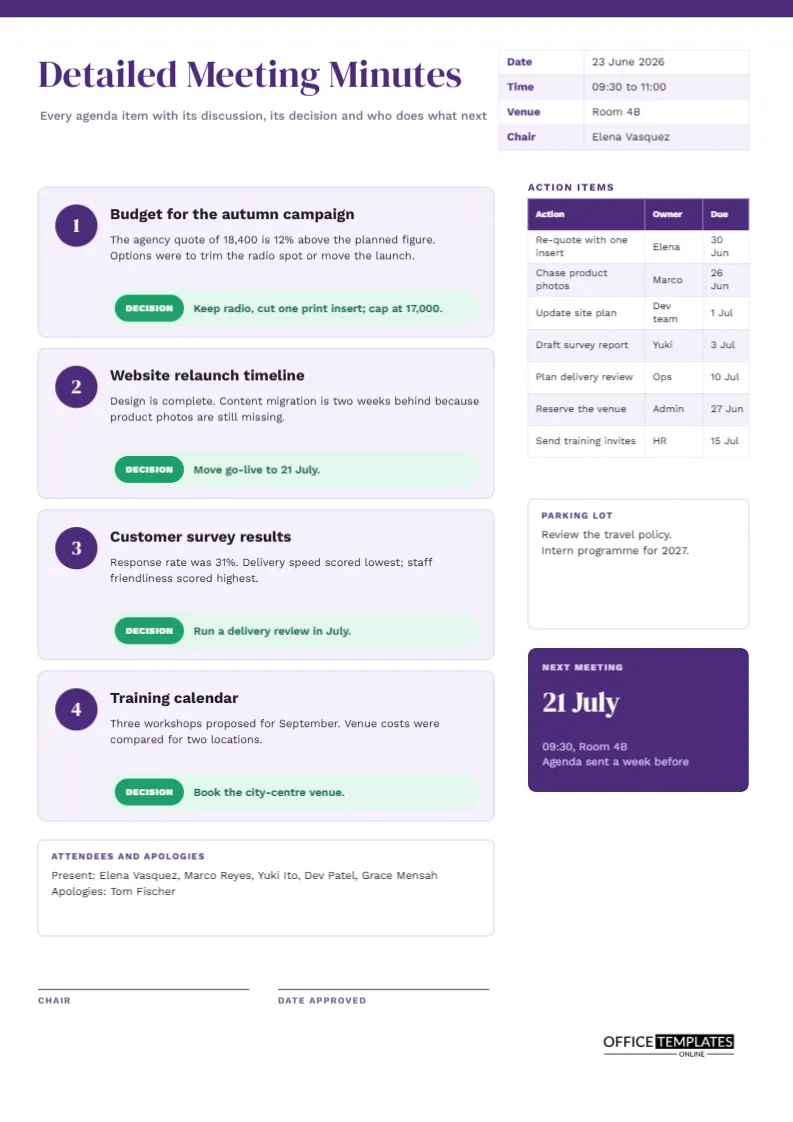
The most common failure in meeting minutes is not missing information. It is information that sits in the wrong place, so nobody can tell a discussion from a decision. This template is built around that problem. Each agenda item gets its own card, and every card ends in a green decision line. An action column stands beside the cards so that outcomes and tasks never get buried in paragraphs.
Five Mistakes This Layout Is Designed to Prevent
Before looking at the page, it helps to know what goes wrong in ordinary minutes.
- Decisions hidden inside discussion text, where nobody finds them.
- Actions written as vague wishes, such as look into pricing.
- Actions with no named owner and no date.
- Minutes that run to five pages because everything was recorded.
- Late distribution, so the record arrives after people have moved on.
The structure of this page answers the first three directly and discourages the fourth by limiting each topic to a card of fixed size.
Numbered Cards in Plum and Lilac
The top of the page carries a thin plum rule and a large title in DM Serif Display. A small table on the right holds date, time, venue, and chair. Below it, four pale lilac cards run down the left side. Each card has a plum circle with a white number, a bold topic heading, a short discussion paragraph, and a rounded green strip labelled DECISION. The right-hand column holds the action table, a parking lot and a plum tile announcing the next meeting date.
Anatomy of One Agenda Card
| Part of the card | What to write | Sample from the page |
|---|---|---|
| Topic heading | A short name for the item | Budget for the autumn campaign |
| Discussion text | Two lines of context | The agency quote is 12% above the planned figure |
| Decision strip | The outcome in one sentence | Keep radio, cut one print insert; cap at 17,000 |
Keeping the discussion to two lines is a discipline. If you need more, the topic probably contains more than one decision and should be split.
Good and Weak Decision Wording
A decision should pass a simple test: could someone who was absent act on it without asking questions? Compare these pairs.
| Weak entry | Better entry | Why it works |
|---|---|---|
| Talked about the website | Move go-live to 21 July | It states a date that can be checked |
| Budget concerns | Cap the campaign at 17,000 | It sets a limit |
| Consider training | Book the city-centre venue | It names a concrete step |
The Action Column
The action table to the right has three narrow columns: action, owner, and due date. It lists seven rows, which is usually enough for a meeting with four agenda items. The owner column is deliberately narrow so that you use first names or team names rather than long titles. If an action belongs to a group, name the person who will chase it.
Parking Lot and Next Meeting
Below the actions is a small white box called Parking Lot for topics that came up but were not ready for a decision, such as a travel policy review. Beneath it, the plum tile shows the next meeting date in large serif type, with time and room underneath. Giving the date a prominent place means people see it when they scan the page.
Attendance Without a Big Table
This template uses a single bordered box near the bottom for attendees and apologies, written as two short lines. That saves space for the cards. If you prefer a full attendee table, shrink one card or move to the standard form, which has a table for exactly that purpose.
Editing the Cards
The cards are ordinary shapes and text boxes, so you can select and move them. If you need five agenda items, duplicate a card by copying and pasting, then shift the remaining cards down. The action table is a real Table object. Use Edit Table Data to retype cells and the Add Row button to extend it.
When the Meeting Overruns the Cards
Sometimes a topic generates a long debate. Resist the urge to write all of it in the card. Record the decision, then attach any extra material, such as a quote or a chart, as a separate document and mention it by name. The minutes should stay short enough that people read them.
Sending the Minutes On Time
Aim to circulate the filled page within one working day. A tidy page like this takes about fifteen minutes to complete from rough notes. Add the date of approval in the signature area once the chair has confirmed that the record is correct.
Running the Meeting Around the Four Cards
The page can also act as the agenda. Print it with the cards left blank, or fill in the topic headings in advance and bring the page to the meeting. As each item comes up, the note-taker writes two lines of discussion and waits for the chair to state the decision. If the chair moves on without one, the empty green strip is a visible prompt to ask. Over time, groups that use this layout tend to reach decisions faster, because nobody wants to leave a strip empty.
Worked Example: Writing Card Two in Real Time
Suppose the second agenda item is the website relaunch. During the first minute, the project lead explains that design is finished but product photos are missing. The note-taker writes exactly that as the discussion: design complete, content migration two weeks behind because photos are missing. A short debate follows about whether to launch without photos. The chair asks for a decision, the team agrees to wait, and the strip reads: Move go-live to 21 July. The matching action appears in the right column: chase product photos, owned by Marco, due 26 June. Total writing time is under two minutes.
Printing the Purple Rule Edge to Edge
The page is 210 by 297 millimetres. The purple rule at the top runs to the page edge, so use a printer that can handle edge-to-edge colour, or set a small margin and accept a white border. Black and white output remains readable since the numbers, headings and borders do the structural work.
Cards, Colours and Counts: Quick Questions
Can I use fewer than four cards?
Yes. Delete the unused cards and move the attendee box up.
Does the green strip have to say DECISION?
No. Rename it to Outcome or Agreed if that suits your organisation.