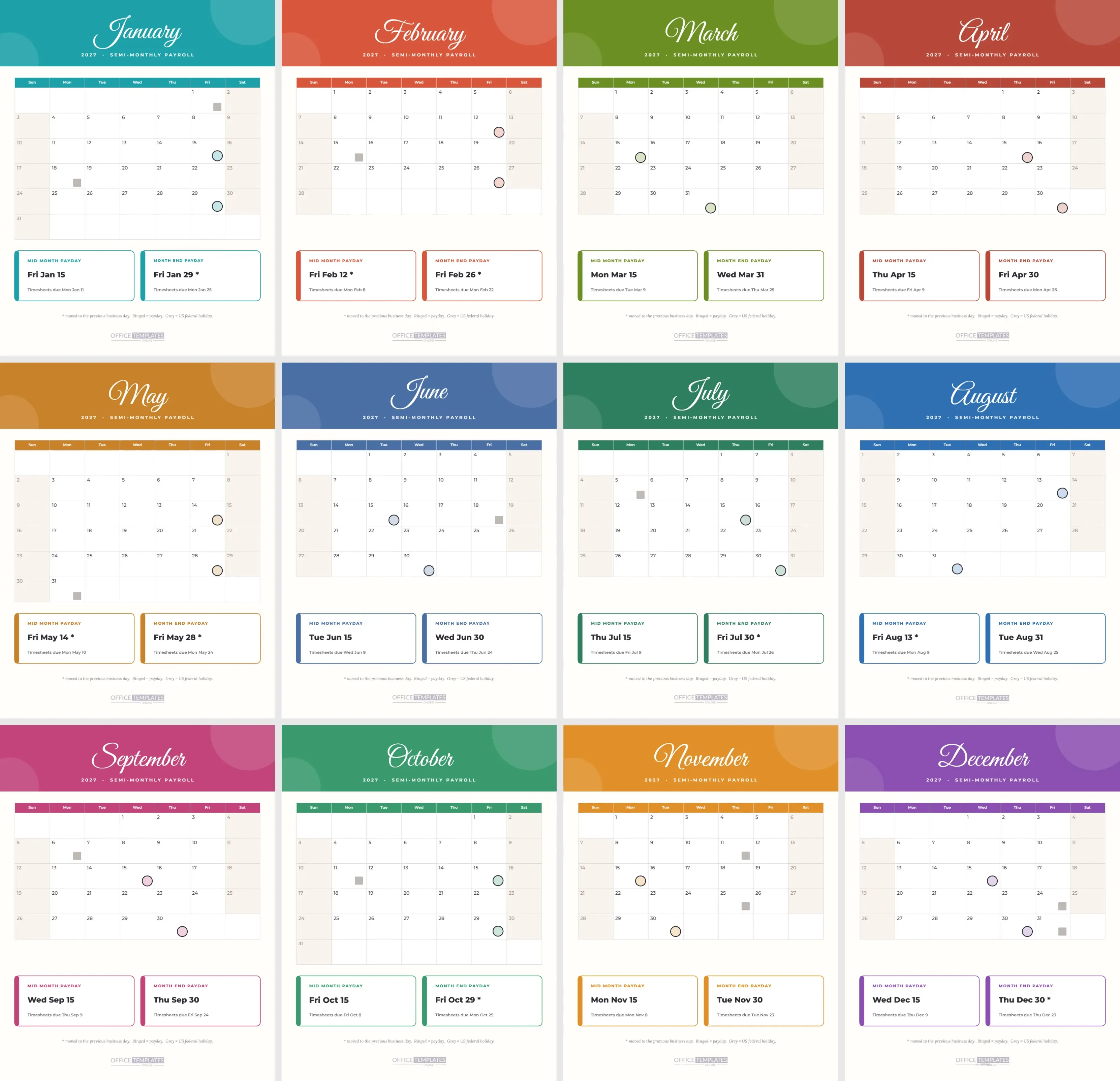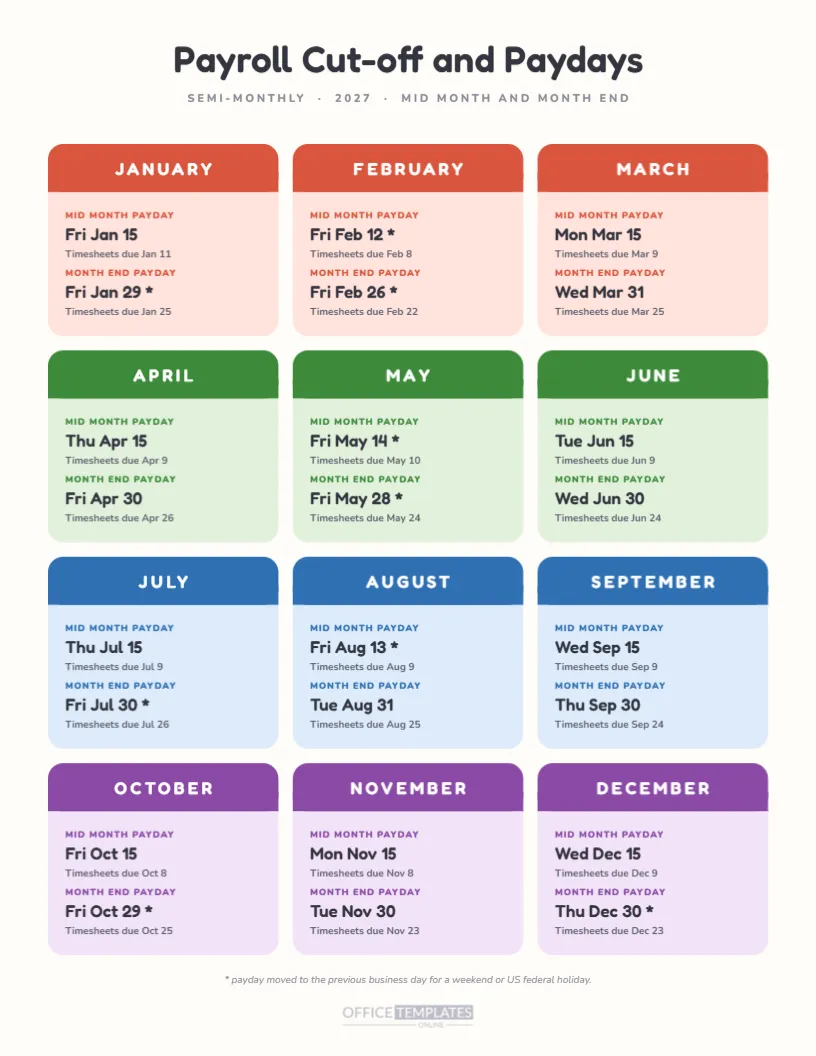
Not everyone wants a table. A set of friendly cards, one per month, can be easier on the eyes and easier to scan, especially for staff who see payroll only a few times a year. This page puts twelve pastel cards on one portrait sheet, each showing the two paydays for the month and the timesheet cut-off for each. It reads like a wall planner, not a spreadsheet.
Q: What Does the Page Look Like?
A: A cream page with a centred title in Fredoka, Payroll Cut-off and Paydays, and a grey line saying SEMI-MONTHLY, 2027, MID-MONTH AND MONTH-END. Twelve rounded cards sit in a grid of three columns and four rows. Each card has a coloured month header and two blocks of text.
Q: Why Four Colours?
A: Each row of three cards represents a quarter. January to March are coral, April to June are green, July to September are blue, and October to December are purple. Quarter colours let a reader find a month faster and make the page look organised even at a glance across the room.
Q: What Is in Each Card?
A: Each card names the month in white capitals on its coloured header. Below, two blocks say MID MONTH PAYDAY and MONTH END PAYDAY in small coloured capitals, followed by the date in larger type and a line reading Timesheets due, with the cut-off date. A star after a date means it moved earlier.
Q: Which Payday Dates Are Included?
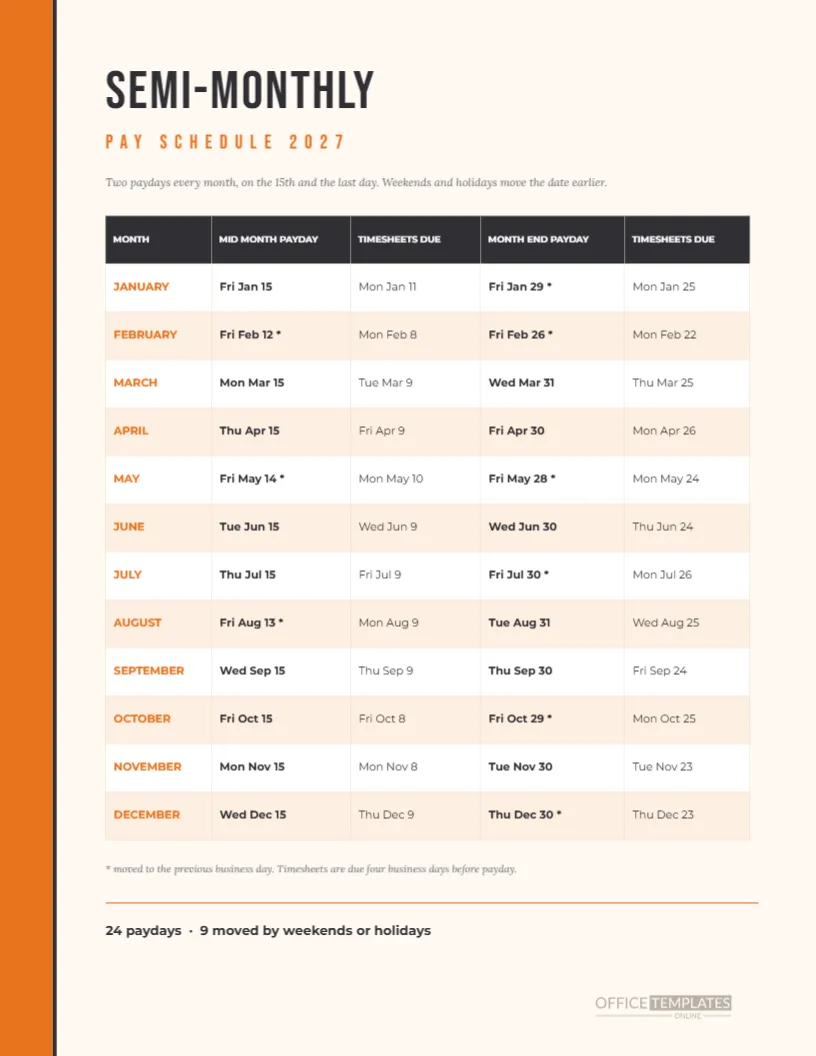
A: All 24. January pays on Friday the 15th and Friday the 29th. February pays are on the 12th and 26th. March pays on Monday the 15th and Wednesday the 31st. The remaining months follow the same pattern, with the moved dates marked by an asterisk after the day.
Q: What Is the Cut-off Rule?
A: Timesheets are due four business days before payday. For January 15, that is Monday, January 11. For February 12, it is Monday, February 8. Weekends and observed US federal holidays are skipped when counting, so a holiday week produces a cut-off a day earlier than the usual Monday.
Q: Why Are Some Dates Starred?
A: A star marks a payday that moved to the previous business day because the 15th or the last day fell on a weekend or an observed holiday. Nine dates move in 2027. The footnote under the cards says so, in a small grey line.
Q: Who Is It For?
A: Offices that want something friendlier than a table, such as a school business office, a clinic front desk, a small shop, or a community organisation. Because the cards are large and colourful, staff who are not comfortable with spreadsheets still understand it, and managers can point to a card in a meeting.
Q: Can I Cut the Cards Apart?
A: You can print the page and cut along the card edges to make a set of month cards. Pin the current month’s card on a board, or hand each manager the quarter they need. Print on card stock if you plan to handle them often. Leave a margin of a few millimetres so the rounded corners cut cleanly.
Q: Are the Cards Editable?
A: Yes. Every shape and every line of text is editable. The cards are separate shapes with text on top, not a table, so you can change one card without affecting its neighbours. Select a text line and type a new date, or recolour a header to match your branding.
Q: Can I Change the Colours?
A: Easily. Each quarter shares a header colour and a pale body tint. Select all the cards of one quarter, change the header fill and body fill, and the new colour spreads across them. Keep the header colour darker than the body so the white month name stays legible.
Q: What If My Paydays Are Different?
A: Retype the dates in each card. If you pay on the 10th and the 25th, change the labels MID MONTH PAYDAY and MONTH END PAYDAY to something that suits you, like FIRST PAYDAY and SECOND PAYDAY. The structure of the page does not depend on the 15th.
Q: Does It Cover Holidays?
A: Not directly. Holidays appear only through their effect, which is a moved date or an earlier cut-off. If you need a full holiday list, the holiday adjusted payroll calendar in this collection lists every observed US federal holiday for 2027 with the bi-weekly effect.
Q: How Do I Print It?
A: Print portrait on Letter at actual size, with background graphics on so the card colours appear. The page is quite light in ink use, so an ordinary inkjet works. If a card’s text prints slightly small for you, scale the page up to 105 percent, which still fits inside the margins.
Q: Is It Right for a Large Company?
A: It suits small and mid-size teams better. A large HR department will want a deeper tool with employee groups, locations, and several pay schedules. For one schedule, though, it is a lovely summary page that staff will actually read.
Q: Can I Use It for Bi-Weekly Pay?
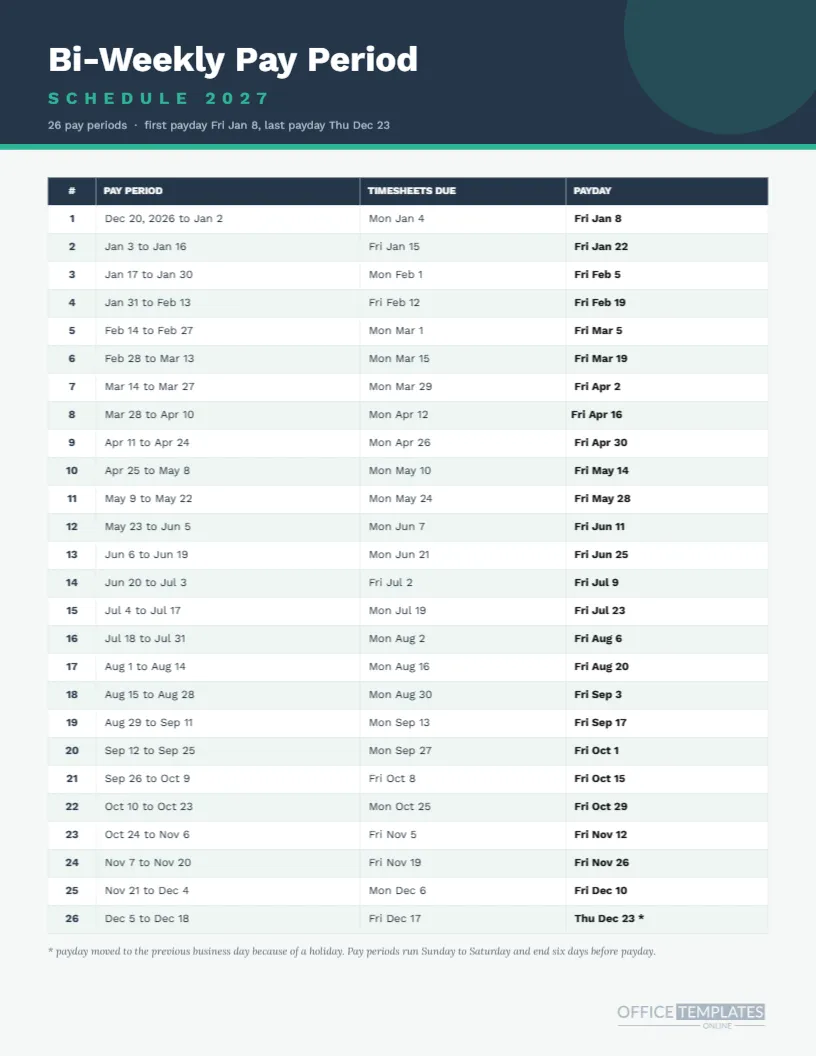
A: Not without a rebuild, because bi-weekly pay has 26 dates and does not follow months. For those schedules, use the bi-weekly calendar and schedule pages in this collection. They have been built around the right pattern.
Q: What Are the Limits?
A: The dates follow one rule and a US federal holiday list. They do not know your provider’s cut-off times or your local holidays. Check important dates before telling anyone, and update the cards if your rules differ.
Q: Is There a Quick Summary?
A: Twelve cards, four colours, 24 paydays, nine moves, one cut-off rule. Print it, pin it and share it.
Q: Can the Cards Work as a Quarterly Handout?
A: Yes. Photocopy the page and cut each row of three cards, so a manager receives one strip per quarter. Hand out January’s strip in December, April’s in March, and so on. A short strip is less intimidating than a full page, and managers tend to keep it on the desk.
Q: Why Use Rounded Cards at All?
A: Rounded shapes feel friendly, and payroll can feel stern. The soft colours and cards make staff more willing to read the dates. That is the entire reason for the design, and it is a good enough reason.