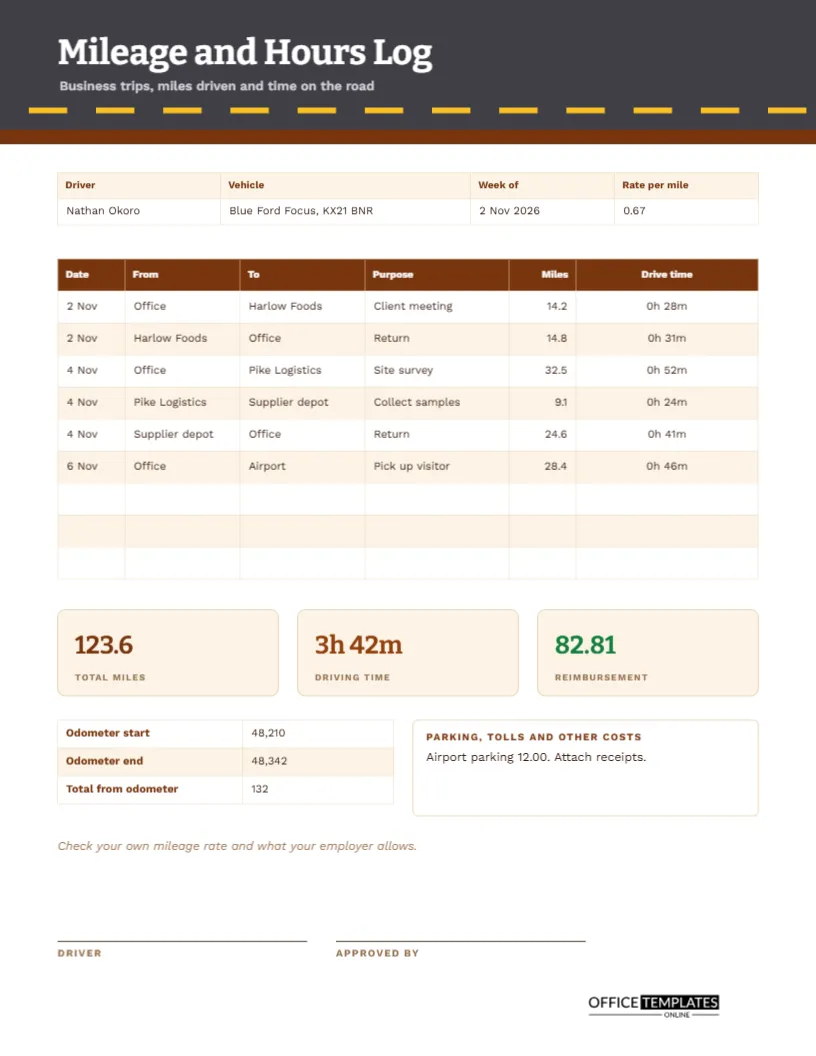
Anyone who drives for work eventually faces the same question: how many miles was that? Employers reimburse mileage, tax offices allow deductions, and clients are sometimes billed for travel. All need a record that says when, where, why, and how far. A shoebox of fuel receipts does not answer that. A mileage log does. This US Letter sheet lists each trip with its purpose, miles, and drive time, then works out the reimbursement at a stated rate.
A Dashed Road Across a Grey Header
The header is charcoal grey with a row of amber dashes running across it like the centre line of a road, and a strip of brown below. The title Mileage and Hours Log is set in Bitter, a sturdy slab serif that feels practical, and a subtitle reads business trips, miles driven and time on the road. Work Sans sets the table text. The design is plain but unmistakably about driving.
Driver, Vehicle, Week and Rate per Mile
The strip records the driver, the vehicle, the week and the rate per mile. The sample is Nathan Okoro in a blue Ford Focus with a registration plate KX21 BNR, for the week of 2 November 2026, at a rate of 0.67 per mile. The vehicle and plate matter because some employers and tax offices ask which car was used.
Six Trips in One Week
| Date | From | To | Purpose | Miles |
|---|---|---|---|---|
| 2 Nov | Office | Harlow Foods | Client meeting | 14.2 |
| 2 Nov | Harlow Foods | Office | Return | 14.8 |
| 4 Nov | Office | Pike Logistics | Site survey | 32.5 |
| 4 Nov | Pike Logistics | Supplier depot | Collect samples | 9.1 |
| 4 Nov | Supplier depot | Office | Return | 24.6 |
| 6 Nov | Office | Airport | Pick up visitor | 28.4 |
A final column records the drive time for each trip, from 24 to 52 minutes.
Why Each Leg Gets Its Own Line
Writing the return journey as a separate line may feel tedious, but it makes the log accurate and credible. Trips with several stops, such as the Wednesday route, show every leg, so nobody has to guess whether the miles include the way back. Short, clear purposes, such as site survey or collecting samples, make each line easy to justify.
Total Miles, Driving Time and Reimbursement
Three tiles at the foot report the totals: 123.6 miles, a driving time of 3 hours 42 minutes, and a reimbursement of 82.81. The last figure is miles times the rate, rounded to the nearest cent. These are the numbers you transfer to an expense claim, and the tiles make them easy to find without reading the whole table.
Odometer Readings as a Cross-Check
A small table beside the notes records the odometer at the start and end of the week: 48,210 and 48,342, a difference of 132 miles. The log shows 123.6 business miles, which leaves 8.4 miles for other use. The comparison is a sanity check, and it shows how much of the driving was for work. Some tax rules require this split.
Parking, Tolls and Other Costs
A notes box records extra expenses. The sample lists airport parking of 12.00 and reminds the driver to attach receipts. Mileage rates usually cover fuel and wear but not parking or tolls, which are reimbursed separately. Keeping them on the same page means you claim everything at once and never lose a receipt.
A Reminder About the Mileage Rate
A line of italic text says to check your own mileage rate and what your employer allows. Official rates change from year to year and differ between countries, vehicle types, and tax rules. The 0.67 on the page is an example. Replace it with the rate that applies to you, and retype the reimbursement tile.
Keeping the Log as You Drive
- Write the date, start point, and destination before you set off.
- Note the odometer reading at the start of the week.
- Record the purpose in a few clear words.
- After the trip, enter the miles and the time.
- Add the weekly totals and work out the reimbursement.
- Attach receipts, sign, and submit.
Using a Phone Alongside the Paper Log
Many people use a maps app to check distances. That is fine, but write the numbers in the log at the time. Tax offices usually prefer contemporaneous records, written when the trip happened, to figures reconstructed months later. A paper sheet in the glove box or a digital copy on your phone both serve the purpose.
Commuting Versus Business Travel
In many places, travel between home and a regular workplace is commuting and is not claimable. Travel between work sites or to client visits usually is. The rules vary, so check them. Record only business trips on this log, and keep personal journeys out of it, which also keeps the odometer comparison meaningful.
Billing Clients for Travel
Freelancers and contractors sometimes charge clients for mileage. The log supplies the evidence: dates, destinations, purposes, and miles. Attach it to the invoice with the rate stated, and clients can check each line. Clear travel records often avoid awkward conversations about the bill.
Editing Trips and Rates
All text is editable, and the table is a real Table object. Add rows for busy weeks, retype the rate, and update the tiles. The odometer table and the notes box are separate fields, so you can adjust them freely. For monthly use, change the heading to month and extend the rows.
Approval and Filing
The driver and the approver sign at the foot. Submit the signed sheet with receipts for payment. Keep a copy for your own records for the period required by your tax authority, and note where you stored it.
Reviewing a Month of Mileage Logs
Add four weekly totals and compare the miles with your budget or your usual pattern. A sudden rise may point to a new client, an inefficient route, or a trip that could have been a video call. Looking at the numbers monthly turns a chore into a small piece of cost control.
Mileage Log Questions
Can I use kilometres?
Yes. Replace the word miles with kilometres in the headings and use a rate per kilometre.
Does it calculate the reimbursement?
No. Multiply the total by the rate and retype the total.
Is the log accepted by tax offices?
Requirements differ. Check what your tax office asks for before relying on any format.