Your photographer will capture the big moments. Your guests will capture everything else: the flower girl asleep under the table, your grandmother dancing, the best man’s face when the speech went wrong. Those photos usually stay scattered across a hundred phones. A photo-sharing QR sign gathers them into one album, and this design makes the invitation feel as romantic as the rest of your day.
Soft Blush, Florals and an Arch
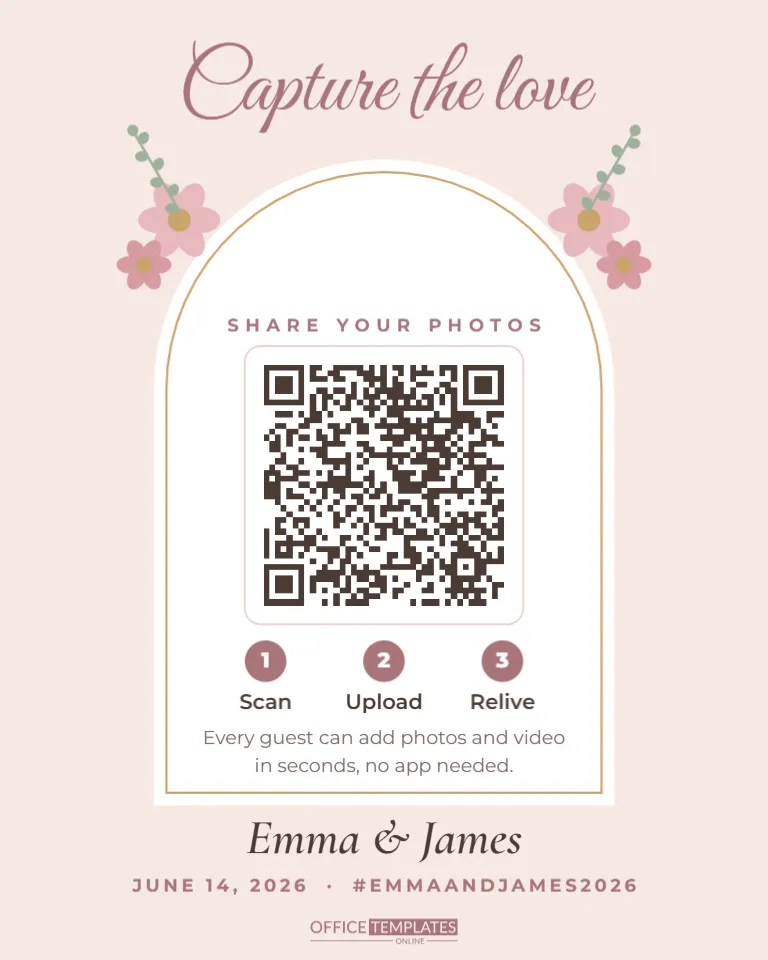
The 8 x 10-inch sign has a blush pink background. Capture the love sits across the top in mauve Great Vibes script. Below, a tall white arch with a thin gold inner line frames the main content. Pink flowers with gold centres and small sage leaf sprigs bloom at the top corners of the arch.
Inside the arch, SHARE YOUR PHOTOS is set in small, spaced capitals above the QR code, which sits on a white plate with a soft pink outline. Under it, three numbered mauve circles read Scan, Upload, and Relive, followed by a short line explaining that guests can add photos and video in seconds with no app needed. Beneath the arch, your names appear in italic Cormorant Garamond, with the date and your wedding hashtag in spaced capitals.
Setting Up the Shared Album
The QR code opens a web address, so first choose where the photos will live. Popular options are a shared album in a photo service you already use, a dedicated wedding photo-sharing app, or the upload page on your wedding website. Look for these features before you decide:
- Guests can upload without creating an account or installing anything.
- Videos are accepted as well as photos.
- You can download everything in full quality after the wedding.
- You can hide or remove photos if needed.
- There is enough storage for a few hundred guests’ worth of pictures.
Copy the album’s upload link, then click the QR code, choose Edit Code, paste the link into URL/Website, and press Update QR Code. Ask a friend to test the upload from their own phone a week before the wedding.
Wording Ideas for Every Style
The headline and the line under the steps are editable text, so the sign can match your tone.
| Wedding style | Headline | Line under the steps |
|---|---|---|
| Romantic | Capture the love | Help us see the day through your eyes |
| Playful | Snap it, share it | Bonus points for dance floor photos |
| Rustic | Our story, your view | Add your favourite moments to our album |
| Modern | Share the moment | Scan, upload, done. Thank you! |
| Bilingual | Capture the love | Add a second line in your other language |
Welcome Table, Bar and Dance Floor
One sign is good; two or three are better, because guests move around all day. Place a sign at the welcome table where people arrive with phones in hand, another at the bar or cocktail area, and one on a small easel near the dance floor. Many couples also add a smaller copy to each table, printed at 5 x 7 inches in a simple frame. Ask your venue coordinator or a reliable friend to make sure the signs are moved from the ceremony to the reception.
Making It Match Your Wedding Palette
The flowers, leaves, arch line, and text colours are separate shapes and text boxes. Swap blush and mauve for sage and ivory, dusty blue and navy, terracotta and cream, or black and gold to match your invitations. Recolour the flower petals and centres individually for a mixed bouquet. Keep the arch white and the code dark so it scans in dim reception lighting; the editor will warn you if a colour choice could stop the code from reading.
Change the names, date and hashtag by double-clicking each line. If you do not use a hashtag, replace that part with your venue name or simply delete it.
Printing for the Big Day
Print on heavy matte or linen-textured card for an elegant finish, and avoid glossy paper under string lights or candles, as reflections make scanning harder. Eight by ten inches fits a standard frame or a tabletop easel. For outdoor weddings, slip the print behind glass or into an acrylic sign holder so a breeze or a spilled drink does not ruin it. The QR code prints at about two and a half inches wide, easy to scan from a step away.
A Gentle Note for Unplugged Ceremonies
Many couples ask guests to keep phones away during the ceremony so the photographer has a clear view and everyone is present for the vows. A photo-sharing sign works well alongside that wish. Place it at the reception rather than the ceremony entrance, and add a small line such as Phones away for the vows, cameras out for the party. Your officiant can make a short announcement before the ceremony starts, then the signs take over once the celebration begins. Guests understand the difference, and you still collect every candid moment from the reception, from toasts to the last dance.
After the Wedding
Leave the album open for a week or two so guests can upload late photos, then download everything and back it up in two places. Many couples send a thank-you message with a link back to the album so guests can enjoy each other’s photos. Some print a small book of the best guest shots as a keepsake.
Couples Ask
Can the album be private?
Most sharing services let you control who can view photos. Set it so only people with the link can see them.
Will older guests manage?
The three numbered steps help. Ask a younger cousin to offer help near the welcome table during the cocktail hour.
Can I use this for an engagement party or anniversary?
Yes. Change the headline, names, and date, and it works for any celebration where you want to collect photos.
Set up your album, add the link and your names, and print a few copies. A few weeks after the wedding, you will have hundreds of photos you would never have seen otherwise.