Ask any experienced host which question guests send most often in the first hour, and the answer is nearly always the same: What’s the Wi-Fi? The second is usually about check-out time. This 8 x 10 inch welcome board answers both before anyone opens a messaging app, and it does so in a way that feels like part of a well-styled home rather than a laminated rule sheet.
A Coastal Welcome in One Frame
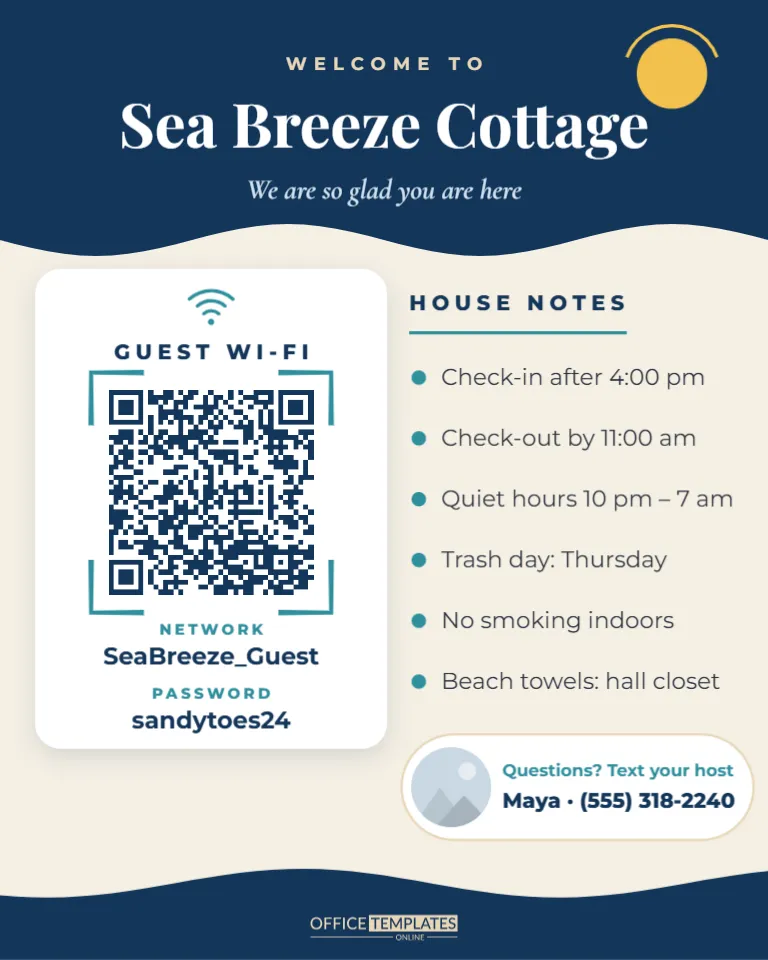
A deep navy header with a gently waving lower edge spans the top of the board. It reads Welcome to in small sand-coloured capitals, the property name, Sea Breeze Cottage, in Playfair Display, and an italic line: We are so glad you are here. A golden sun peeks out of the top-right corner. Below, a sandy cream background holds two areas side by side.
On the left, a white card titled Guest Wi-Fi shows the QR code inside teal scan brackets, with the network name and password printed underneath. On the right, a House Notes column lists six essentials with teal bullet points. A rounded host strip near the bottom shows a small photo slot, Questions? Text your host and a name with a phone number. A second navy wave closes the board at the bottom.
The Five-Minute Host Setup
Work through this once, and you will have a board that answers most first-night questions for you.
- Rename the property. Double-click Sea Breeze Cottage and type your listing name, or a friendly nickname guests will remember.
- Set the Wi-Fi. Select the QR code, click Edit Code, and enter your guest network name and password in the Wi-Fi Network form. Press Update QR Code, then change the printed name and password beneath it.
- Rewrite the house notes. Keep each note to one line. Six is the maximum that reads comfortably at a glance.
- Add yourself. Replace the round photo with a friendly picture of you or your co-host using Replace Image, and type your first name and number.
- Test the code. Disconnect your phone from Wi-Fi, scan the screen, and make sure it joins.
Which House Notes Belong on the Board?
The board is not the place for your full house manual. It works best for the facts guests need in the first hour and on the last morning. Everything else can live in a binder or your listing’s digital guidebook.
| Put it on the board | Keep it in the house binder |
|---|---|
| Check-in and check-out times | Detailed appliance instructions |
| Quiet hours | Restaurant and activity recommendations |
| Trash and recycling day | Emergency procedures and fuse box location |
| Smoking and pet rules | Hot tub or pool care steps |
| Where to find towels or beach gear | Local transport and parking permits |
| How to reach the host | The full house rules from your listing |
Reviews Love Small Comforts
Guest reviews regularly mention two things hosts underestimate: how easy it was to get online and how clearly the house was explained. A board that solves both on arrival removes friction at the moment guests are tired from travel. It also cuts down on messages you have to answer at awkward hours, and it shows the kind of care that earns phrases like thoughtful host in reviews.
A Sample First-Night Message to Pair With the Board
The board works even better when your check-in message points to it. Hosts can adapt this short note: Welcome to Sea Breeze Cottage! The Wi-Fi code and house notes are on the board by the front door. Just scan the code with your phone camera to get online. Check-out is 11:00 am on your last day, and you can text me any time at the number on the board. Enjoy the beach! Guests read the message on the way, find the board on arrival, and rarely need to ask anything else that evening.
Restyling for Different Properties
The navy and sand palette suits beach houses and lake cabins, but the board adapts easily. Select the header and footer waves to recolour them: forest green and cream for a mountain cabin, terracotta and white for a desert casita, black and warm grey for a city loft. The sun in the corner can be recoloured or deleted. Fonts are Playfair Display, Cormorant Garamond, and Montserrat, all Google Fonts available in the editor.
If you manage several properties, make one copy per listing with its own name and Wi-Fi details. Guests occasionally photograph the board, so double-check that each one shows the right network. A quick way to stay organised is to name each design after its listing in the editor, so the right file is always easy to find.
Displaying the Board
Eight by ten inches is a standard frame size, so the board fits any off-the-shelf frame. Hang it in the entry hall, stand it on the kitchen counter, or place it on the dining table where guests drop their keys. Print on matte photo paper to avoid glare that can upset phone cameras. If the Wi-Fi password changes between seasons, update the code, reprint, and slide the new sheet into the same frame.
A tip from busy hosts: keep a printed spare in the cleaning cupboard so housekeepers can replace a damaged board between stays. It takes seconds and keeps every arrival looking as polished as the photos in your listing.
Questions From Vacation Rental Hosts
Should I put the door code on the board?
No. Door codes belong in your private check-in message, not on a sign that every visitor and contractor can see.
Can I add a second code for my digital guidebook?
Yes. Add another QR code from the editor’s QR tool, choose URL/Website and paste your guidebook link. Place it in the house notes column with a short label.
What if my rental has no separate guest network?
The sign still works with your main network. Just change the password between long-term guests if you are concerned about who has it.
Personalise the property name, Wi-Fi, and notes, then print and frame it. Your next guests will be online and settled before they have finished unpacking.