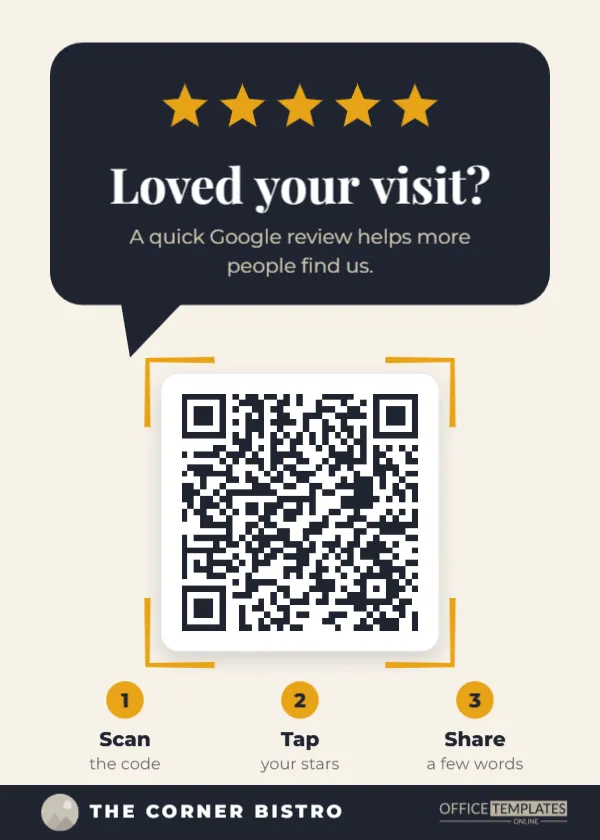
Most happy customers would gladly leave a review. They simply forget, or they do not know where to tap. A small sign by the register fixes both problems at the exact moment someone is smiling at you and reaching for their wallet. This 5 x 7 inch counter sign is built to do that one job well: catch the eye, explain the action in a second, and send the customer straight to your review form with a single scan.
Inside the Speech Bubble Design
The top third is a charcoal speech bubble with a small tail, as if your shop is starting a conversation. Five gold stars sit across it, followed by the headline Loved your visit? in Playfair Display and a short line explaining that a Google review helps more people find you. Below the bubble, the QR code sits on a white rounded plate with gold corner brackets, the kind of scan frame people already recognise from phone cameras. Three numbered gold circles underneath read Scan, Tap your stars, and Share a few words. A charcoal footer band carries a round logo slot and your business name, with the OfficeTemplatesOnline mark on the right.
The page is cream rather than white, which feels warm on a café or salon counter and hides the fingerprints that a pure white card shows by the end of a busy week.
Getting Your Own Review Link Into the Code
The sample QR code opens a placeholder address, so the first job is to swap in your real review link. Google gives every verified business a short link that opens the review box directly, which saves customers from searching for you and picking the wrong listing.
- Sign in to your Google Business Profile and choose the option to ask for reviews or share a review form. Copy the short link it gives you.
- Open this template in the editor and click the QR code once to select it.
- Click Edit Code in the toolbar. The QR drawer opens with the type set to URL/Website.
- Paste your review link into the URL box and press Update QR Code. The code redraws in place, at the same size and position.
- Test it: point your phone camera at the screen and make sure your review form opens.
The editor checks every QR code it builds. If a colour or logo choice makes the code hard for cameras to read, it shows a QR Code May Not Scan warning, so you know before you print.
Where a Review Sign Works Hardest
Placement decides whether the sign is seen. In our experience, the best spots are the places where customers pause for a few seconds with their phone already in hand.
| Business | Best spot for the sign | Why it works |
|---|---|---|
| Café or bakery | Beside the card reader or pickup counter | Customers wait for their order with phones out |
| Hair or nail salon | At the checkout desk, facing the chair | The client has just seen the result in the mirror |
| Dental or medical office | Check-out window, not the waiting room | The visit is over, and the relief is real |
| Restaurant | In the bill folder or by the host stand | Guests review while the meal is fresh in mind |
| Repair shop or garage | Where keys are handed back | The problem has just been solved |
Asking Without Breaking the Rules
Google’s review policies ask businesses not to offer rewards for reviews and not to ask only happy customers. The wording on this sign respects that: it invites everyone, mentions no discount, and simply explains that reviews help people find you. If you change the text, avoid lines such as Get 10% off for a 5-star review or Review us and win. Those can get reviews removed and, in some regions, run into consumer protection rules. A friendly, neutral invitation is both safer and more convincing.
Staff can back up the sign with one natural sentence at the till: If you enjoyed today, the code there takes you straight to our review page. Customers respond to a person far more than to cardboard, and the sign does the remembering for them.
Making It Look Like Your Brand
- Logo: the small circle in the footer is a photo slot. Select it and use Replace Image to drop in your logo; it stays round and the same size.
- Name: double-click The Corner Bistro and type your business name. Short names look best in the spaced capitals.
- Colours: select the speech bubble or footer band and change the fill. Charcoal and gold suit most brands, but navy and coral or forest and cream work too.
- QR colour: in the Edit Code drawer, you can change the code colour. Keep it dark on a light background; pale or bright codes are harder to scan.
- Stars: the five stars are separate shapes, so you can recolour them to match your palette.
Printing a Sign That Survives the Counter
At 5 x 7 inches, the sign fits a standard acrylic sign holder, the kind sold for menus and price cards. Print on heavy matte card stock (at least 250 gsm) so it does not curl, or ask a print shop to laminate it if it will sit near drinks. Keep the QR code at its full size: it prints at roughly two inches wide, which scans comfortably from arm’s length. Shrinking it to fit a smaller holder makes it harder to read, especially in dim restaurant lighting.
Download the finished design as a PDF for the printer, or as a PNG if you also want to share it on social media or show it on a tablet at the counter.
Small Questions, Quick Answers
Can I point the code at Yelp or Tripadvisor instead?
Yes. Any review page with its own web address works. Paste that address into the URL field and change the headline line about Google to match.
Will the code stop working if my link changes?
The code stores the exact address you paste. If you later change your business name or listing, open Edit Code, paste the new link, and reprint.
How many reviews should I expect?
That depends on your foot traffic and how often staff mentions it. Businesses usually see the biggest jump when the sign and a quick verbal reminder work together.
Edit the sign online, add your review link and logo, and print a copy for every register you have. It is a small piece of card that keeps working every single day.