A Green Panel Over Boutique Shelves for Retail Prices
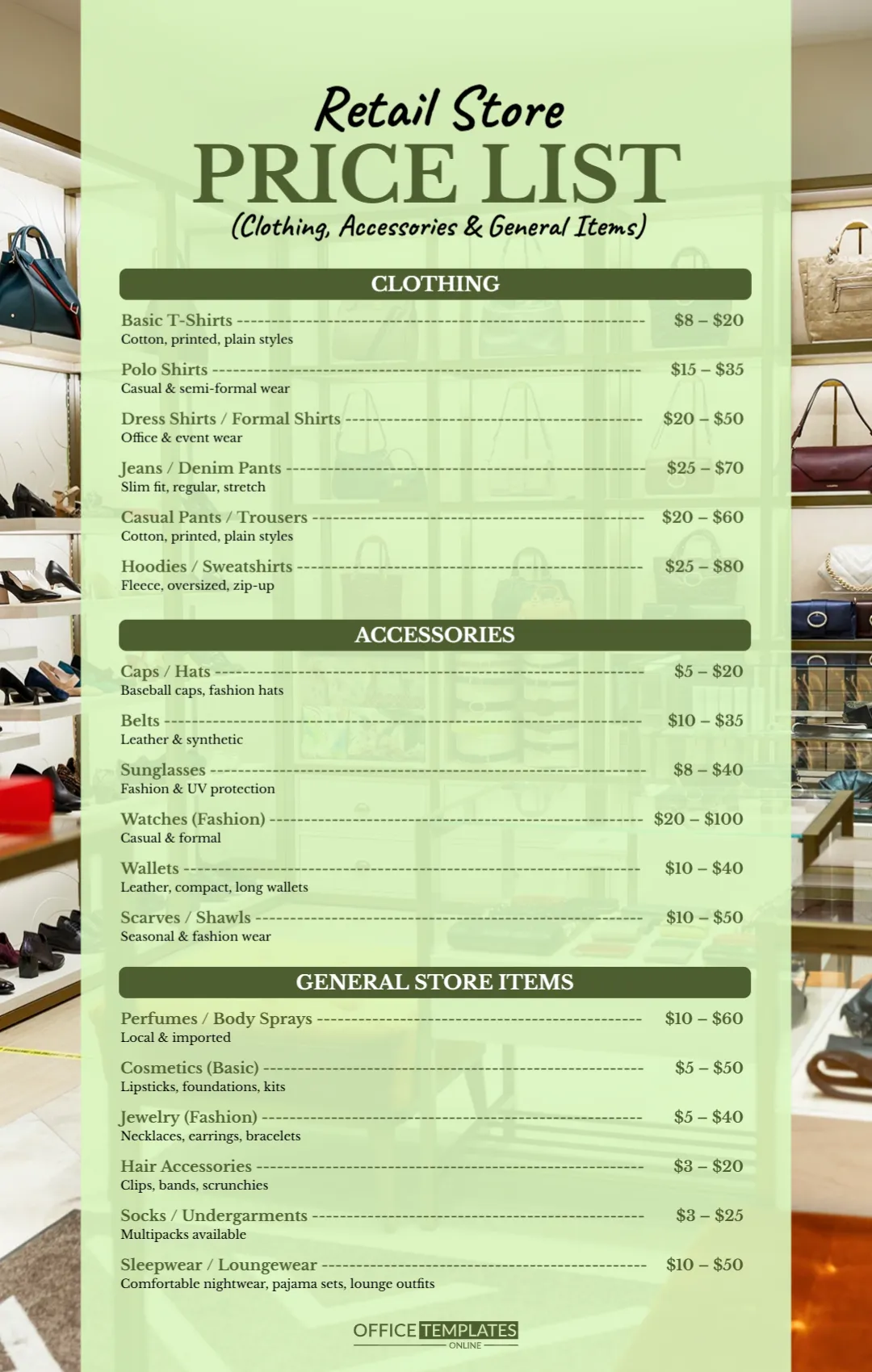
A photo of boutique shelves lined with handbags and shoes fills the background. A wide pale green panel sits on top, letting the shelves show through at the sides. Retail Store runs in a black script, PRICE LIST sits in heavy olive serif capitals, and a line in brackets says Clothing, Accessories and General Items. Three dark olive bars introduce lists, and each item has a short grey description under its name.
Names, Descriptions and Ranges
The page is 1080 x 1700 pixels, portrait. Each item has a name with a dash leader to a price range, and a small description underneath. The panel keeps text readable over the photo.
Clothing, Accessories and Store Items
Clothing lists T shirts, polo shirts, dress shirts, jeans, casual trousers and hoodies from $8 to $80. Accessories list caps, belts, sunglasses, watches, wallets and scarves. General Store Items list perfumes, basic cosmetics, fashion jewellery, hair accessories, socks and underwear, and sleepwear. Every price is a range, which suits a shop with many brands. The ranges use dashes, so type them as $8 to $20 if you prefer.
Updating the Retail Menu
- Add your shop name.
- Set your own ranges.
- Add or remove product lines.
- Add hours and address.
- Swap the background photo.
Ranges Versus Exact Prices
Ranges give a quick idea of cost. For a small shop with set items, exact prices may build more trust.
Highlighting Sales
Add a small line such as Sale on hoodies this week in olive under the clothing list.
Store Address and Hours on the Green Panel
The retail sheet has no address, phone or opening hours. Add them in olive under the general store list, so a shopper who sees the image online can find the shop and visit when it is open.
Printing as a Window Sign
The green panel reads well from a distance. Print it at poster size for the shop window.
Returns and Exchange Notes
Shoppers like to know they can return an item. A short line such as Exchanges within 14 days with receipt under the clothing list answers that. Check your local consumer rules and keep the wording in line with your store policy.
Sharing the Retail Price List
Post it on social media or send it to wholesale buyers.
Step by Step Editing of the Retail Store Boutique Green Design
- On the retail store boutique green design, click the main headline and type your own words, keeping a similar length.
- Retype every name, date and contact line on the retail store boutique green design, checking each against a trusted source.
- Search the retail store boutique green design for the words Lorem and Company so that no placeholder remains.
- Click any logo or photo on the retail store boutique green design, choose Replace Image and resize the new picture to fit.
- Zoom the retail store boutique green design to full size and read each line aloud before you save it.
- Keep a clean master of the retail store boutique green design without private details, so later versions start tidy.
You may also like the printing and stationery price list. For comparison, open the bakery and cake shop price list. Consider the car wash price list. Find more designs next to the retail store boutique green design in price list templates.