The potluck is the most democratic meal there is. Everyone cooks a little, everyone eats a lot, and the host does not spend three days in the kitchen. The only real risk is the famous potluck problem: eleven bowls of pasta salad and no main course. This invitation solves it with a sign-up table built right into the card.
Casserole on the Left, Sign-Up on the Right
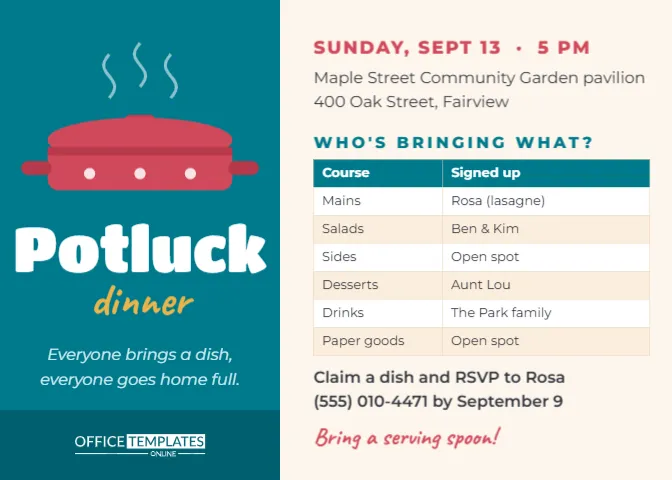
This is a landscape card, 7 x 5 inches. The left third is a deep teal panel. At the top, a tomato-red casserole dish with a lid, handles, and three little white dots sits under curls of rising steam. Below it, Potluck is set in chunky white Titan One and dinner in mustard Caveat handwriting, followed by the gentle italic promise Everyone brings a dish, everyone goes home full. The OTO logo sits in white on a darker teal strip at the foot of the panel.
The right side is warm cream. The date and time are set in red capitals, then the venue: Maple Street Community Garden pavilion, 400 Oak Street, Fairview. Then comes the heart of the card: WHO’S BRINGING WHAT? Above a two-column table listing courses and who has signed up for each. The sample rows read Mains, Salads, Sides, Desserts, Drinks, and Paper goods, with names like Rosa (lasagne) and open spots for the gaps. Below the table, a line asks guests to claim a dish and RSVP to Rosa by a set date, and to bring a serving spoon! closes the card in red handwriting.
Why a Real Table Matters
The sign-up grid is the editor’s own Table object, not a picture of a table. That means you can treat it like a small spreadsheet. Click into a cell to type a name, and use the Table options to add a row above or below, add a column, or change the colours. As people reply, you update the table and send the new version to the group, so everyone can see which courses are still open. It is the simplest way to avoid the pasta salad problem.
Step by Step: Running the Potluck from the Card
- Set the courses: Decide which categories you need. For twenty people, a good mix is three mains, three salads, three sides, three desserts, drinks, and paper goods. Add rows for each.
- Claim your own dish first: As host, put your name next to a main course so guests see the table started.
- Send version one: Download a PNG and share it in your group chat or by email with a note: Reply with what you’d like to bring.
- Update as replies come in: Replace Open spot with each guest’s name and dish.
- Send a reminder: A week before, send the updated card again so people can see what is still missing.
- Print one for the day: Tape a printed copy to the food table so everyone knows whose dish is whose.
How Much Food Each Guest Should Bring
A common worry is portion size. A good rule is that each dish should serve about two-thirds of the expected guests, because everyone takes a little of many things. For a party of twenty-four, each main should serve about sixteen, and each salad or side about twelve to fifteen. Desserts can be a little smaller, since people tend to try several. If your group is large, encourage guests to bring dishes in disposable or labelled containers, and to include a serving spoon, which is exactly why the card says so.
Potluck Etiquette for Hosts and Guests
| Who | Do | Avoid |
|---|---|---|
| Host | Provide plates, cutlery, napkins, ice, and a main drink | Expecting guests to bring everything |
| Host | Label the table by course and leave space for each dish | Stacking dishes so nothing can be reached |
| Guest | Bring your dish ready to serve, with a spoon | Needing the oven for an hour on arrival |
| Guest | Add a small card naming the dish and allergens | Mystery dishes with hidden nuts |
| Everyone | Take home your own dish and containers | Leaving the host with twelve washing-up bowls |
Where Potlucks Shine
Potlucks work in almost any setting where people share something in common. Neighbourhood associations use them for summer block gatherings. Churches and mosques use them after services. Offices use them for holiday lunches and farewells. Schools use them for international food days, where families bring a dish from their culture. Sports teams use them at the end of the season. Friends use them for Friendsgiving, birthdays and New Year’s Day. The same card fits every one of them; only the venue line and the table rows change.
Recolouring the Panel and the Dish
The teal panel, mustard script and tomato-red dish make a warm, homely palette. To match a seasonal theme, select the panel and change its colour: deep orange for autumn, green for a spring picnic, navy for a winter supper. The casserole is a group of simple shapes, including the lid, handles and steam curls, so you can recolour the dish to look like an enamel pot or a cast-iron Dutch oven. The table colours are set in the Table options: header colour, alternating row colours, and border colour.
The fonts are Titan One for Potluck, Caveat for the handwritten lines, and Montserrat for the details, all from the editor’s Google Fonts list.
Printing the Sign-Up Sheet
Download the card as a PDF and print it at 7 x 5 inches to post or hand out, or print it larger on letter-size paper to pin on a community noticeboard. Many organisers keep a printed copy on the fridge and update it in pen as calls come in. For digital use, download a PNG or JPG; the table text stays sharp on a phone screen.
Potluck Questions
Should the host cook too?
Usually yes. Most hosts provide the main protein or a centrepiece dish, plus drinks and tableware.
What if two people bring the same dish?
That is what the table is for. If it still happens, enjoy the comparison and crown the better version.
How do I handle dietary needs?
Add a Vegetarian main row to the table, and ask guests to label any dish with common allergens.
Can I use the card for a work potluck?
Absolutely. Replace the venue with the third-floor kitchen and the time with the lunch hour.
Fill in your courses, claim your own dish, and share the card. In a week, your table will be full of names, and on the day it will be full of food.