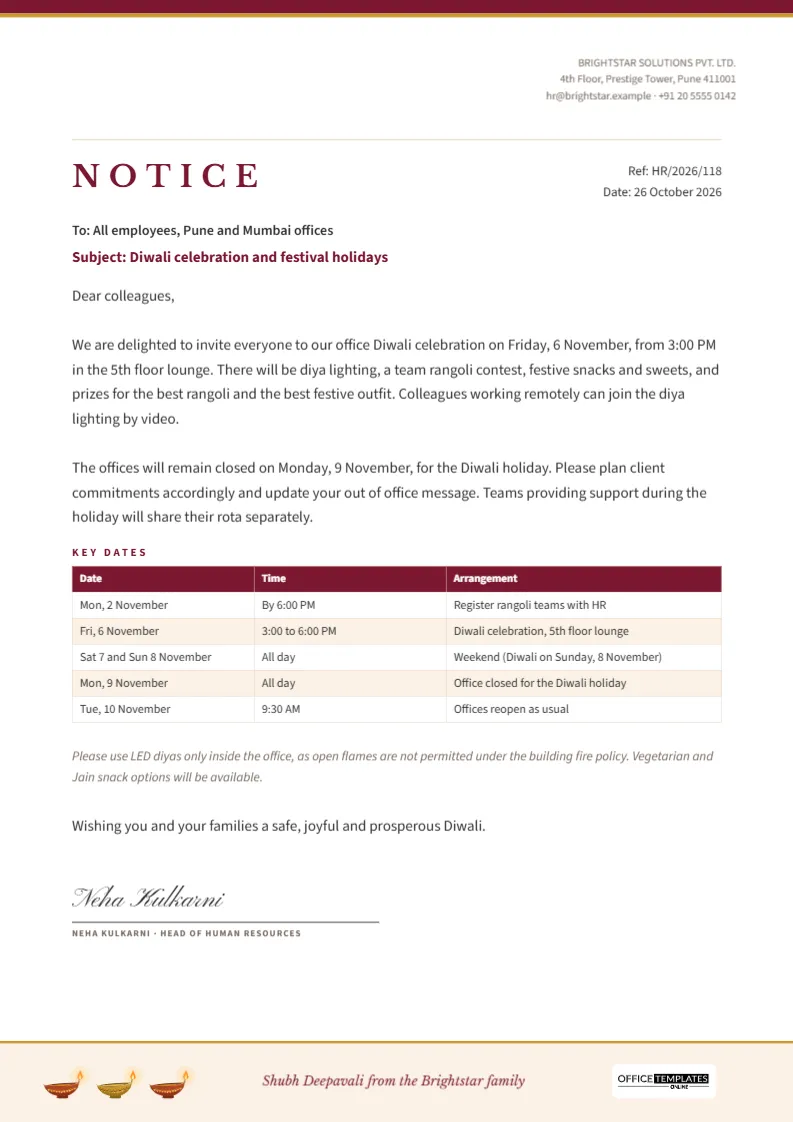
Every year, someone in HR or administration writes the same notice: when the Diwali celebration is, when the office closes, when it reopens, and what employees need to do before the break. This template turns that annual task into a ten-minute edit. It is a formal A4 notice on company letterhead, with a clear subject line, two paragraphs of announcement, a key dates table and a signature block, finished with a subtle festive footer.
What Belongs in a Diwali Notice to Staff
A good holiday notice answers every question employees would otherwise send to HR. Check that yours covers these points before you send it:
- The date, time, and place of any office celebration, and whether remote staff can join.
- Which days the office is closed and when it reopens.
- What employees should do before leaving: client communication, out-of-office messages, handover of urgent work.
- How essential support will be covered during the holiday.
- Any rules for the celebration, such as fire safety or dress.
- Who to contact with questions.
The sample text addresses each of these in two paragraphs, a table and a short note.
Anatomy of the Notice
| Part | What it contains | How to edit |
|---|---|---|
| Letterhead | Logo frame on the left, company name, address, and contact on the right, maroon and gold top rule | Replace Image on the logo; type over the address |
| Title block | NOTICE in Libre Baskerville capitals, reference number and date on the right | Update the reference and date |
| Addressee and subject | To all employees, and the subject line in maroon | Name the offices or teams it applies to |
| Body | Greeting and two paragraphs about the celebration and the closure | Rewrite with your own details |
| Key dates table | Date, time, and arrangement in five rows | Edit Table Data; add rows with + Row |
| Note and wish | Fire safety and food note in italics, a one-line festive wish | Adjust to your policy |
| Signature | Script name, signature line, and title in small capitals | Type the signatory’s name and role |
| Footer | Pale cream band with three small diyas, a greeting and the Office Templates Online mark on a white plate | Change the greeting to your company name |
Adding Your Company Letterhead
Click the logo frame in the top left and choose Replace Image to upload your company logo. The frame keeps its size, so the letterhead stays balanced. Then type your registered company name, address, email, and phone number in the right-hand block. If your company already has an official letterhead with specific colours, change the maroon top rule and the title colour to match. Formal documents look best when they use the same letterhead as other HR notices, so employees recognise it instantly.
Choosing the Holiday Dates
In 2026, Diwali falls on Sunday, 8 November, with Dhanteras on Friday, 6 November. Because the main festival day falls on a weekend, many companies in India and abroad give Monday, 9 November as the Diwali holiday, which is the arrangement shown in the sample. Others close on Friday instead, or give two days. Some regions also observe Govardhan Puja, the Gujarati New Year, or Bhai Dooj in the days after Diwali. Check your local holiday list and company policy, then edit the table rows to match.
Editing the Key Dates Table
The table is the editor’s Table object. Double-click it, or choose Edit Table Data, to type into the cells. Use + Row to add a date, for example, a deadline for submitting expense claims before the break, or a second celebration in another office. The Date column is wide enough for entries such as Sat 7 and Sun 8 November; keep the Arrangement column to one line per row so the table stays tidy.
Writing the Body in a Warm but Clear Tone
A notice is a formal document, but Diwali is a happy occasion, and the tone can reflect both. Start with an invitation rather than an instruction: We are delighted to invite everyone. Put practical requirements in the second paragraph, phrased as requests: Please plan client commitments accordingly and update your out-of-office message. End with a sincere wish. Avoid long lists of rules in the body; the table and the short italic note handle details.
Safety Rules for Office Celebrations
Many office buildings do not allow open flames, incense, or firecrackers indoors. The sample note asks employees to use LED diyas inside the office in line with the building fire policy. If you plan to use real diyas, check with your facilities team and the building management first, keep them away from paper decorations and curtains, and make sure a fire extinguisher is nearby. Rangoli made with powder can be slippery on smooth floors, so mark the area clearly and clean it promptly afterwards.
Inclusive Wording
Diwali is celebrated by Hindus, Sikhs (as Bandi Chhor Divas), Jains and some Buddhists, and enjoyed by colleagues of all backgrounds. Keep the notice welcoming to everyone. The sample mentions vegetarian and Jain snack options, which is a thoughtful touch in workplaces where colleagues follow these diets. If some colleagues celebrate other festivals around the same time, a line acknowledging them shows care.
Distributing the Notice
Download a PDF to attach to an email, upload to the intranet, or print for notice boards. A4 is the standard size for office notices in India, the UK and most of the world. Send the notice at least two weeks before the holiday so employees can plan travel and leave. For large organisations, post it in the HR channel of your workplace chat and pin it until the holiday ends.
Using the Template for Other Festivals
The same layout works for Holi, Eid, Christmas, Pongal, Onam, or any office closure. Change the subject line, rewrite the body, update the dates table, and replace the diyas in the footer with a suitable small motif or remove them. Keeping a consistent HR notice format across the year makes every announcement look professional.
Office Notice Questions
Can I print it on US Letter?
The notice is designed for A4. Printing with fit to page on US Letter works with slightly larger side margins.
Is the OTO mark required?
It appears small on a white plate in the footer as part of the template’s branding. You can place your own logo at the top, which is where employees will look for the company identity.
Can I add a second page with a rota?
Yes. Use Add Page and place a Table with names and dates for the support rota on page two.
Announce the Festival With Clarity
Add your letterhead, adjust the dates and the wording, sign it, and send it in good time. A clear notice lets everyone relax and enjoy the celebration, knowing exactly when the office closes and opens again.