A Diwali potluck takes the pressure off one kitchen and turns the meal into a shared celebration. It only works, though, if somebody keeps track of who is bringing what. Otherwise, you end up with five trays of samosas and no rice. This invitation solves that by putting a dish sign-up table right on the card.
Here are seven practical ways to get the most from it, followed by a guide to the design and a few common questions.
1. Use the Sign Up Table as Your Potluck Planner
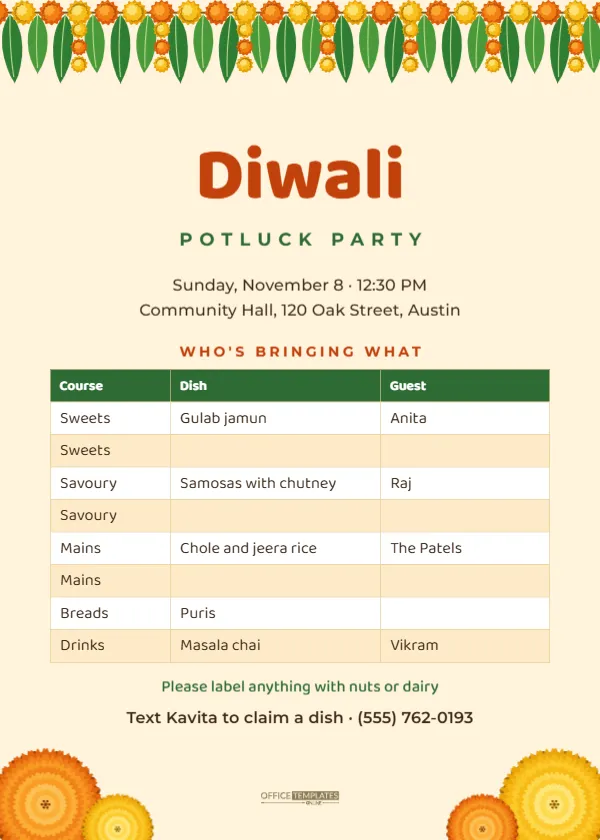
The centre of the card is a real editable table with three columns, Course, Dish and Guest, and eight rows. The sample already balances the meal: two rows each for sweets, savoury snacks and mains, plus breads and drinks. Some rows are filled in with sample names and dishes; the rest are left blank for guests to claim. Before sending, replace the sample entries with dishes you or close family have already promised, and leave the rest open.
To edit, double-click the table or choose Edit Table Data. Add rows with the + Row button if you expect a big crowd, and change the Course labels to suit your menu.
2. Balance the Diwali Menu Before Guests Choose
The order of the rows nudges people toward a complete meal. If you want more control, use this simple guide to the number of dishes per category for different group sizes.
| Guests | Sweets | Savoury snacks | Mains | Breads or rice | Drinks |
|---|---|---|---|---|---|
| 10 to 15 | 2 | 2 | 2 | 1 | 1 |
| 16 to 25 | 3 | 3 | 3 | 2 | 2 |
| 26 to 40 | 4 | 4 | 4 | 3 | 2 |
| More than 40 | 5 | 5 | 5 | 4 | 3 |
Adjust the rows in the table to match. A good rule is one main dish for every eight to ten people, with sweets slightly oversupplied, because it’s Diwali.
3. Send a Digital Copy and Keep a Master Version
Most potlucks are organised in a group chat. Download the card as a JPG and post it in the family or neighbourhood group with a message such as: Reply with the dish you will bring, and I will update the list. Each time someone claims a dish, type their name into the table and send the updated image. Guests can see at a glance what is still missing.
4. Print a Copy for the Fridge or the Venue
For a community hall potluck, print the card on US Letter or as a 5 x 7 card and pin it by the food tables, so people can find where their dish goes. A printed copy also helps the host on the day when phones are busy taking photos.
5. Add Allergy and Labelling Notes
The card already says Please label anything with nuts or dairy. Diwali sweets are often made with cashews, almonds, pistachios, and ghee, so labelling matters for guests with allergies or vegan diets. You could add a second line such as: Small cards and pens will be at the table, or Please bring a serving spoon with your dish.
6. Change the Details for Your Gathering
The text at the top tells guests when and where: Sunday, November 8, 12:30 PM, Community Hall, 120 Oak Street, Austin. Click to replace it with your own. A lunch potluck on Diwali day itself leaves the evening free for puja and fireworks at home, which suits many families. The contact line at the bottom, Text Kavita to claim a dish, tells people how to sign up; change the name and number.
7. Reuse the Card After Diwali
The design works for any festive potluck. Change Diwali to Navratri, Holi, or a housewarming, adjust the courses, and you have a new invitation in a minute. The toran and marigolds suit any Hindu celebration.
The Design: Toran, Marigolds and a Friendly Table
The card is 5 x 7 inches portrait on a warm pale saffron background. A mango leaf and marigold toran runs across the top edge. The title Diwali is set large in Baloo 2 ExtraBold in a deep orange, a rounded friendly font that also supports Devanagari, with POTLUCK PARTY in spaced green capitals below. The date, time, and venue sit in Montserrat. A small orange label, WHO’S BRINGING WHAT, introduces the table, which has a green header row and alternating white and soft saffron rows, set in Baloo 2 for a relaxed, handwritten feel without losing legibility.
At the bottom, four marigold blooms are tucked into the corners, large orange and yellow flowers with small ones beside them, and the Office Templates Online mark sits between them. The toran and marigolds are editable vectors with their own colour swatches.
Setting Up the Potluck Table on the Day
The invitation does half the organising; a little setup on the day does the rest. Put a printed copy of the card at the end of the buffet so guests can see which dishes have arrived. Group the food in the same order as the rows on the card, sweets at one end and drinks at the other, so the table reads like the menu. Keep a few spare serving spoons, foil and takeaway boxes nearby, because Diwali potlucks always end with too many leftovers and everyone deserves a box of sweets for the road.
Printing Tips for a Fill-In Card
If guests will write on a printed card by hand, print it on matte paper or card so pens do not smudge. Download the PDF and print at actual size. For a wall copy, print the 5 x 7 design centred on US Letter or enlarge it at a copy shop; the vector art and text stay sharp when enlarged.
Potluck Invitation Questions
Can guests fill in the table themselves?
On paper, yes, with a pen. Digitally, the host updates the table in the editor and reshares the image. Editor tables hold typed text rather than formulas, so nothing updates automatically.
Can I add a column for quantity?
Yes. In Edit Table Data, add a column such as Serves and narrow the Dish column a little.
Is there room for more rows?
The card fits about ten rows. For more, reduce the row height slightly or move the notes below the table into a smaller font.
Share the Cooking, Share the Joy
With the menu organised on the card, the host can enjoy the party too. Fill in the details, claim the first dish yourself, and send the invitation to the group.