In the week before Diwali, a sweet shop’s counter is chaos. Phones ring, families order boxes for twenty relatives, companies want two hundred gift packs, and everyone wants to collect on Dhanteras. A clear order form turns that rush into a list you can actually fulfil. This US Letter form is designed for sweet shops, home bakers, caterers, and community groups taking festive mithai orders.
How an Order Flows Through the Form
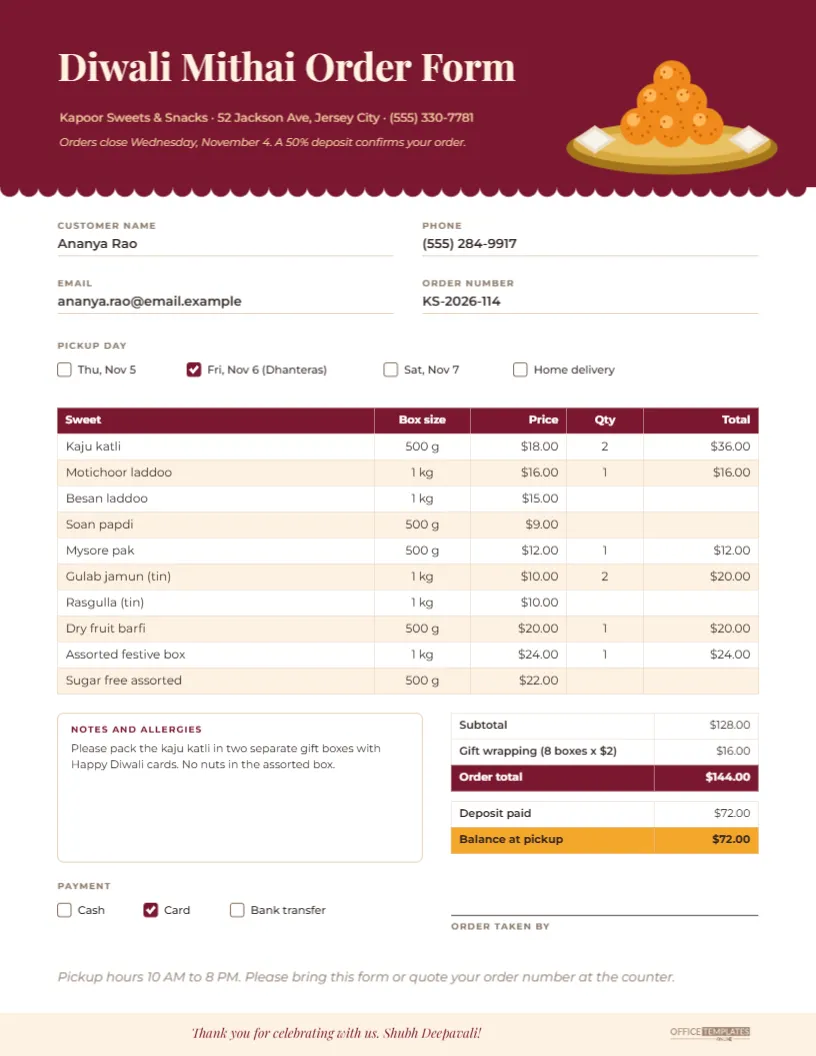
- Customer details: Name, phone, email, and an order number go in four labelled fields at the top. The order number helps when the same customer calls twice.
- Pickup day: Checkboxes offer Thursday, November 5, Friday, November 6 (Dhanteras), Saturday, November 7, and Home delivery. Tick one.
- The sweets: A real table lists ten sweets with box size and price; the customer or staff fill in quantities, and the line totals follow.
- Totals and deposit: A summary block shows the subtotal, gift wrapping, the order total, the deposit paid, and the balance due at pickup.
- Notes, payment and sign-off: A notes box captures allergies and packing requests; checkboxes record the payment method; a signature line shows who took the order.
The Maroon Order Form Design
A maroon header band with a scalloped lower edge carries the title Diwali Mithai Order Form in cream Playfair Display, the shop name, address and phone, and a line about the order deadline and deposit. A brass thali piled with orange laddoos and two silver-topped kaju katli sits on the right of the header. The body of the form is white, with fields, tables, and boxes in maroon, cream, and a warm saffron for the balance due row. A pale cream footer thanks the customer and wishes them Shubh Deepavali, with the Office Templates Online mark on the right.
Setting Up Your Sweets and Prices
The table is the editor’s Table object. Double-click it, or choose Edit Table Data, to change the sweets, sizes, and prices. The sample list covers popular choices: kaju katli, motichoor laddoo, besan laddoo, soan papdi, Mysore pak, gulab jamun and rasgulla in tins, dry fruit barfi, an assorted festive box, and a sugar-free assortment. Replace them with your own range. Use + Row if you sell more items; the form has space for two or three extra rows before the summary block needs moving down.
If you print blank forms for customers to fill in by hand, delete the sample quantities and totals so those cells are empty.
Working Out the Totals
Editor tables hold typed text, not formulas, so totals do not calculate themselves. The sample figures were calculated in advance so you can see how the form reads when complete: two boxes of kaju katli at $18, one motichoor laddoo at $16, one Mysore pak at $12, two tins of gulab jamun at $10, one dry fruit barfi at $20, and one assorted box at $24 make a subtotal of $128. Eight boxes at $2 each for gift wrapping add $16, for an order total of $144. A 50 percent deposit of $72 leaves $72 to pay at pickup.
When you fill in a real order on screen, multiply each price by the quantity, add the lines, then update the summary. For handwritten orders, a calculator at the counter does the job.
A Deposit Policy That Protects Your Shop
Festive orders are made to order, and unpaid boxes left on the shelf on Diwali evening are a loss. The sample form states that a 50 percent deposit confirms an order and that orders close on Wednesday, November 4. Whatever policy you choose, print it on the form so there are no surprises. Many shops also take full payment for corporate bulk orders in advance.
Freshness Notes for Customers
Customers often ask how long sweets keep, especially when they are buying for relatives they will visit later in the week. Shelf life depends on your recipes and ingredients, so give your own guidance. A simple way is to add a line to the notes or the footer, such as: Milk sweets are best within two days; keep refrigerated. Dry sweets keep for a week in an airtight box. Make sure any guidance matches what you actually make.
Allergies and Labels
The notes box in the sample asks for no nuts in the assorted box. Nuts, dairy, and gluten are common in Indian sweets, so encourage customers to write allergies here, and label boxes clearly when you pack them. The gift tags and sweet box labels in this collection can be printed to match.
Printing the Form
Download a PDF and print on US Letter paper. For a counter pad, print in batches and keep them on a clipboard. Customers can also download the form if you send it digitally, fill it in, and send a photo back. The header uses a solid maroon band, so a laser printer or a print shop gives the cleanest result for large batches. For a carbon copy feel, print two copies of each order: one for the customer, one for the kitchen.
Customising the Mithai Form for Your Shop
- Replace the shop name, address, and phone in the header.
- Change the pickup days if you are open on different dates; Diwali falls on Sunday, November 8, 2026.
- Add your logo by placing a shape from the Elements panel in the header and using Replace Image.
- Change the maroon to your brand colour and the saffron balance row to an accent colour.
Mithai Order Form Questions
Can I use it for savoury snacks too?
Yes. Rename the first column Item and add namkeen, chakli, or mathri to the list.
Can I add a delivery address field?
Yes. Add a field below the email row by copying one of the existing fields and changing its label to Delivery address.
Can I take online orders with it?
The form is designed for print and PDF. For online orders, you can share it as an image and ask customers to reply with their choices, or use it as a reference for an online form.
Stay Organised Through the Rush
Update the sweets and prices, print a stack of forms, and put them by the phone and the counter. When Dhanteras arrives, every box will be ready, and every customer will leave smiling.