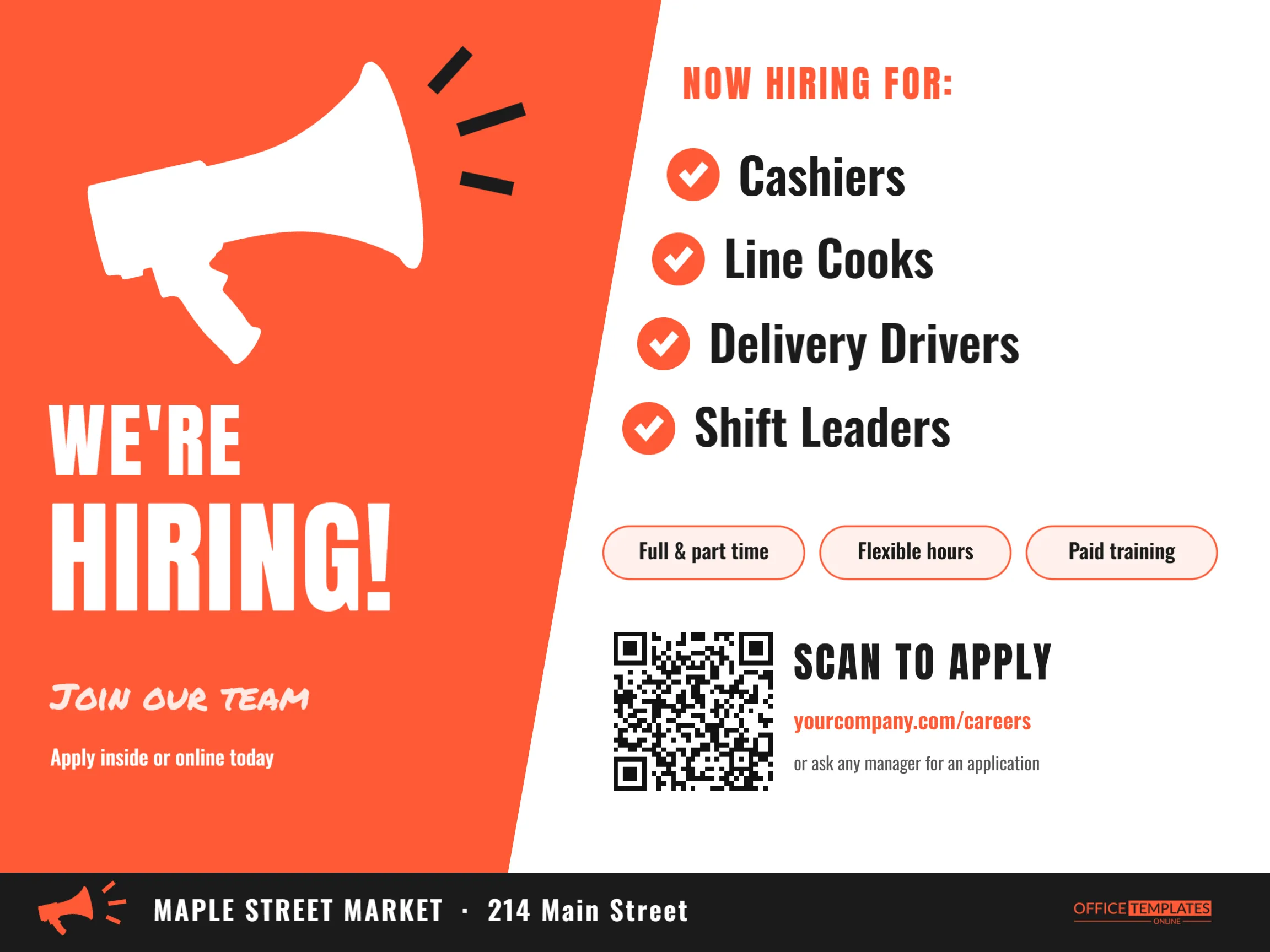
When a shop, restaurant or warehouse needs people fast, the cheapest recruiting channel is often the one right outside the door. Neighbours, regular customers and people walking by on their lunch break are already local, already know the business, and are more likely to stay. A strong hiring sign turns that foot and car traffic into applications. This Now Hiring Sign Template shouts the message with a megaphone and a diagonal slab of orange, then gets straight to the details: which jobs, what perks, and how to apply in ten seconds.
How the Layout Guides the Eye
The sign is 24 x 18 inches, landscape. A bright orange panel fills the left side and ends in a sharp diagonal edge, which adds energy and pushes the eye toward the job list on the right. In the upper part of the orange panel, a large white megaphone tilts upward, with three dark sound strokes bursting from its mouth. Below it, WE’RE and HIRING! are stacked in white Anton capitals, the second word much larger. Under that, Join our team is written in Permanent Marker, and Apply inside or online today in plain Oswald.
On the white side, NOW HIRING FOR: introduces four positions, each marked with an orange circle and a white tick: Cashiers, Line Cooks, Delivery Drivers, and Shift Leaders. The list steps slightly left as it goes down, following the diagonal. Three rounded chips name the perks (full and part-time, flexible hours, paid training), then a QR code sits beside SCAN TO APPLY, the careers web address, and a note that any manager can hand out an application. A black footer band repeats a small orange megaphone next to the business name and address, with our logo in orange at the right.
Writing Job Titles That Get Applicants
Use the titles people actually search for and understand. Crew Member means little to someone driving past; Cashier and Line Cook are instantly clear. If a role pays well, say so; a starting wage on a hiring sign is one of the most effective lines you can add. You could replace one perk chip with From $17/hr or add the wage after the job title. Keep the list to four jobs so each line stays large. If you are hiring for more roles, write and more on the last line and list everything on the careers page.
Step-by-Step: Make It Yours
- Change the roles: Click each position and type your own. The ticks and circles stay aligned.
- Edit the perks: Retype the three chips: Weekly pay, Employee discount, No experience needed, and Free meals are all popular choices.
- Set up the QR code: Select it, open its options, and paste your application link under URL/Website. If you take applications by text message, the SMS type works too.
- Update the web address: under SCAN TO APPLY so people without a camera phone can still find it.
- Put your name in the footer: Replace MAPLE STREET MARKET and the address with your business details.
- Recolour if you like: The orange panel, chips, and ticks can switch to your brand colour; the megaphone is an editable vector you can recolour from its colour swatches.
Recruiting Channels Compared
| Channel | Best for | Where this template helps |
|---|---|---|
| Yard or window sign | Hourly roles, local staff | Print the full 24 x 18 design |
| Counter or register | Customers who already like you | A US Letter print on a small stand |
| Social media post | Friends and followers sharing the news | Download a PNG and post it |
| Community boards | Students and job seekers nearby | Letter prints on library and campus boards |
Placement Tips
For a storefront, the best spot is usually a window at eye level near the entrance, or a stake sign on the lawn facing the busiest direction of traffic. Drive-through businesses get excellent results from a sign near the menu board, where drivers sit still for a minute or two with nothing else to read. For warehouses and industrial sites, place the sign where trucks and cars slow down at the gate. Wherever it goes, the QR code needs to be reachable: people must be able to walk up and scan it safely without standing in traffic.
Printing the Sign
Download a PDF and order a 24 x 18 inch corrugated plastic sign with stake holes for outdoor use, or a poster print for a window. The white area should stay truly white for the best contrast behind the QR code, so avoid printing on coloured paper. On a home printer, fit the design to US Letter landscape; it scales proportionally and still reads well on a door or counter. A second copy near the register reaches customers who never look at the window.
Keeping It Legal and Welcoming
Job advertisements should describe the job and its requirements, not the kind of person you picture in it. Avoid words that point to age, gender, or other protected characteristics, such as young and energetic or waitress. Neutral phrases like friendly, reliable team members invite everyone to apply. If there is a genuine requirement, such as a valid driver’s licence for delivery drivers, state it plainly in the application.
After the Applications Arrive
A hiring sign works quickly, so be ready to respond just as quickly. Check applications daily and call promising candidates within a day or two; good hourly workers often accept the first reasonable offer they receive. Once a role is filled, update the sign straight away by deleting that line, so people are not applying for jobs that no longer exist. When every position is filled, take the sign down but keep the file: seasonal businesses often reuse the same design each spring and autumn with only the dates and roles changed.
Common Questions About Hiring Signs
Can I use it for a single job opening?
Yes. Delete three list lines and make the remaining title larger, or change NOW HIRING FOR: to NOW HIRING: and write one role.
What if we accept walk-in applications only?
Delete the QR code and web address, and make Apply inside today the main instruction beside the perks.
Can I post it online too?
Download it as a PNG and share it on your social pages or local job groups; the design reads well at phone size.
Turn Passers-By into Team Members
Name the jobs, list the perks, link the application, and put the sign where people pause. With a bright, confident design, your next great hire might be someone who walks past your door every day.