A Lens Table and Eye Logo for an Optometrist’s Prescription Pad
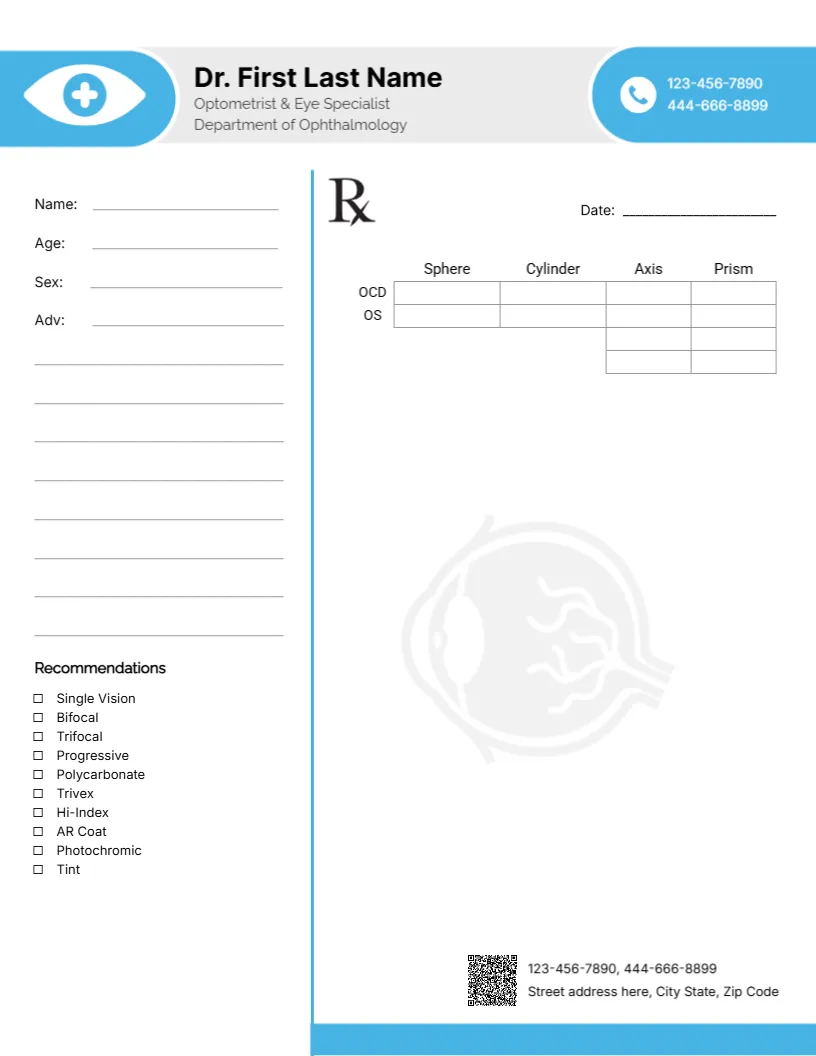
A light blue tab at the top left holds a white eye with a cross, beside the doctor’s name in black and Optometrist and Eye Specialist, Department of Ophthalmology in grey. A blue rounded badge at the right holds two phone numbers. A blue vertical rule splits the page. The left column has Name, Age, Sex and Adv lines and a Recommendations list with tick boxes for single vision, bifocal, trifocal, progressive, polycarbonate, Trivex, hi index, AR coat, photochromic and tint. The right side has an Rx symbol, a date line and a table for sphere, cylinder, axis and prism, over a faint eye watermark.
Built for Eyewear Prescriptions
The page is 8.5 x 11 inches. Unlike general pads, this one includes a proper lens table and lens options, making it practical for optometrists and opticians.
A Typo in the Eye Labels
The lens table labels the rows OCD and OS. The right eye is normally labelled OD (oculus dexter), so correct OCD to OD. The table also has two extra rows under axis and prism without labels, which you can use for an add power or delete. The credentials here match the specialty, unlike many other pads.
Setting Up the Optometrist Pad
- Change OCD to OD.
- Label or remove the extra rows.
- Type the doctor’s name.
- Update phones and address.
- Replace the QR code.
Lens Recommendations at a Glance
The tick box list lets optometrists recommend lens types and coatings quickly, which helps opticians fill the order correctly.
Prescription Standards
Eyewear prescriptions have legal requirements in many places, such as expiry dates and pupillary distance. Check your local rules, since this is a layout, not clinical advice.
Printing Fine Table Lines
The table lines are thin, so print at a good quality setting.
Adding Pupillary Distance
Add a PD line under the table if your patients order glasses elsewhere.
Contact Lens Prescriptions
Contact lens prescriptions need extra details, such as base curve. Use a separate form for those.
Patient Copies
Give patients a copy and keep one on file.
Using the Optometrist Pad
Keep pads in each exam room.
Step by Step Editing of the Optometrist Eye Lens Table Design
- On the optometrist eye lens table design, click the main headline and type your own words, keeping a similar length.
- Retype every name, date and contact line on the optometrist eye lens table design, checking each against a trusted source.
- Search the optometrist eye lens table design for the words Lorem and Company so that no placeholder remains.
- Click any logo or photo on the optometrist eye lens table design, choose Replace Image and resize the new picture to fit.
- Zoom the optometrist eye lens table design to full size and read each line aloud before you save it.
- Keep a clean master of the optometrist eye lens table design without private details, so later versions start tidy.
Another option is the doctor prescription pad. A related layout is the healthcare letterhead. Also worth a look: dermatologist letterhead. Looking beyond the optometrist eye lens table design? See all letterhead templates.