How to Fill In This Gift Certificate in Five Steps
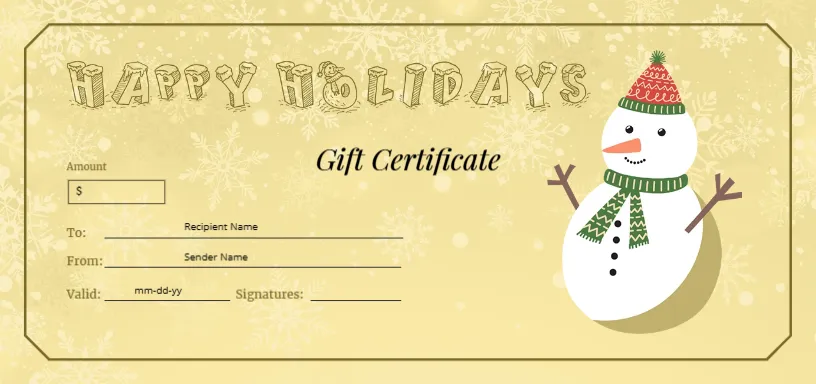
- Open the template and look at the left side of the card. Four labelled lines wait for you: To, From, Valid and Signatures, with a small box marked with a dollar sign above them for the Amount.
- Type the amount. Click the dollar sign in the box and add the value, such as $40, or the name of the service or treat.
- Add the names. The lines contain grey prompts reading Recipient Name and Sender Name. Click them and type the real names, or delete the prompts and write by hand after printing.
- Set the date. The Valid line shows the format mm-dd-yy. Replace it with the last date the certificate can be used.
- Download and print. Choose PDF for printing on card stock, or PNG and JPG for a message or email.
The Look You Are Working With
This certificate is wider than most of the set. It measures 8.5 x 4 inches in landscape, which is large enough for handwriting and big enough to stand upright in a frame. The background is a warm pale gold with a very light pattern of snowflakes. A thin gold line with rounded corners runs around the inside edge like a frame.
Across the top, the words HAPPY HOLIDAYS are drawn in decorative letters that look as if they are made of frosty snow. A friendly snowman stands on the right: round, white and smiling, with a red and green knitted hat, a green scarf, a carrot nose and twig arms. In the centre, the words Gift Certificate are written in an elegant italic.
Neutral and Welcoming
Happy Holidays is a broad greeting, and the snowman has no religious symbol, so this certificate works for schools, workplaces, community groups and mixed audiences. Many offices use designs like this for secret gift programmes, because it does not assume anything about the person receiving it.
What You Can and Cannot Edit
All the text lines are editable. The HAPPY HOLIDAYS lettering and the snowman are artwork, so to change the greeting you would remove the picture and add your own text with a font of your choice. If you only need the card as it is, leave them alone. The gold frame can be recoloured, and the amount box is a separate shape.
Printing and Framing
Because the card is 8.5 inches wide, which is the full width of a letter sheet, printers may clip the edge slightly. Choose Fit to page in the print dialog, or print on a larger sheet and trim. Heavy card stock between 250 and 300 gsm gives the certificate a premium feel. If you give it as a framed gift, a standard 5 x 10 inch or 4 x 8 inch frame can hold a scaled-down copy.
Using It at a Work or Class Party
Because the card is large and friendly, it suits a workplace gift exchange or a classroom party. Agree on a value first, print one card for each person, and ask every giver to fill in the To and From lines. The Amount box keeps everyone inside the agreed limit, and the snowman keeps the mood light.
If you prefer Santa to a snowman, see the Santa Happy Holidays voucher. For a bold navy design with gold bells, try the bell motif Christmas gift voucher. More options are in the Christmas gift certificate collection.