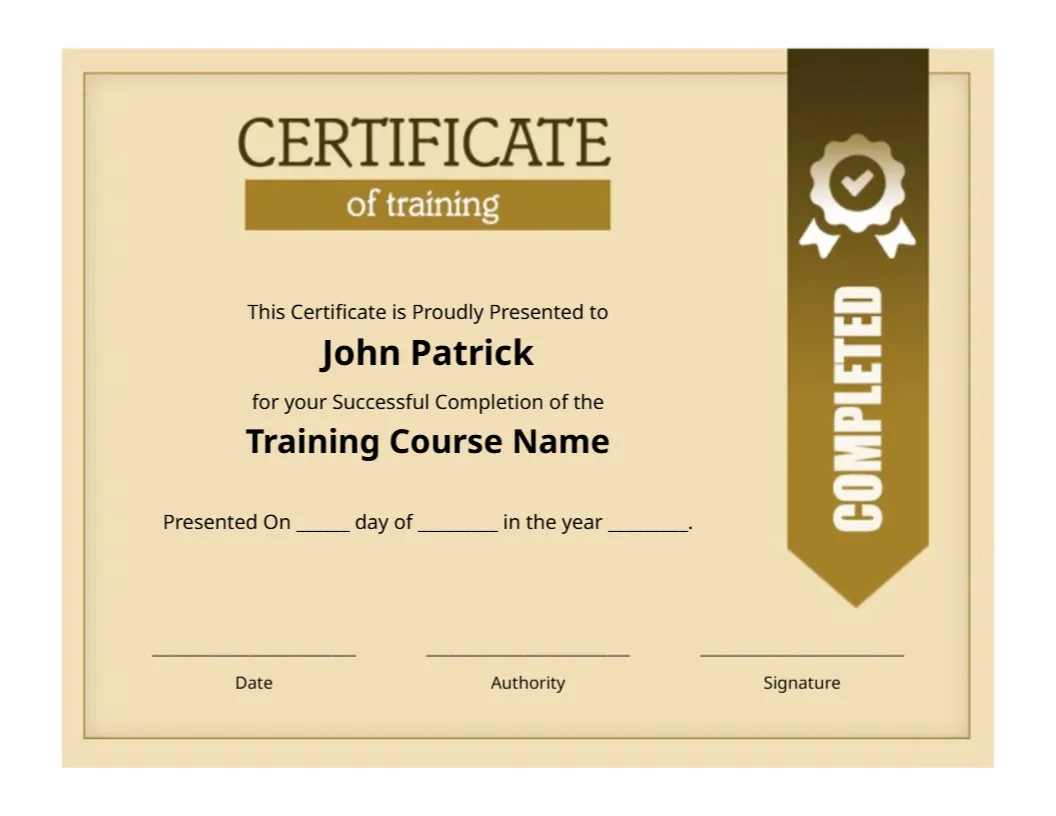
A Gold COMPLETED Ribbon on a Cream Training Certificate
A tall brown and gold ribbon hangs from the top right of this cream certificate, with a white rosette at its head and the word COMPLETED in white capitals running down it. CERTIFICATE of training sits at the top left on a gold bar. John Patrick and Training Course Name sit in bold black type, followed by a presented on sentence and three lines.
A Letter Landscape in Cream
The page is 11 x 8.5 inches. The cream background with a thin gold double border looks warm and simple, so it prints well on both white and ivory paper.
Name, Course and the Date Sentence
Replace John Patrick and Training Course Name, then fill the blanks in Presented On ___ day of ___ in the year ___. Under the Date, Authority and Signature lines, add a name and title for each person signing.
Preparing the Completed Certificate
- Type the trainee name.
- Enter the course name.
- Fill the date blanks.
- Add the authority name.
- Sign and date.
A Simple Layout for Any Course
There are no logos, seals or crowded borders, so the certificate suits almost any course, from first aid to software. Add a logo in the empty space at the top left if you wish.
A Ribbon That Says Completed
The vertical COMPLETED ribbon is a strong visual cue. It reads from a distance, and it tells viewers at once that this is a record of finishing a course.
Three Signature Lines
Date, Authority and Signature give you space for the day, the issuing body and a named signer. If you need only one signature, delete two lines and centre the remaining one.
The Blanks for the Date
The date sentence uses blanks to fill by hand. If you prefer a typed date, replace the underscores in the editor and print the date with the name.
Warm Colours for Easy Printing
The brown and gold tones print well on most colour printers. On a black and white printer the ribbon becomes dark grey, and the white lettering stays clear.
A Template for Frequent Courses
If you run the same course often, save a master with the course name filled in. Then only the name and the date change for each trainee, which speeds up the work.
Handing Over and Recording
Give the certificate on the last day of the course, and record the name, course and date. A list of issued certificates helps if someone later requests a duplicate.
Step by Step Editing of the Training Certificate Completed Ribbon Cream Gold Design
- On the training certificate completed ribbon cream gold design, click the main headline and type your own words, keeping a similar length.
- Retype every name, date and contact line on the training certificate completed ribbon cream gold design, checking each against a trusted source.
- Search the training certificate completed ribbon cream gold design for the words Lorem and Company so that no placeholder remains.
- Click any logo or photo on the training certificate completed ribbon cream gold design, choose Replace Image and resize the new picture to fit.
- Zoom the training certificate completed ribbon cream gold design to full size and read each line aloud before you save it.
- Keep a clean master of the training certificate completed ribbon cream gold design without private details, so later versions start tidy.
Another option is the company training certificate. A related layout is the workshop participation certificate. Also worth a look: project training certificate. Every training certificate completed ribbon cream gold style alternative sits in certificate templates.