Navy and Silver Curves for a Non Voting Stock Certificate
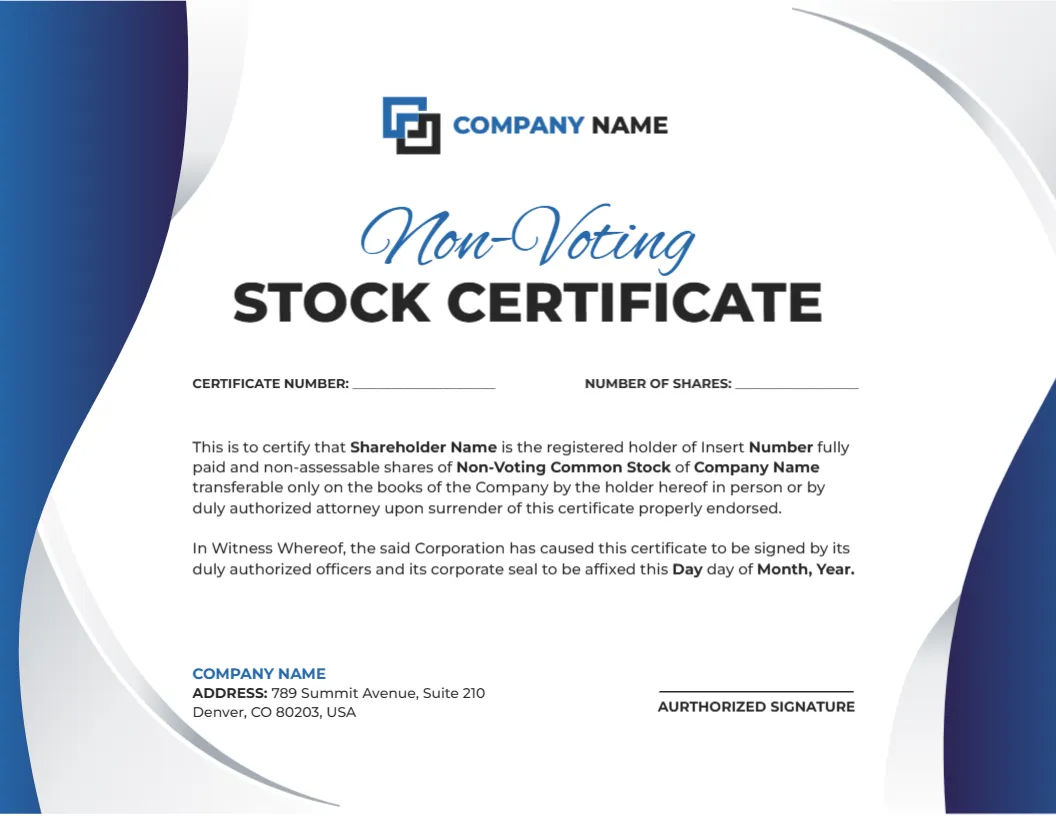
Navy blue and silver curves flow along the left and right edges of this landscape certificate. A logo and COMPANY NAME sit at the top, with Non-Voting in blue script over STOCK CERTIFICATE in black capitals. Fill in lines for certificate number and number of shares lead to a registered holder paragraph, a witness clause and an address.
A Letter Landscape With Silver Edges
The page is 11 x 8.5 inches. The silver curves are light, so they print softly, while the navy is the heaviest area and needs good ink coverage.
Holder, Shares and the Witness Clause
Replace Shareholder Name and Insert Number in the first paragraph, and fill the day, month and year in the witness clause. Update the Denver sample address, fill the two numbers and correct AURTHORIZED to AUTHORIZED.
Setting Up the Non Voting Certificate
- Swap the logo.
- Enter the two numbers.
- Fill the holder name and shares.
- Fix the signature label.
- Sign and seal.
What Non Voting Means on the Page
Non voting shares carry ownership without a vote at meetings. Describing rights correctly is a legal task, so have a lawyer approve any wording that states what the class can and cannot do.
A Cooler Palette for Finance
Navy and silver feel calm and professional. They suit investment firms, family offices and private companies that want a restrained document rather than a festive one.
Script and Capitals for the Class Name
Non-Voting appears in script above bold capitals. If your class name differs, keep it to one or two words, so that the script line stays a clean accent.
Matching Other Classes in a Set
If your company issues several classes, use the sibling layouts so each class has its own colour and name. A consistent set helps the board and shareholders tell them apart.
Sealing the Certificate
A corporate seal or an embossed stamp adds formality, if your company uses one. Check local practice, since many places no longer require a seal for validity.
Maintaining the Share Ledger
Each certificate number should appear in the ledger with the holder, the class and the issue date. When shares transfer, cancel the old certificate and issue a new one with a fresh number.
Safe Storage and Delivery
Keep issued certificates in a fireproof place, and deliver originals by tracked mail. A scanned copy is useful for records, but store it with restricted access.
Step by Step Editing of the Non Voting Stock Certificate Blue Silver Design
- On the non voting stock certificate blue silver design, click the main headline and type your own words, keeping a similar length.
- Retype every name, date and contact line on the non voting stock certificate blue silver design, checking each against a trusted source.
- Search the non voting stock certificate blue silver design for the words Lorem and Company so that no placeholder remains.
- Click any logo or photo on the non voting stock certificate blue silver design, choose Replace Image and resize the new picture to fit.
- Zoom the non voting stock certificate blue silver design to full size and read each line aloud before you save it.
- Keep a clean master of the non voting stock certificate blue silver design without private details, so later versions start tidy.
Have a look at the class B common stock certificate. Another option is the common stock certificate. A related layout is the blank stock certificate. The rest of the series around the non voting stock certificate blue silver design is in certificate templates.