Keep Your Classroom Informed, Organized, and Inspired in One Creative Display
A classroom bulletin board can do much more than decorate a wall. It can give students one clear place to see what is happening this week, upcoming events, classroom activities, important reminders, student achievements, and shared goals. This Classroom Bulletin Board Template brings all of those details together in a colorful, school-themed design that is easy to read and simple to customize.
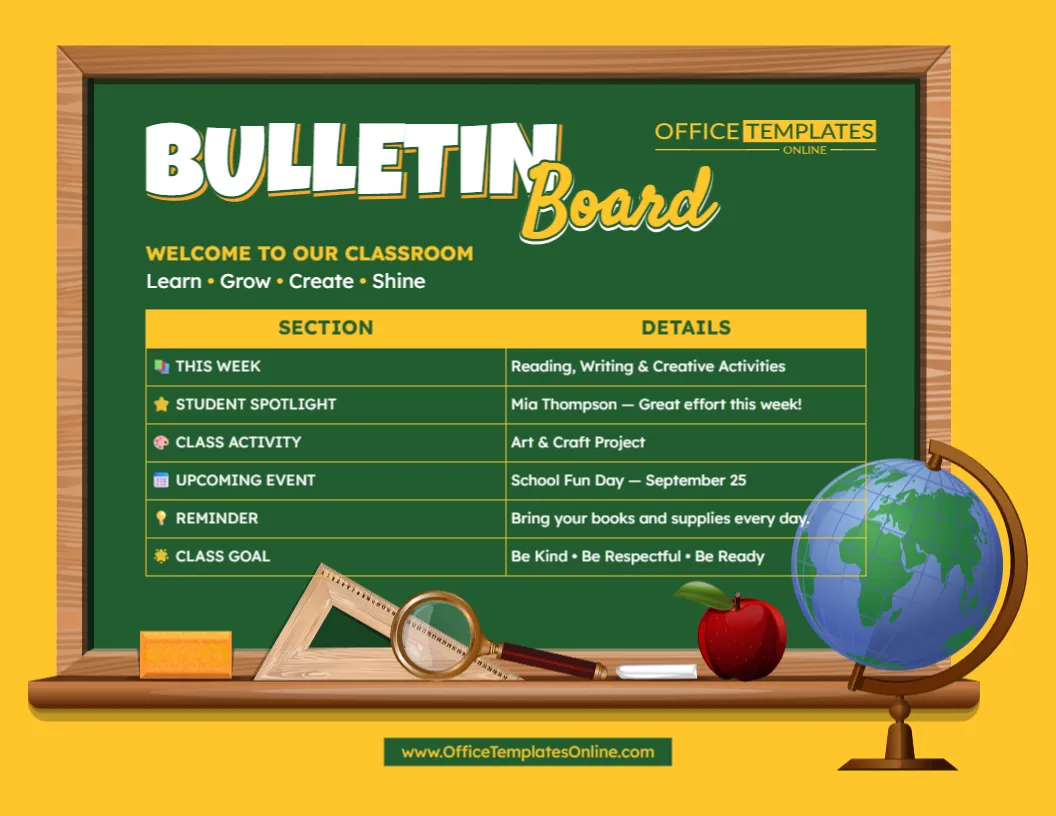
Designed to look like a traditional green classroom chalkboard with a wooden frame, the template combines a familiar school setting with an organized information table. Decorative elements such as a globe, apple, ruler, magnifying glass, chalk, and eraser add visual interest without taking attention away from the information.
The template can be customized online directly in your browser, so you can replace the sample content with information from your own classroom. There is no login required to use the editor. Once your bulletin board is ready, download the finished design in PDF, PNG, or JPG format.
What’s Included in This Bulletin Board Design?
The template uses a simple two-column structure with Section on the left and Details on the right. This makes it easy for students, parents, teachers, or classroom visitors to quickly connect each announcement with the information that belongs to it.
The ready-made design includes six useful sections:
- This Week – Share the main lessons, topics, or activities planned for the week.
- Student Spotlight – Recognize a student’s effort, improvement, achievement, or positive contribution.
- Class Activity – Highlight a current project, group activity, assignment, or classroom exercise.
- Upcoming Event – Display an important school or classroom event and its date.
- Reminder – Add a short message about books, supplies, homework, deadlines, or classroom responsibilities.
- Class Goal – Show a shared goal, expectation, positive behavior, or message for the class.
These sections provide a useful starting point, but they do not have to remain exactly as shown. You can customize the wording and information to match the way your own classroom operates.
Put Important Classroom Information Where Students Can See It
Teachers often have several small but important pieces of information to communicate at the same time. One announcement may relate to an upcoming event, another to the week’s learning activities, and another may simply remind students to bring certain supplies.
Instead of presenting these details separately, this bulletin board layout provides a single organized overview.
The short section labels make the information easy to scan. Students can quickly check what they are working on, see what event is coming next, read the latest reminder, or review the current class goal.
This makes the design useful as a weekly classroom bulletin board, classroom announcement board, class information display, or school notice board.
Personalize Every Section with the Online Editor
The sample text is there to show how the finished bulletin board can be organized. Before using the template, you can replace it with your own information using the browser-based online editor.
For example, the sample “This Week” entry can be replaced with the subjects or lessons your students will cover. The Student Spotlight area can feature a different student, while Upcoming Event can be updated with a field trip, test, presentation, school celebration, parent meeting, or other important date.
You can also update the welcome message, section headings, details, reminders, goals, and other editable text to create a bulletin board that better fits your needs.
You do not need to install special software or create an account simply to make these changes. Open the template, customize it online, and prepare the version you want.
Highlight Students with a Dedicated Spotlight
Recognition can be an important part of classroom life, and this template includes a dedicated Student Spotlight section.
It can be used to acknowledge a student’s excellent effort, improvement, helpful behavior, creativity, participation, completed work, or another classroom achievement.
The spotlight does not have to focus only on academic performance. Teachers can adapt it to recognize positive actions and progress that are meaningful in their particular classroom.
If a Student Spotlight is not needed, the section can instead be changed to another category, such as Star of the Week, Great Work, Classroom Helper, Team Achievement, or a different heading that suits the class.
Make Upcoming Events Easier to Notice
School schedules can quickly become busy. Tests, projects, special activities, field trips, celebrations, presentations, and other events may all need to be communicated to students.
The Upcoming Event section provides a clear space for displaying one of these important dates prominently within the weekly classroom overview.
You might use it for entries such as:
Science Fair – October 12
Reading Day – Friday
Class Presentation – November 6
School Sports Day – Next Wednesday
Because the content is customizable, the section can be updated whenever your classroom schedule changes.
Use the Reminder Area for Everyday Classroom Needs
Some of the most useful classroom messages are also the easiest for students to forget.
The Reminder section gives you a visible place for short instructions such as bringing books, returning permission slips, completing homework, carrying art supplies, preparing for a test, or submitting an assignment.
Keeping the message short and specific can make the bulletin board easier to read from a glance.
For a different purpose, you could rename this section to Don’t Forget, Important Notice, Homework, Due This Week, Materials Needed, or another suitable label.
Give the Class a Shared Goal
The template also contains a Class Goal area that can be used for a weekly objective, positive classroom expectation, or shared target.
The sample design uses the message “Be Kind • Be Respectful • Be Ready,” demonstrating how several short expectations can fit neatly into the space.
You could replace this with a learning goal, behavior goal, attendance target, reading challenge, teamwork objective, or another message that is relevant to your students.
Changing the goal regularly can also help keep the bulletin board current rather than allowing it to become a display that students stop noticing.
Adapt the Sections to Match Your Teaching Style
Although this classroom bulletin board template arrives with a complete set of useful categories, you can give those categories different purposes.
Depending on the class, the sections could be adapted for information such as Homework, Today’s Tasks, Weekly Vocabulary, Birthdays, Reading Goals, Important Dates, Question of the Week, Project Updates, Classroom Jobs, Attendance Goals, Test Dates, or Words of Encouragement.
For example, a teacher who does not need a Student Spotlight could turn that row into “Homework.” A teacher preparing students for examinations could change Class Activity to “Revision Focus.” A reading-focused classroom might use the rows for books, reading targets, vocabulary, and discussion topics.
The existing layout gives you the structure while leaving room to make the information your own.
A School-Themed Design That Feels at Home in the Classroom
The visual design helps distinguish this template from a plain announcement sheet.
Its green chalkboard background and wooden frame immediately create a classroom feel. Yellow headings provide contrast against the dark board, while the table keeps the actual information neatly aligned.
Around the bottom of the board are familiar educational objects, including an apple, ruler, magnifying glass, chalk, and eraser, with a large globe positioned at the side. These elements give the template a lively academic appearance while maintaining a clear area for the announcements themselves.
The result is suitable for teachers who want classroom information to look organized without making the display feel overly formal.
Use It for Weekly or Regular Classroom Updates
This template works particularly well as a weekly classroom information board because several types of updates can appear together.
At the start of each week, you can change the current activities, featured student, event, reminder, and class goal. This creates a fresh overview for students without requiring you to design a completely new layout every time.
It can also be adapted for daily updates, monthly announcements, a special classroom project, or a particular school event.
Suitable for More Than Traditional Classrooms
While the design is primarily intended as a teacher resource, its flexible layout can work in many educational environments.
Teachers can use it in elementary or secondary classrooms where the style is appropriate. It may also be customized by tutors, homeschool educators, learning centers, after-school programs, children’s activity groups, educational workshops, and school clubs.
The headings can be changed to suit the setting, allowing the same basic design to serve different educational purposes.
Download Your Finished Bulletin Board as PDF, PNG, or JPG
Once you have added your own announcements and finished customizing the design, you can download the completed bulletin board in PDF, PNG, or JPG format.
Choose PDF when you want a convenient format for printing or keeping a finished document. Choose PNG or JPG when you need the bulletin board as an image for compatible digital displays, classroom materials, presentations, or online communication.
Having multiple download formats allows you to choose the option that works best for your intended use.
Turn a Blank Classroom Display into a Useful Information Center
Creating a classroom bulletin board from scratch can involve deciding on a layout, arranging headings, choosing visual elements, and finding a clear way to present several different types of information. This template gives you that structure from the start.
Simply customize the classroom bulletin board online, replace the example information with your own announcements, and make the content relevant to your students. There is no login required, and when everything looks right, you can download your completed design as a PDF, PNG, or JPG.
From weekly lessons and upcoming events to student recognition, reminders, activities, and class goals, this editable Classroom Bulletin Board Template provides one attractive place to keep important classroom information organized and easy to find.