Before you print a payroll calendar, it is worth being sure that biweekly pay is the schedule you run. The comparison below shows how the common pay frequencies differ, and where this template fits.
Biweekly, Weekly or Semi-Monthly Payroll?
| Pay frequency | Paydays per year | Typical payday | Good fit for |
|---|---|---|---|
| Weekly | 52 | Every Friday | Hourly staff, construction, hospitality |
| Biweekly | 26 (sometimes 27) | Every other Friday | Most US employers with hourly and salaried staff |
| Semi-monthly | 24 | 15th and last day of the month | Salaried office teams |
| Monthly | 12 | Last working day of the month | Many employers outside the US |
Biweekly payroll is the most common schedule in the United States. Pay always falls on the same weekday, which staff like, but the dates move around the month, which is why a clear payroll calendar is so useful. This template is built for exactly that schedule.
How the 2027 Pay Schedule Works
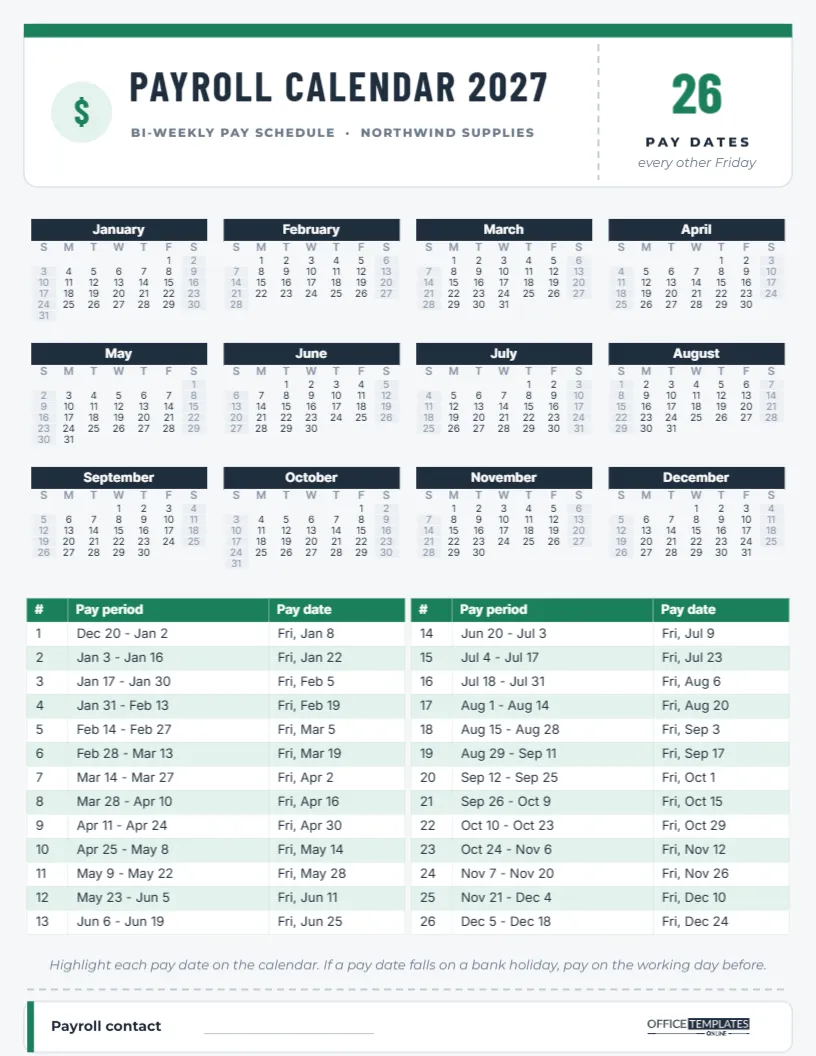
The template assumes two-week pay periods running Sunday to Saturday, with pay on the Friday after each period closes. The first period of 2027 runs from Sunday, December 20, 2026 to Saturday, January 2, 2027, and is paid on Friday, January 8. Every following period starts fourteen days later. The 26th and final period runs from December 5 to December 18, paid on Friday, December 24, 2027.
The six-day gap between the end of a period and pay day gives managers time to approve timesheets and payroll time to process them. If your business uses a different lag, for example, paying on the Friday the period ends, edit the Pay date column.
A Pay Stub on Paper: The Design
The page is US Letter portrait on a light grey background. The header is designed like a pay stub: a white card with a green bar across the top, a green dollar sign in a mint circle, PAYROLL CALENDAR 2027 in condensed Barlow Condensed capitals, and BI-WEEKLY PAY SCHEDULE · NORTHWIND SUPPLIES underneath (the company name is a placeholder). A dashed perforation line separates a stub on the right, which shows a big green 26, the words PAY DATES, and every other Friday.
Below is the full year as twelve mini months with navy month bars. The lower part of the page holds two green-and-mint tables, side by side, listing periods 1 to 13 and 14 to 26 with columns for #, Pay period, and Pay date. The footer repeats the stub idea: a dashed tear line, then a small white card with a green edge, a Payroll contact line, and the OTO logo.
Marking Pay Dates on the Year Calendar
The year calendar is the editor’s Calendar object in Full Year style, so it does not highlight pay dates automatically. Print the page and circle or highlight the 26 Fridays from the tables; it takes five minutes and makes the rhythm of the year obvious. You will notice that two months in 2027, April and October, contain three pay dates instead of two. Staff often call these extra paycheck months, and they are worth pointing out to employees who budget monthly.
Pay Dates That Meet a Holiday
A small note under the tables says: if a pay date falls on a bank holiday, pay on the working day before. In 2027, the final pay date, Friday, December 24, is the observed Christmas holiday for federal purposes, and many banks are closed. Most employers would move that payroll to Thursday, December 23. Check the rest of your dates against your bank’s holiday calendar and adjust the Pay date cells where needed.
Editing the Payroll Tables
Both tables are the editor’s Table objects. Click any cell to change a date; use the Table options to add a column, for example, Timesheets due or Hours approved by, or recolour the header and stripes. If your pay periods start on a different day, change the first period and continue in fourteen-day steps. Replace the company name in the header with your own business name and fill in the payroll contact line with a name, email, or extension.
Changing the Year
To reuse the template for 2028, open Calendar Options on the year calendar and change the year, then update both tables. Remember that the 2028 schedule continues from the last 2027 period, so it starts on December 19, 2027, not on January 1. Every 11 or so years, a biweekly schedule produces 27 pay dates in one calendar year; in that case, add a row to the second table.
Timesheet Cut-Offs and Approval Deadlines
A payroll calendar is only as reliable as the steps before pay day. Decide when timesheets must be submitted, when managers must approve them, and when payroll must be finalised, then make sure everyone knows those deadlines. A common pattern for this schedule is timesheets due on the Monday after the period closes, approvals by Tuesday at noon, and payroll processed on Wednesday, giving the bank two days to move the money before Friday. Write those steps on the back of the page or add them as columns in the tables, and circulate the calendar with a short explanation at the start of the year.
When a public holiday falls in the processing week, the whole chain moves earlier, not just the pay date. Check each holiday week in advance and warn managers so approvals arrive on time.
Who Should Get a Copy
- Employees, so they know when money arrives and can plan bills.
- Managers, who must approve timesheets before each cut-off.
- Payroll and HR staff, as a desk reference for the whole year.
- Accountants and bookkeepers, for cash-flow planning.
Pin it to the staff noticeboard, include it in new-starter packs, or share the PNG on the company intranet in January.
Printing the Payroll Calendar
Download the PDF and print at 100% on letter paper. The grey background is light and prints cleanly on office printers; if you want to save toner, select the background rectangle and change it to white before downloading. Fonts are Barlow Condensed and Inter, both Google Fonts, and they stay crisp even in small table text.
Twenty-six Fridays, one page, and no more when do we get paid? emails.