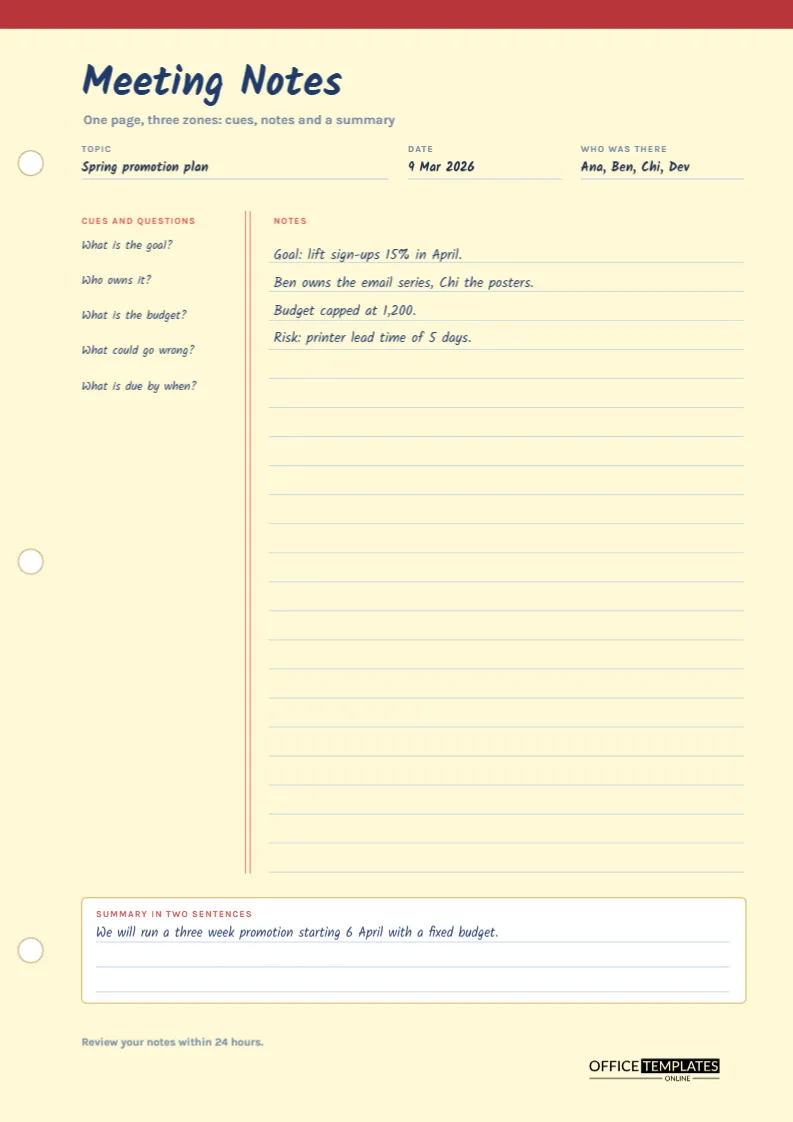
Sometimes you do not need minutes. You need a page where you can think while somebody else talks. That is what the Cornell method of note-taking was designed for, and it works as well in a meeting room as in a lecture hall. This template dresses the method as a yellow legal pad with punch holes and a red margin, and it arranges the page into three zones: a narrow column for cues and questions, a wide ruled area for notes, and a box at the bottom for a two-sentence summary.
Three Zones and What Each One Does
The Cornell layout separates three jobs that most note takers mix up. The right side is for capturing what is said during the meeting. The left column is for writing cues, questions, and keywords afterwards, which helps recall. The bottom box is for summarising in your own words. Keeping the jobs apart means your notes are easy to review, because you read the cues first and the summary last.
How to Use the Page Before, During and After
| Stage | Where to write | What to write |
|---|---|---|
| Before | Header fields and cue column | Topic, date, attendees and your questions |
| During | Ruled notes area | Key points, numbers, decisions and names |
| Within a day | Cue column | Cues and questions that match the notes |
| Within a day | Summary box | Two sentences in plain words |
A Legal Pad on the Screen
The page background is a pale legal pad yellow. A dark red band runs across the top, as if the pad were bound there, and three white punch holes with tan outlines sit along the left edge. Two thin red lines run down the page like a margin, and the notes area is crossed by light blue ruled lines. The effect is familiar and friendly, and it invites people to write.
Handwriting-Style Type for the Header
The title Meeting Notes and the sample entries use Kalam, a font that looks like casual handwriting, in dark blue ink. The small labels in capitals use Karla. The sample text shows how a real page might look: a spring promotion plan with a goal, owners, a budget, and a risk. All of it is editable text, so you can retype the lines or clear them for a blank page.
Topic, Date and Attendees at the Top of the Pad
Three fields sit under the title: topic, date, and who was there. Each has a short ruled line. Writing the topic and the names first gives the page an identity, so that when you find it in a folder three weeks later you know what it was about.
The Cue Column
The left column is headed Cues and questions and contains five prompts in the sample: what is the goal, who owns it, what is the budget, what could go wrong, and what is due by when. These are general prompts that suit most working meetings. You can keep them, replace them with your own, or leave the column blank and fill it in afterwards. The prompts also help you listen, because you notice when a question has not been answered.
Ruled Lines Spaced for Writing
Twenty-two ruled lines run down the notes area, spaced about three-quarters of a centimetre apart. This is wide enough for most handwriting and for typed text at ten points. Sample text in the first four lines sits on the rules. If you type onto the page, keep each note on its own line.
Writing a Two Sentence Summary
The box at the bottom is headed Summary in two sentences. Two sentences force you to decide what mattered. In the sample, the summary says that the team will run a three-week promotion starting in April with a fixed budget. If you cannot summarise in two sentences, you may not have understood the point of the meeting, and that is worth knowing early.
Reviewing Notes Within Twenty-Four Hours
The footer reminds you to review your notes within twenty-four hours. Memory fades quickly, and a short review makes the difference between notes you can use and notes you cannot decipher. Write the cues, check the summary, and add any action to your own task list.
When to Use Notes and When to Use Minutes
Personal notes are not minutes. They record what mattered to you, and they may contain opinions and half-formed ideas. If the meeting needs an official record, use one of the minutes templates and let this page be your private working copy. If you are the minute-taker, the notes are a good way to prepare.
Using the Page for Calls and Interviews
The same layout works for phone calls, job interviews, training sessions, and conversations with customers. The cue column suits questions you want to remember to ask. Because the page is a single sheet, it is easy to scan and file.
Editing the Pad
All the text is editable. To clear the sample, select each text box and delete the words, leaving the labels. The ruled lines are thin shapes you can recolour or delete. The yellow background can be changed from the page colour control.
Printing the Legal Pad Page
A4 portrait. Print on white paper and the yellow background will print as a pale tint, or print on yellow paper with the background turned off for a more authentic look.
Using Symbols and Shorthand in the Notes Area
You do not need to write full sentences. Simple symbols speed things up: a star for something important, a question mark for something to check, an arrow for an action, and a circle around a decision. Whatever system you use, keep it consistent, and put a small key in the cue column. Over time, your page becomes a fast personal language that anyone you trust could learn in a minute.
Turning the Page Into Action Items
When you review the notes, underline anything that needs a response and copy it into your task list with a date. The summary box then states the main outcome, and the underlined lines show what you must do. This makes the page a short bridge between talking and doing, which is where most meetings lose their value.
Note Taking Questions
Does the Cornell method suit fast meetings?
Yes. Write quickly in the notes area and fill in the cues afterwards.
Can I type onto the page?
Yes. Retype the text boxes in the editor, then print or download.