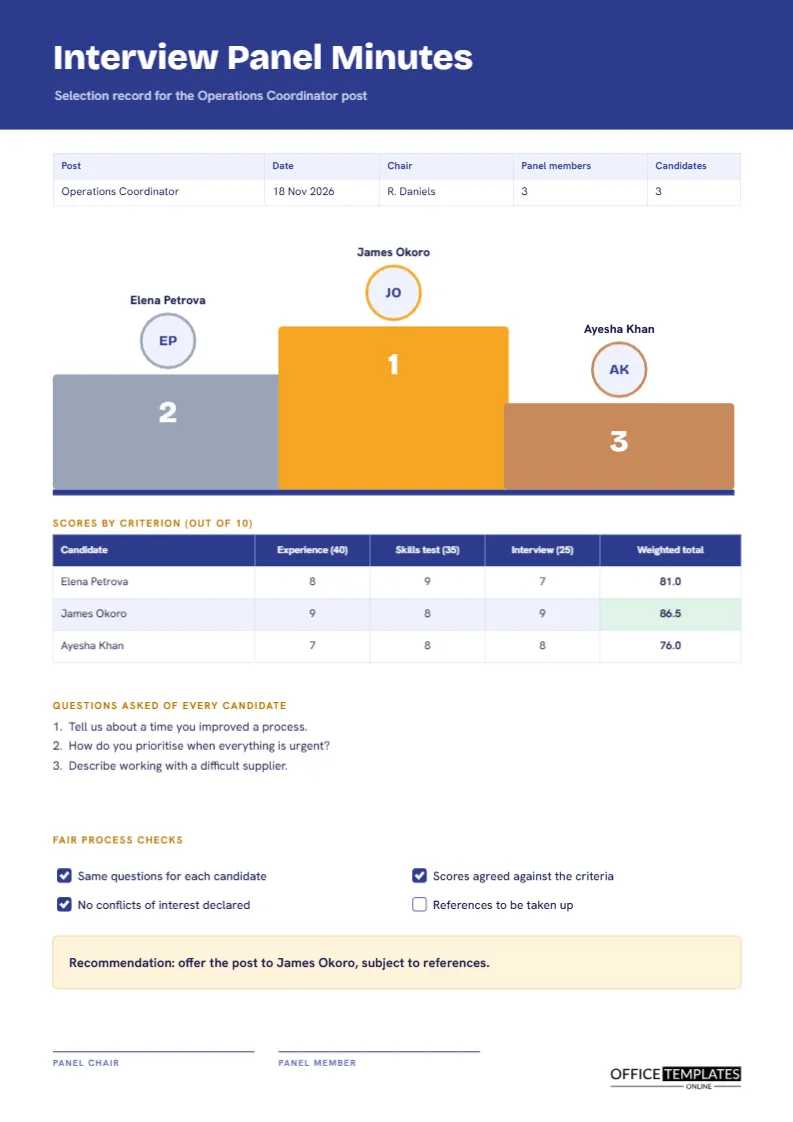
When a panel chooses between candidates, the decision should rest on evidence that can be explained later. Rejected candidates sometimes ask why; colleagues wonder whether the process was fair, and an employer may need to show that it was. Written panel minutes answer all of them. This page records who was interviewed, how each candidate scored against agreed criteria, the questions asked, and the recommendation, and it puts the top three on a podium so the result is clear at a glance.
Three Steps and Three Initials
The centre of the page is a podium with three steps in gold, grey-blue and bronze, marked with the numbers one, two and three. A circle above each step carries a candidate’s initials, and the name appears above it. The tallest step, gold, sits in the middle. The podium is drawn from shapes in the order the scores produce, so in the sample, James Okoro takes first, Elena Petrova second, and Ayesha Khan third.
A Weighted Score Table With Worked Totals
Under the podium, a table lists each candidate with scores out of ten for experience, a skills test, and the interview, and a weighted total. Weights are 40, 35, and 25. Each total is the sum of score times weight, divided by ten.
| Candidate | Calculation | Total out of 100 |
|---|---|---|
| Elena Petrova | 40 x 8 + 35 x 9 + 25 x 7 = 810 | 81.0 |
| James Okoro | 40 x 9 + 35 x 8 + 25 x 9 = 865 | 86.5 |
| Ayesha Khan | 40 x 7 + 35 x 8 + 25 x 8 = 760 | 76.0 |
The winning total is shaded green on the page. Because cells are typed text, recalculate if you change a score.
Indigo, Amber and a Clean Header
The page opens with a solid indigo band and a short line naming the post, here an operations coordinator. The title is set in Bricolage Grotesque, a lively sans serif, and the body text in Hanken Grotesk. Amber accents mark the podium and headings. The palette is confident but professional, which suits a record that may be shown to a candidate.
Why Every Candidate Gets the Same Questions
A numbered list records three questions asked of every candidate: improving a process, prioritising when everything is urgent, and working with a difficult supplier. Asking all candidates the same core questions is a basic principle of fair selection. It lets the panel compare answers directly, and it reduces the risk that a candidate is advantaged by an easier line of questioning. Add follow-up questions as needed and note that they were asked.
Fair Process Checks
Four check boxes record that the same questions were used, scores were agreed against the criteria, no conflicts of interest were declared, and references remain to be taken up. In the sample, the first three are ticked, and the last is open. A visible checklist reminds the panel of good practice and gives the record a second purpose: showing that the process was followed.
Writing Notes That Stick to the Criteria
Panel members should note evidence, not impressions. A line such as described cutting order processing time by a third is evidence. A line such as seemed confident is an impression and may reflect bias. Keep the individual notes with the file and use the page for the agreed scores and the reasons for the recommendation.
Avoiding Bias in the Panel Room
- Score each answer before discussing it with colleagues.
- Judge against the criteria, not against other candidates, at the scoring stage.
- Do not ask about family plans, age, health, or other protected matters.
- Be aware of first impressions, and give each candidate the full time.
- Challenge each other politely when a score seems out of line.
The Recommendation Box
A pale amber box at the foot states the recommendation: offer the post to the top-ranked candidate, subject to references. The name is that of the first-place candidate. Where the panel has a reserve choice, add it in a second line, which saves time if the first candidate declines.
Signing the Record
Two signature lines, one for the panel chair and one for a panel member, close the page. Larger panels can add lines. The signatures confirm that the page is an accurate record of the panel’s decision.
Keeping and Destroying Selection Records
Employers usually keep recruitment records for a limited period, which varies by country and by sector. After that, they should be destroyed securely. Store the page with the scoring sheets in a restricted folder, and note the date on which the records can be removed.
Editing the Podium and Scores
The podium is a group of simple shapes. To change the ranking, move the initial circles and names between steps, and retype the numbers. The scoring table is a real Table object with Edit Table Data and Add Row, and the winning cell is shaded by its fill colour.
Printing the Panel Page
A4 portrait. The indigo header and podium print well in colour. In black and white, the numbers one to three on the podium keep the ranking clear.
Handling Reserve Candidates and Late Withdrawals
Sometimes the first choice declines the offer. If the panel has agreed a reserve in advance, the page already shows the second name and the scores that justify it. Record the date the first candidate withdrew and the date the reserve was approached. Keeping both steps in the record shows that the process continued fairly, and it avoids a restart that could cost weeks.
Giving Candidates Useful Feedback
Unsuccessful candidates often ask how they could improve. The score table lets you give honest, specific feedback: strong on the skills test, less strong on examples at interview. Share only their own scores and comments, never another candidate’s, and keep your explanation consistent with the page. A short, kind call is remembered and reflects well on the organisation.
Panel Questions Answered
Can I use it for an internal promotion?
Yes. Change the post title and criteria to match.
How many candidates fit on the page?
Three on the podium and as many rows in the table as you add.