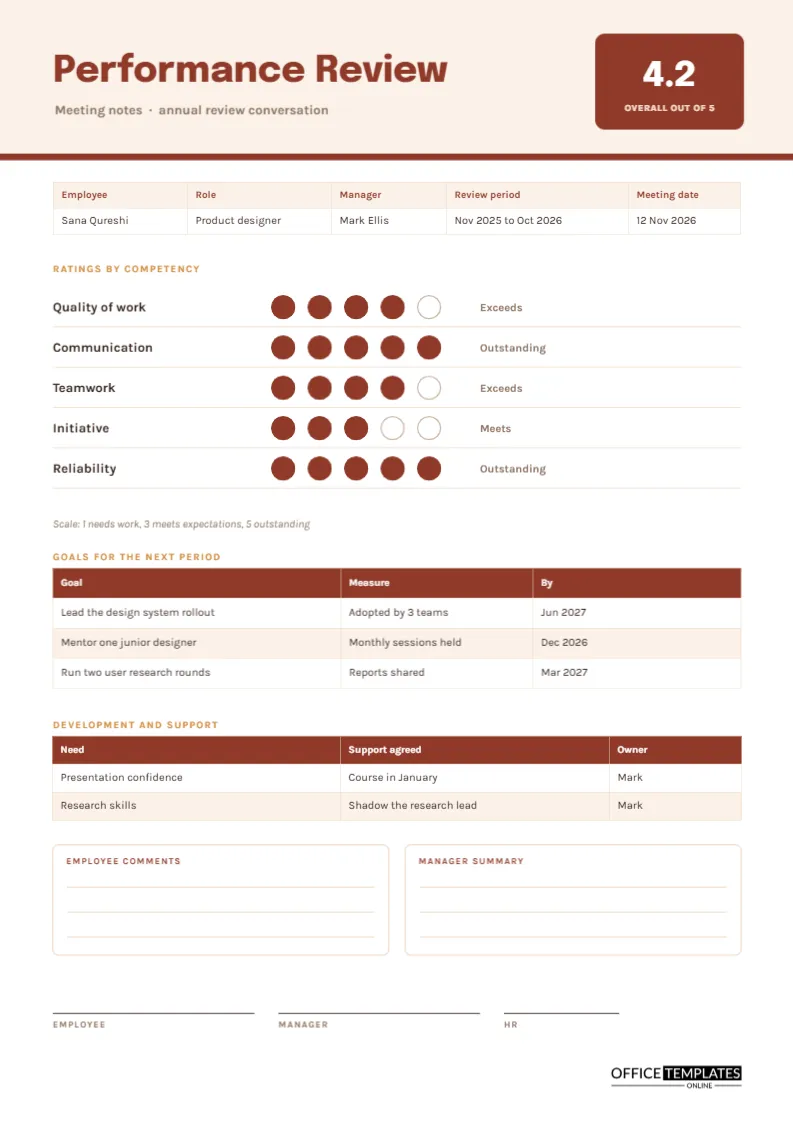
A performance review conversation is easy to dread and easy to fumble. Managers worry about saying the wrong thing, and employees worry about what is going to be written down. A good set of notes reduces both worries by making the structure clear in advance. This page records ratings on a short list of competencies, an overall score, goals for the next period, and the support that was agreed, all in a form the employee can read and sign.
Reading the Dot Ratings
Five rows list the competencies: quality of work, communication, teamwork, initiative, and reliability. Beside each are five circles, filled in brick red up to the rating and left empty beyond it, with a word on the right such as Meets or Exceeds. The sample gives four, five, four, three, and five, so the overall figure is 4.2, shown in a square at the top right. Dots are quicker to read than numbers, and employees tend to respond to a picture of their profile with more interest than to a table of digits.
What Each Rating Might Mean
| Rating | Label | Typical description |
|---|---|---|
| 1 | Needs work | Below what the role requires, with support needed |
| 2 | Developing | Close to the standard in some areas |
| 3 | Meets | Fully meets the expectations of the role |
| 4 | Exceeds | Regularly goes beyond what is expected |
| 5 | Outstanding | Sets the standard for others |
Agree these descriptions with your team before the review season, so everyone reads a four the same way.
A Brick Red and Sand Palette
The header is a pale sand band with a brick red rule beneath it. The title Performance Review is set in heavy Epilogue, and the working text is Karla. The warm palette is deliberate: a performance review is a human conversation, and a harsh colour scheme would work against that. The overall score sits in a brick square, which draws the eye without shouting.
Where the Overall Score Comes From
The overall figure is the plain average of the five ratings: four plus five plus four plus three plus five is twenty-one, divided by five. If your organisation weights competencies differently, say so on the page, and retype the figure. Never let a single number replace the conversation. It is a summary, and the goals and comments carry the real message.
Goals With a Way to Measure Them
A table lists three goals with a measure and a date: lead a design system rollout adopted by three teams, mentor a junior designer with monthly sessions held and run two rounds of user research with reports shared. A measure turns an aspiration into something both sides can check. If a goal has no measure, ask what would show that it was achieved.
Development and Support
A second table pairs a need with the support the manager will give. In the sample, the employee wants more confidence presenting, and the manager agrees to a course in January. Another need is research skills, answered by shadowing the research lead. A review that lists needs without support is a complaint list. This table makes the manager accountable as well.
Comments From Both People
Two boxes with ruled lines sit side by side, headed Employee comments and Manager summary. Giving the employee a space to write signals that their view counts. Many organisations require this, and it is helpful if they later disagree with a rating.
Preparing for the Review Conversation
- Ask the employee to complete a short self-assessment a week before.
- Collect examples for each rating, not general impressions.
- Draft the page with provisional dots in pencil.
- Plan the opening, starting with real strengths.
- Book a private room and enough time to listen.
Giving a Low Rating Fairly
A rating of two or three is easier to discuss when you have an example. In the sample, initiative scores three, and a manager might say that during the rollout the employee waited to be asked rather than proposing improvements, and then offered the research project as a chance to lead. Specific, behaviour-based comments keep the conversation about work, not character.
Why the Page Carries Signatures From Three People
Signature lines for employee, manager and HR sit at the foot. A signature means the person has seen and discussed the page, not that they agree with every rating. Say this aloud when you hand over the pen, because many employees worry that signing is an admission.
Keeping Review Records Confidential
Review notes belong in a secure personnel file, not on a shared drive with open access. Keep one signed copy for HR and give the employee another. Local employment law and company policy set how long to keep them, so check the requirements.
Editing the Dots and Labels
Each dot is a circle you can select and fill or leave empty. To change a rating, adjust the fills in that row and retype the label and the overall score. Both tables can be extended from the editor panel.
Printing the Review Page
A4 portrait. The brick red prints well in colour and in grayscale the filled dots stay clearly darker than the empty ones.
Following Up the Review Through the Year
A review page is a starting point. Put the goal dates in your diary, and book a short check-in each quarter to see how each one is going. At each check-in, ask what has changed, what support has arrived, and what is still missing. Update the goal table with the latest progress and file the new page with the original. When the next annual review arrives, there will be no surprises and plenty of evidence for both sides.
Writing Comments the Employee Will Remember
The comments boxes are small on purpose. Choose one or two points that matter most and say them plainly. Employees remember a clear sentence, such as your analysis of customer interviews changed the design far longer than a paragraph of general praise. Balance it with one specific, actionable point for growth.
Review Questions
Is this a replacement for HR forms?
It can complement them. Use whatever your HR team requires for the official record.
Can I use it mid-year?
Yes. Change the review period and focus on progress against goals.