A retrospective is the only meeting in a sprint where the team looks at itself instead of at the product. It can be one of the most useful hours of the fortnight or one of the most wasted, and the difference often comes down to whether anything is written down and whether the writing leads to an action. This page gives a scribe a simple place to capture what people say, in four coloured quadrants, and then a short route from talk to a small number of agreed changes.
Four Quadrants and What Belongs in Each
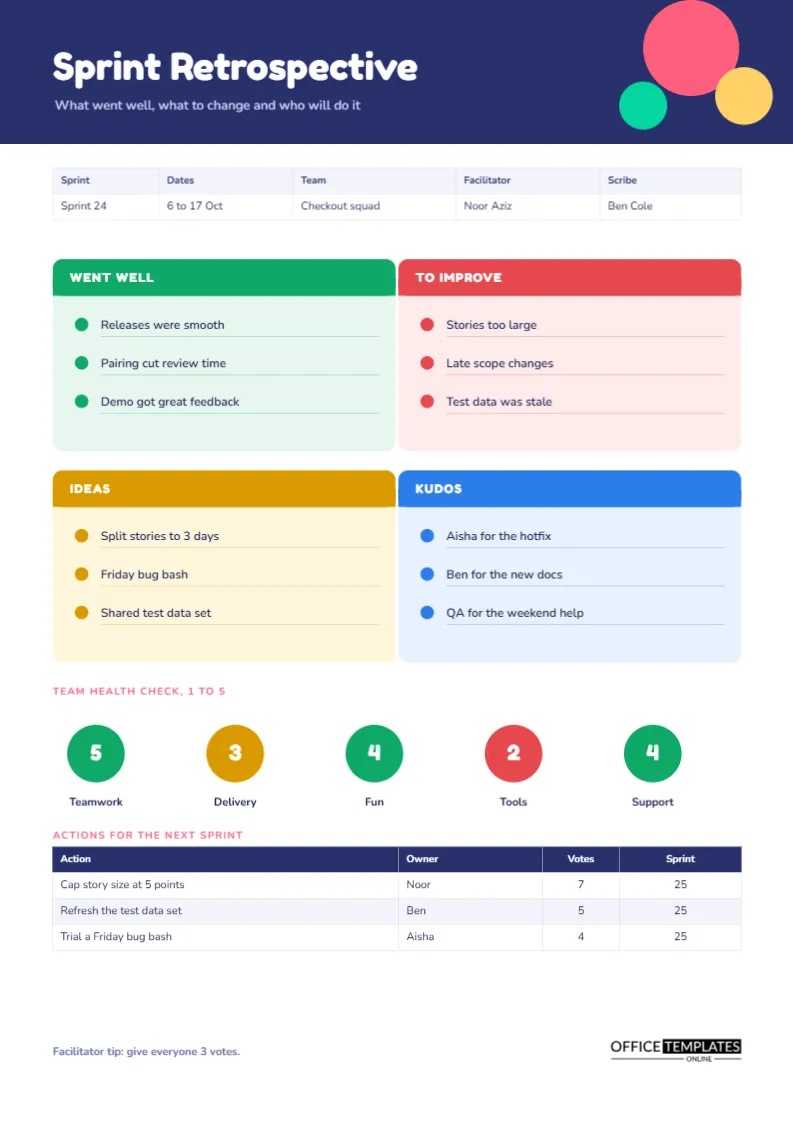
The centre of the page is a two-by-two grid. Went well is green, To improve is red, Ideas is amber, and Kudos is blue. Each quadrant has a bold header bar and three bullet lines with a thin underline beneath each. The layout nudges a team toward balance. A group that fills only the red box is complaining, and a group that fills only the green box is avoiding hard topics. Four boxes ask for both, with ideas and appreciation as a way to end on something constructive.
A Sample Sprint From a Checkout Squad
| Quadrant | Example entry | What the team did with it |
|---|---|---|
| Went well | Pairing cut review time | Kept the practice |
| To improve | Stories too large | Turned into an action |
| Ideas | Split stories into three days | Voted and ranked |
| Kudos | Aisha for the hotfix | Read aloud and noted |
A Navy Header With Playful Dots
The page opens with a deep navy band holding the title in Fredoka One, a rounded, friendly typeface, with three overlapping dots in coral, yellow, and mint at the right. The details strip below records the sprint number, dates, team, facilitator, and scribe. The tone is deliberately light, because people speak more honestly in a retrospective that feels relaxed.
Running the Session in Forty Minutes
- Spend five minutes setting the scene and reminding the team of the sprint goal.
- Give ten minutes of silent writing, one idea per sticky note, into the four boxes.
- Spend ten minutes grouping the notes and reading them aloud.
- Spend ten minutes voting and choosing the top two or three items.
- Spend five minutes agreeing on owners for each chosen action.
The Team Health Check
Below the quadrants, five large circles show scores out of five for teamwork, delivery, fun, tools and support. They are coloured by value: green for four or five, amber for three and red for one or two. In the sample, tools scores two and is red, which gives the team a reason to look at its tooling next sprint. A health check takes two minutes and makes slow changes visible, such as a gradual decline in fun that no single sprint would reveal.
Voting With Dots
The page has a Votes column in the action table. A common method is to give each person three votes and ask them to place them on the items they most want to change. Count the votes, write the totals in the column, and work from the top down. The sample shows an item with seven votes, another with five and a third with four, which makes the order of attention obvious without a long debate.
Turning Ideas Into Actions the Team Will Do
An action in the table has three parts: the change, the owner, and the sprint when it starts. The sample actions are to cap story size at five points, refresh the test data set, and trial a Friday bug bash. Each is small enough to try within one sprint. Resist the temptation to leave a retrospective with ten actions. Two or three done well will change more than ten forgotten.
Reviewing Last Sprint’s Actions First
Before the new quadrants fill up, read last sprint’s actions aloud and ask which were done. This single habit shows whether retrospectives lead to change. If most actions were not done, ask why, and shrink the next list. Teams that skip the review find that the retrospective slowly turns into a place where complaints are repeated.
The Role of the Facilitator and the Scribe
The page names both. The facilitator guides the conversation and keeps time, and the scribe fills in the page. Separating the roles lets the facilitator listen. If your team is small, rotate both roles each sprint so everybody sees the meeting from both sides.
Keeping Retrospectives Safe
People share honestly only when they trust that what they say will not be used against them. State at the start that the notes record themes, not individuals, and avoid writing names against criticisms. Kudos are the exception: naming a colleague for good work is always welcome.
Using the Page for Remote Teams
The quadrant layout translates easily to a shared screen. The scribe types into the page while participants add notes by chat. After the session, download the page as a PDF and post it in the team channel, so the actions stay in sight during the next sprint.
Editing the Quadrants for Your Own Format
Some teams prefer headings such as Start, Stop and Continue, or Liked, Learned, Lacked and Longed for. Retype the four header labels and the colours still make sense. The bullet lines are text boxes with underlines, so you can add more or delete some. The action table is a real Table object that accepts new rows through Edit Table Data and Add Row.
Printing the Retrospective Page
The page is A4 portrait. The coloured quadrants print well in colour and remain distinguishable in grayscale by their headings. Some teams print it at A3 for a workshop and fill it with real sticky notes.
What to Do When the Same Problem Returns Every Sprint
Some issues appear in the To Improve box again and again, such as late scope changes. When that happens, do not write it a fifth time. Treat it as a signal that the team cannot fix it alone, and raise it with whoever controls the cause, perhaps the product owner or a manager. Record the escalation as an action with an owner, and check at the next retrospective whether the conversation happened. A recurring problem with an owner outside the team is a different kind of action from a habit the team can change itself.
Retrospective Questions
How often should a team hold one?
At the end of every sprint is the usual rhythm, with a longer session each quarter.
Should managers attend?
Only if the team agrees. Their presence can reduce candour.