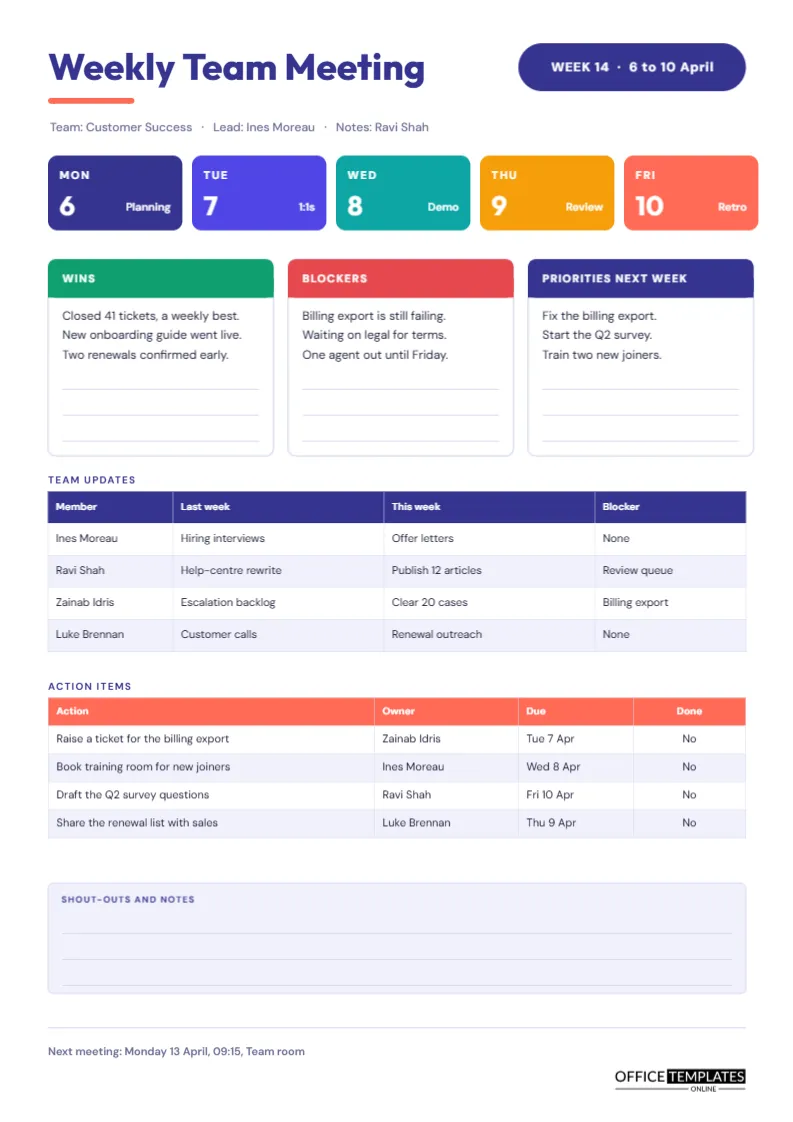
A weekly team meeting works when it has a rhythm, and it fails when it becomes a status read-out nobody remembers. This template builds the rhythm into the page. A coloured Monday-to-Friday strip sets the week, three columns capture wins, blockers, and priorities, and a compact table records what each person did and will do. The result is a record you can write in ten minutes and read in two.
A Week in Five Coloured Chips
Across the top, below a bold indigo title, five rounded chips run side by side in indigo, violet, teal, amber and coral. Each shows a weekday and a large date number, with a small label for the recurring event of that day: Planning, 1:1s, Demo, Review and Retro. Edit those labels to match your own cadence. A pill at the top right reads WEEK 14 with the date range, which makes filed minutes easy to find later.
One Sample Week for a Customer Success Team
To show how the page works, the sample follows a team of four.
| Day | Event | What the minutes capture |
|---|---|---|
| Monday | Planning | Priorities for the week |
| Tuesday | 1:1s | Notes recorded separately, not here |
| Wednesday | Demo | New features shown to the team |
| Thursday | Review | Case backlog and escalations |
| Friday | Retro | Wins and blockers for the page |
Wins, Blockers and Priorities
Three white cards with coloured header bars sit under the chips. Wins has a green header, Blockers a red one, and Priorities next week an indigo one. Each card holds three lines of sample text and three faint writing lines for more. The colours are not decoration. They tell the team how to read each column at a glance: celebrate the first, fix the second, and plan the third.
Why Blockers Deserve Their Own Column
In many teams, blockers are mentioned out loud and then forgotten. Giving them a column forces the question of who will remove each one. In the sample, the billing export failure appears under Blockers and then again in the action table with an owner and a date. That link between a problem and an action is the most useful habit this page can build.
The Team Updates Table
Four rows record each person’s last week, this week, and any blocker. Columns are Member, Last week, This week, and Blocker. Keep entries to a few words. If someone needs to explain a problem at length, that belongs in a separate conversation, not in the minutes.
Action Items With a Done Column
The action table has a coral header and four columns: action, owner, due, and done. The sample lists four tasks, for example, raising a ticket for the billing export by Tuesday. At the next weekly meeting, read the list first and change the final column from No to Yes for each finished item. Unfinished actions roll forward or get dropped on purpose.
The Shout-Outs Box
A pale indigo box at the bottom is labelled Shout-outs and notes, with three writing lines. Recognition costs nothing and is easy to forget under pressure. Giving it a standing place on the page makes it part of the routine.
Running the Meeting in Twenty Minutes
- Spend two minutes on wins.
- Spend five on blockers and who will clear them.
- Spend six on the updates table, one line per person.
- Spend five on priorities and actions.
- Spend two minutes on shout-outs and the next meeting time.
Customising the Page
Every text element is editable. Change the team name, lead, and note-taker in the grey line under the title, and recolour the chips to match your brand. The two tables are real Table objects, so you can add rows through Edit Table Data and the Add Row button. Table cells contain typed text, so there are no formulas to maintain.
Carrying Last Week Forward
Before filling in a fresh page, open last week’s minutes and read the Priorities column aloud. Each line is a promise the team made, and checking it against the week that just ended takes two minutes. Anything achieved goes into Wins on the new page. Anything missed either becomes a blocker with an owner or moves to this week’s priorities with a reason. Doing this every Monday gives the team a continuous thread from one page to the next, and it makes the quarterly picture much clearer when you look back.
Where to Keep the Pages in Between
A shared folder for each quarter works well. Name the folder with the year and quarter, and keep the weekly pages inside it in week order. Anyone who joins mid-quarter can read the pages in sequence and understand what the team has been doing without a long briefing.
Filing the Weekly Minutes
Name each file with the week number first, for example, Week 14 Customer Success. After a quarter, you will have thirteen pages that tell the story of the team’s work, which is useful for performance reviews and planning.
Printing
The page is A4 portrait. The chips and header bars are solid colour, so expect a colour print to look lively. A grayscale print stays clear, as the labels remain readable on mid-tone fills.
Handling Absent Team Members
People are away, and a weekly record still has to make sense. If a team member cannot attend, ask for a two-line update in advance and add it to the updates table with the word Remote or Absent in brackets after the name. That keeps the history complete and shows the person that their work is still visible. It also prevents the week from being recorded as if that person did nothing.
Ending the Meeting on Time
A weekly meeting has a habit of expanding to fill whatever time it is given. The page itself helps by holding a fixed amount of text. When the three cards are full, and the tables are complete, the meeting is finished. If a topic needs more time, write it in the priorities column as something to schedule separately, and let the group go. Teams that adopt this discipline often shorten their weekly meeting from an hour to twenty minutes within a month.
Questions From Team Leads
Can I use it for a fortnightly meeting?
Yes. Replace the week pill with a date range and keep everything else.
What if my team has more than four members?
Add rows to the updates table, or list only the people with something to report.