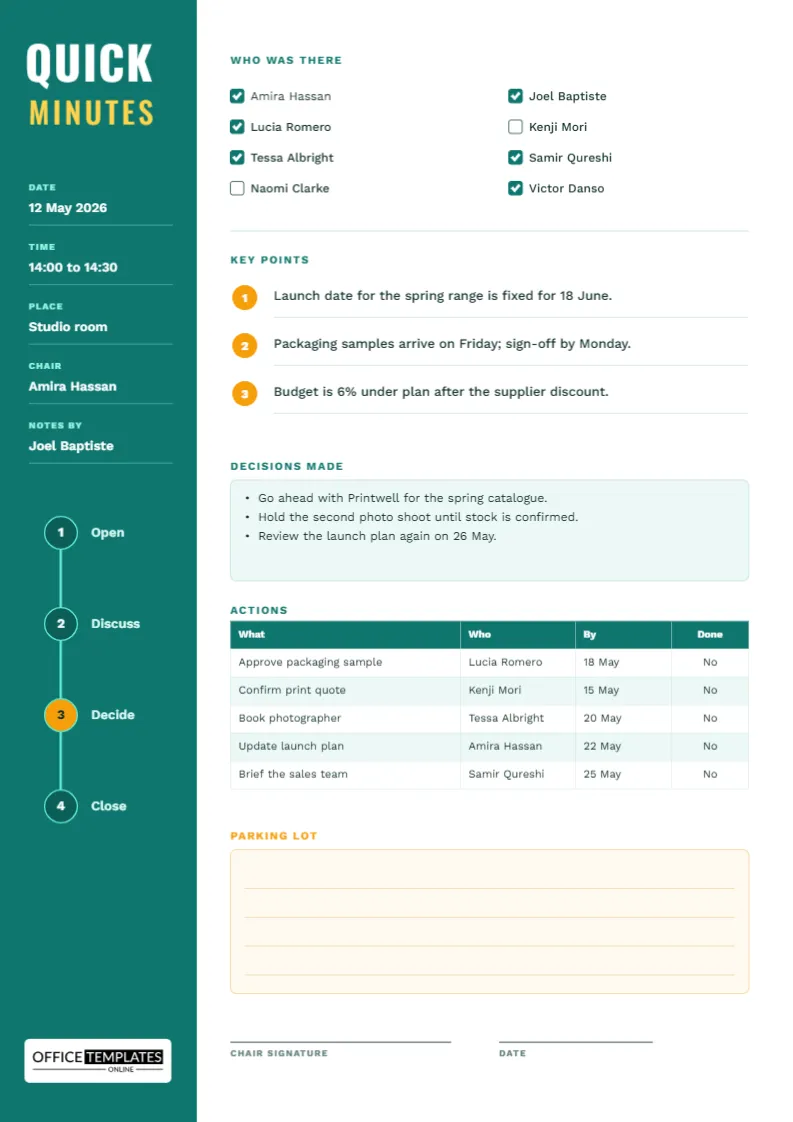
Not every meeting deserves three pages of minutes. A thirty-minute catch-up, a project huddle, or a supplier call needs a record that takes five minutes to write and thirty seconds to read. This quick minutes template fits the whole meeting on one A4 page. The sidebar holds the facts, the main column holds the substance, and nothing on the page asks you to write more than a line at a time.
Four Steps Printed Down the Sidebar
The deep teal sidebar runs the full height of the page and carries a small timeline of four numbered circles: Open, Discuss, Decide, and Close. The third circle, Decide, is amber, because that is the step most meetings skip. The timeline doubles as a facilitation guide. If you glance at it halfway through a rambling meeting, you can ask which step you are on and whether the group is ready to move to the next one.
A Ten Minute Script for Using the Page
Here is how a short meeting can run with this sheet in front of you.
| Minute | Step | What you write |
|---|---|---|
| 0 to 2 | Open | Date, time, place, chair, and ticks beside the attendee names |
| 2 to 7 | Discuss | Up to three key points, one line each |
| 7 to 9 | Decide | Bullets in the decisions box |
| 9 to 10 | Close | Actions with names and dates, then the parking lot |
Treat the timing as a guide rather than a rule, but notice that writing the actions last, while everyone is still in the room, is what makes them stick.
The Sidebar Facts
Five labelled lines sit in the sidebar in white on teal: date, time, place, chair, and who is taking notes. The sample shows a studio meeting on 12 May 2026 from 14:00 to 14:30. Because the lines are ordinary text boxes, you can retype them directly on the canvas. Keep the lengths short so the words stay inside the sidebar width.
Who Was There, With Check Boxes
Eight names are laid out in two columns, each with a check box. Ticked boxes are filled teal and empty ones are outlined, so the sample page shows at a glance that two people were absent. For a team of five, delete three names. For a larger group, use the page for the core attendees and attach a sign-in sheet.
Keeping Key Points to Three
The key points list has room for three numbered items, each on its own ruled line with an amber number badge. Three is a useful limit. If you cannot name the three most important things said in a short meeting, the meeting probably lacked focus, and the minutes will help you see that for next time.
The Decisions Box
A pale teal box holds bullet points for decisions. In the sample, the team agrees to go ahead with a printer for a spring catalogue, hold a second photo shoot until stock is confirmed, and review the plan on 26 May. Write each decision as a complete statement that someone who missed the meeting could follow.
Five Actions, One Table
The actions table has four columns: what, who, by, and done. The final column starts as No. Change it to Yes when the task is finished, or add a tick symbol if you prefer. If the meeting produces more than five actions, add rows with Edit Table Data, but consider whether the meeting was really short.
What the Parking Lot Is For
The amber-tinted box at the bottom holds four ruled lines for ideas that came up but do not belong in this meeting. Writing them down stops people from derailing the discussion, because they know their point will not be lost. At the next meeting, read the parking lot first and decide which items deserve a proper slot on the agenda.
Where the Page Is Weak
A single page cannot hold a long debate, a formal vote, or a legal record. If your meeting needs motions, quorum, or signatures from several officers, use one of the formal minutes templates instead. This page is for speed.
Ground Rules That Keep a Short Meeting Short
A one-page record only works if the meeting itself stays small. Teams that use quick minutes well tend to agree on a few rules before they start.
- Name the purpose of the meeting in the first sentence, and write it in the first key point.
- Set a visible end time, and let the chair say when the time is half gone.
- Keep one person in charge of the pen, ideally someone who is not leading the discussion.
- Ask for decisions out loud, so the note-taker can write them without guessing.
- Read the actions back before anyone leaves the room or the call.
The last rule takes less than a minute and removes most later disagreements about who was meant to do what.
Using the Sheet for Stand-ups, Phone Calls and Supplier Catch-ups
The same page works well outside the office meeting room. For a daily stand-up, the three key points become blockers, plans, and help needed. For a call with a supplier, the attendee boxes list the people on each side, and the decisions box records delivery dates and prices that were confirmed. For a parent and teacher chat, the actions table can hold the follow-ups each side promised. Because the sidebar facts are so short, you can fill them in before the conversation even starts.
Printing the Teal Sidebar Page and Emailing It
The page is A4, 210 by 297 millimetres. Print it, scan it, or download it as a PDF and email it to the group before the end of the day. Because the sidebar is a solid colour block, expect it to use a fair amount of toner on a draft print. Switch the sidebar to a light tint in the editor if you print many copies.
Short Answers About the Quick Sheet
Can I record a meeting for twenty people on this page?
Only if you list the attendees separately. The checkbox grid is sized for about eight names.
Is the sidebar timeline editable?
Yes. The labels are text boxes, so you can rename the four steps to suit your own meeting style.
Can I add my own logo?
The sample brand mark sits on a light plate at the bottom of the sidebar. Add your own logo beside it or place it elsewhere on the page.