Quick Comparison of the Two Pages
| Feature | January to June | July to December |
|---|---|---|
| Header colour | Deep teal | Rust |
| Months shown | Six | Six |
| Paydays shown | 12 semi-monthly | 12 semi-monthly |
| Moved paydays | Five | Four |
Why Half Years
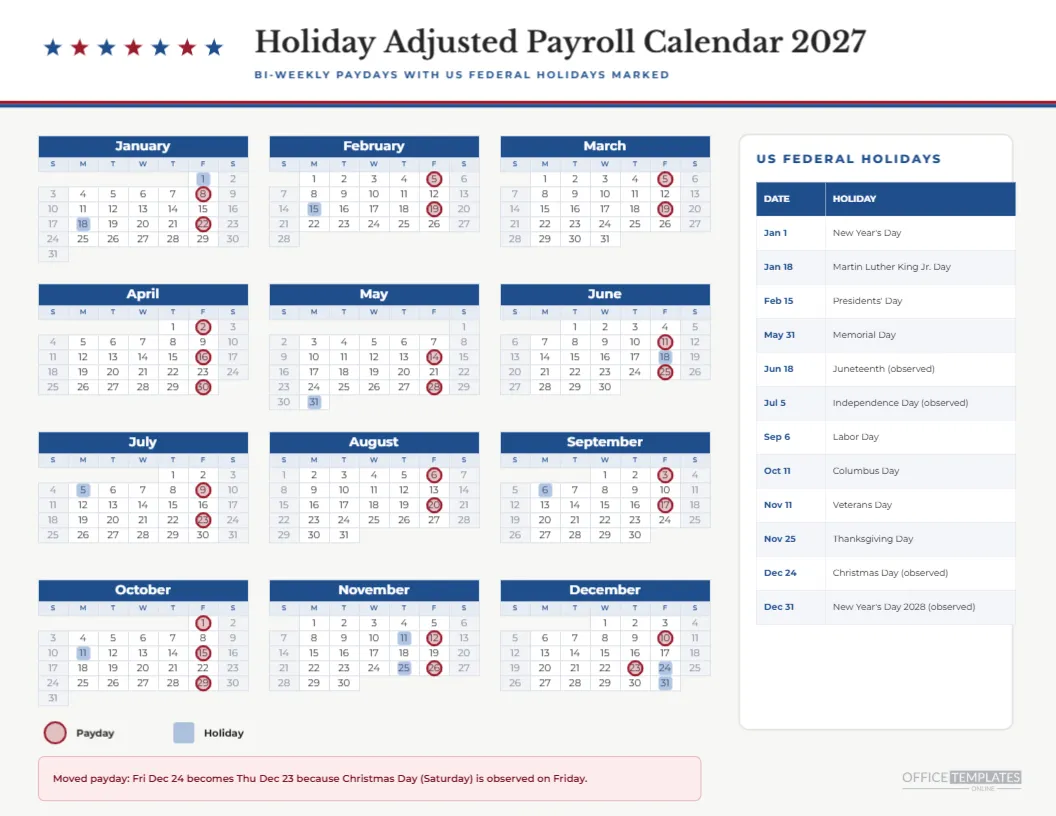
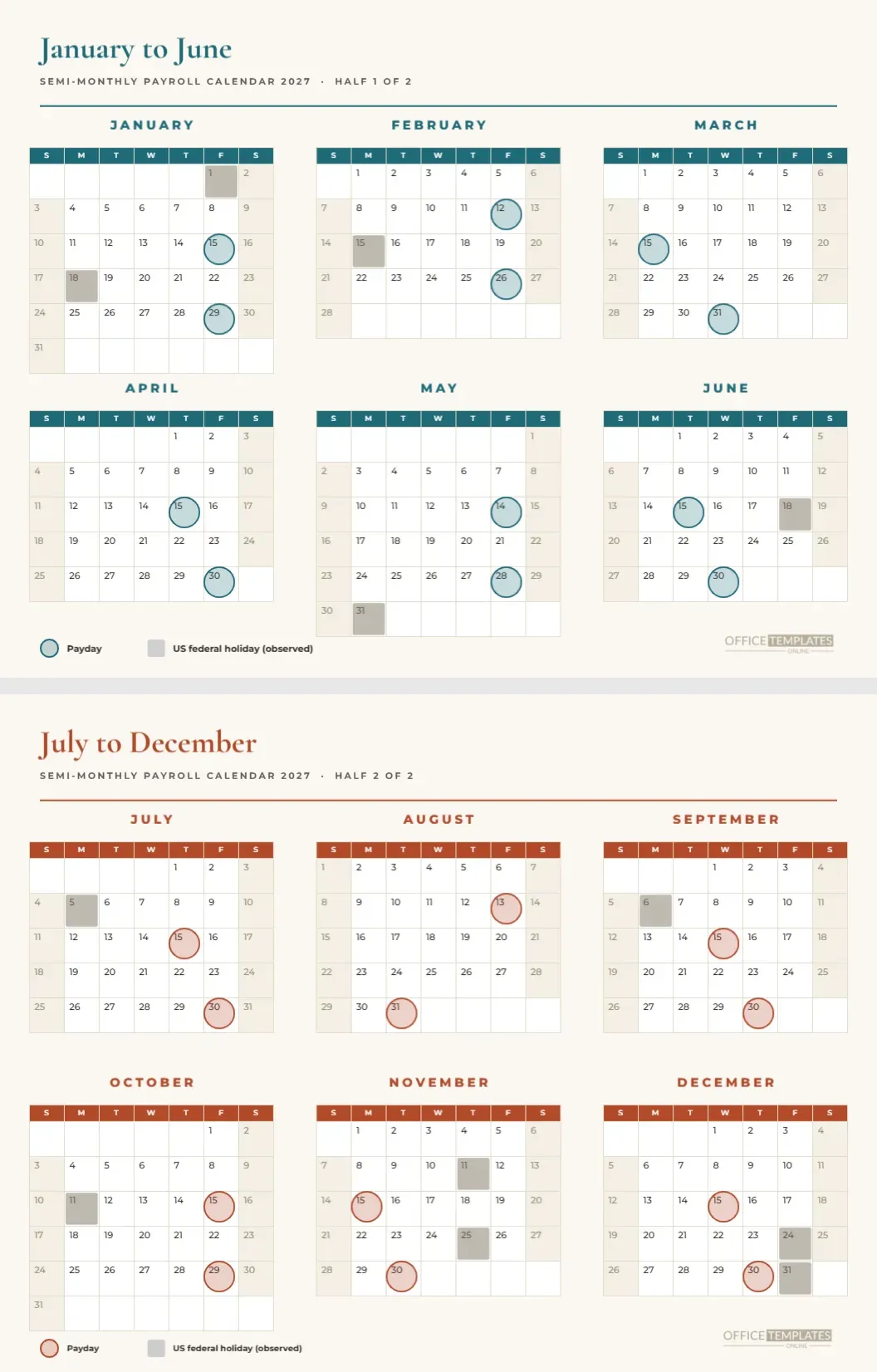
Many organisations plan twice a year: a first half and a second half. Schools, charities and businesses with a mid-year review are examples. For them, a half-year payroll page matches the rhythm of the work. This pair of landscape pages shows six months on each with the semi-monthly paydays ringed, large enough to write on.
The First Page in Detail
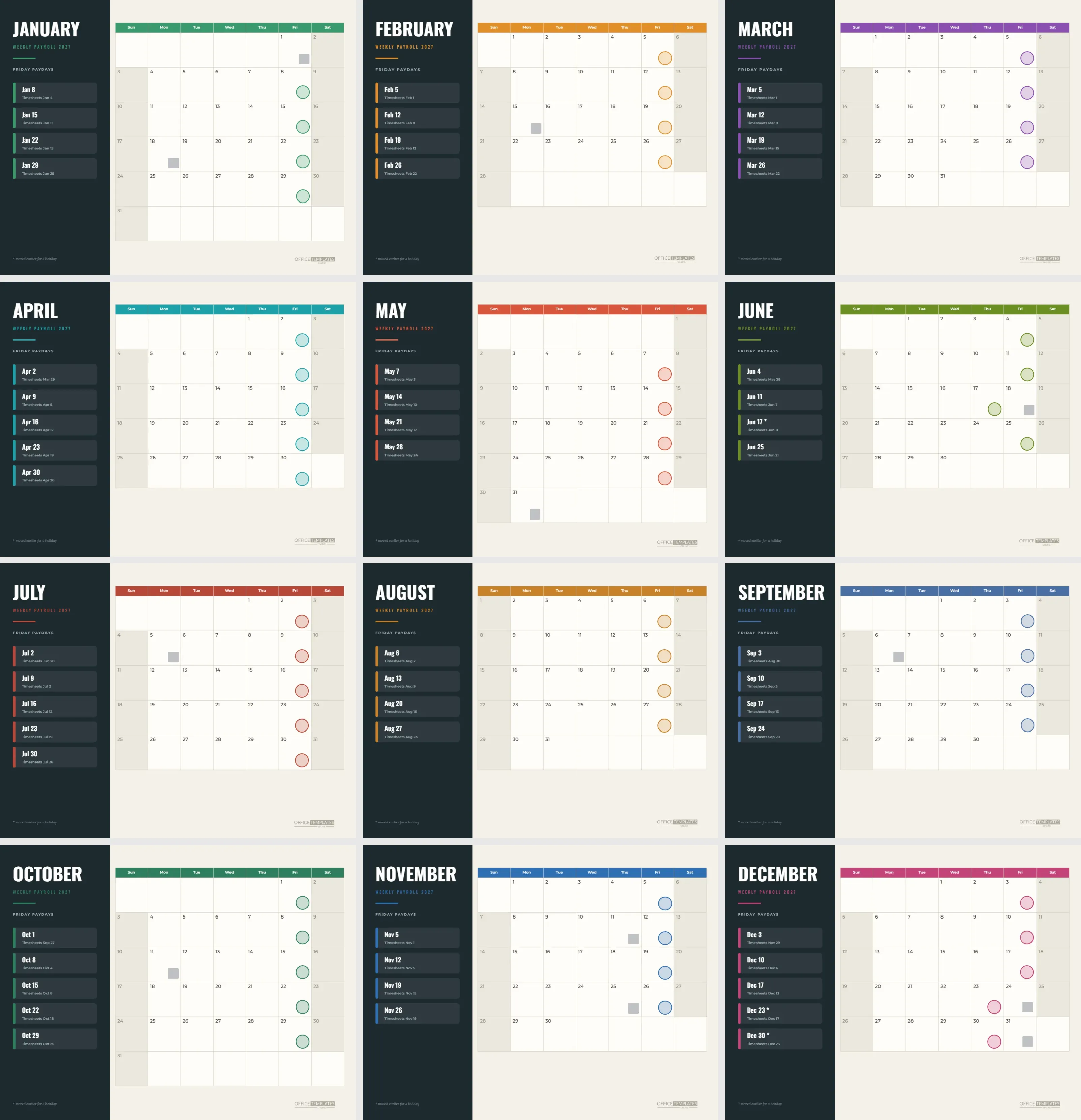
The January to June page has a deep teal serif title in Cormorant Garamond, a subtitle line saying SEMI-MONTHLY PAYROLL CALENDAR 2027, HALF 1 OF 2, and a thin teal rule. Six months fill a grid of three columns and two rows. Teal rings mark the paydays, and a muted tan square marks each holiday.
The Second Page in Detail
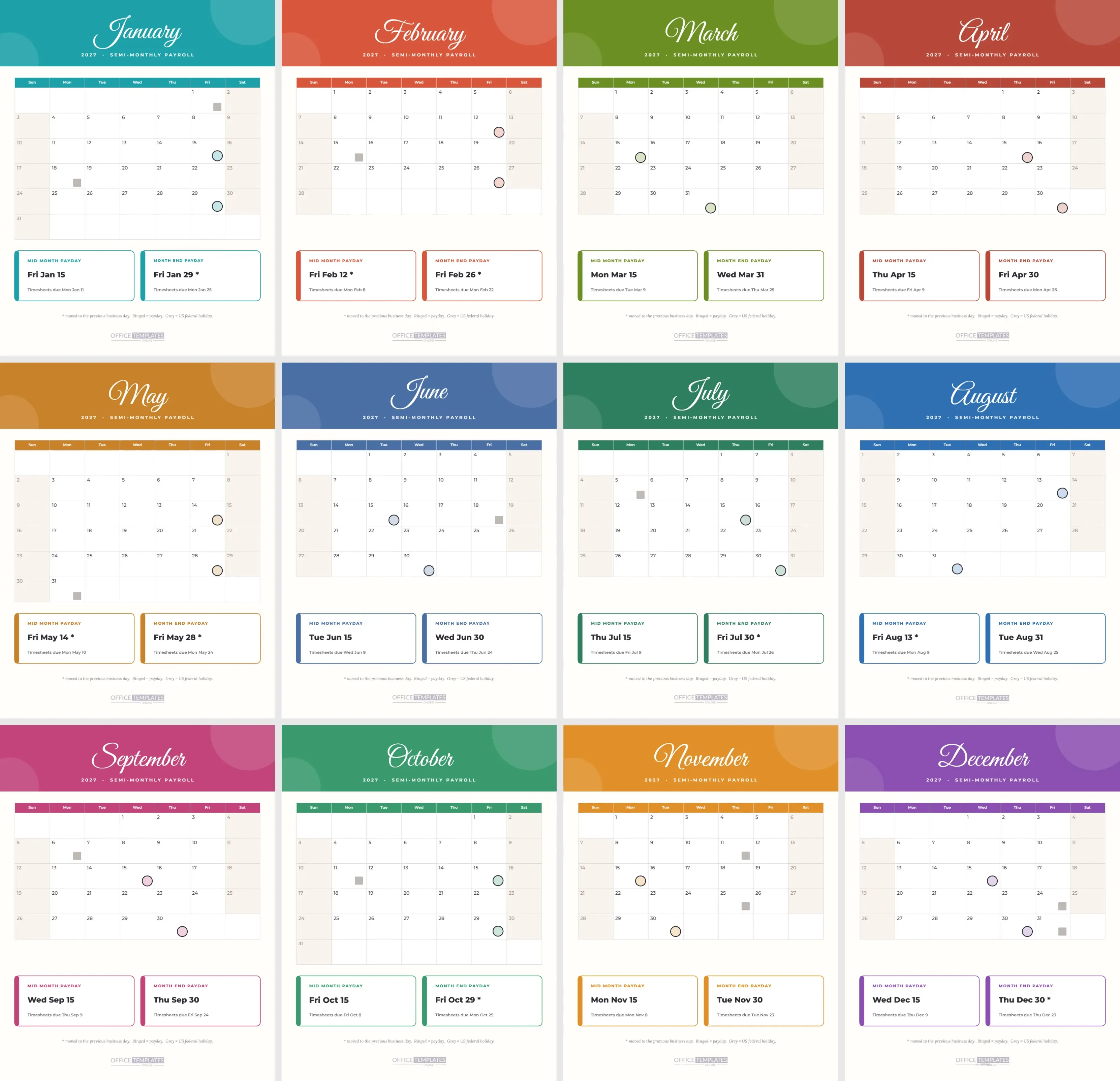
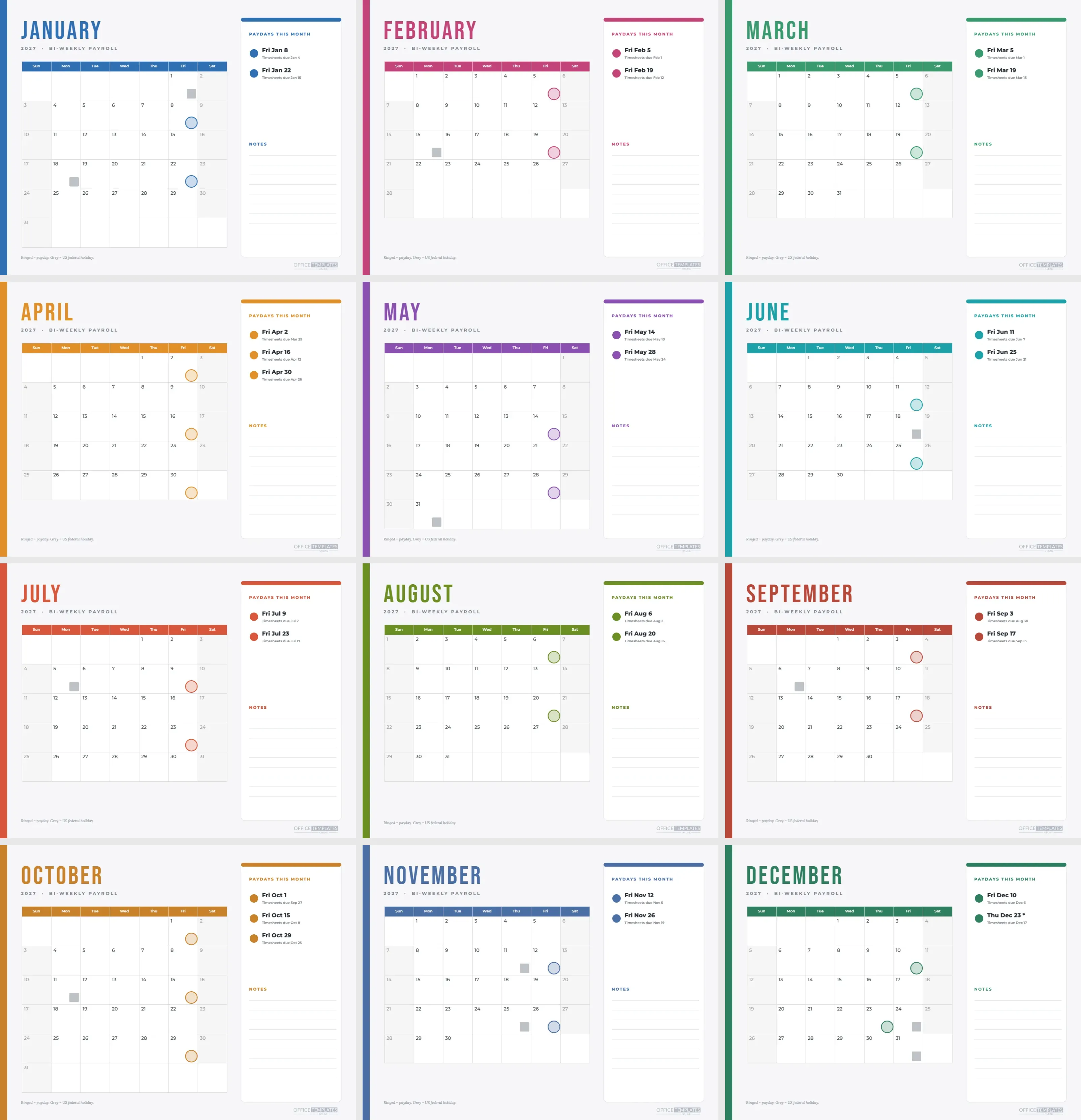
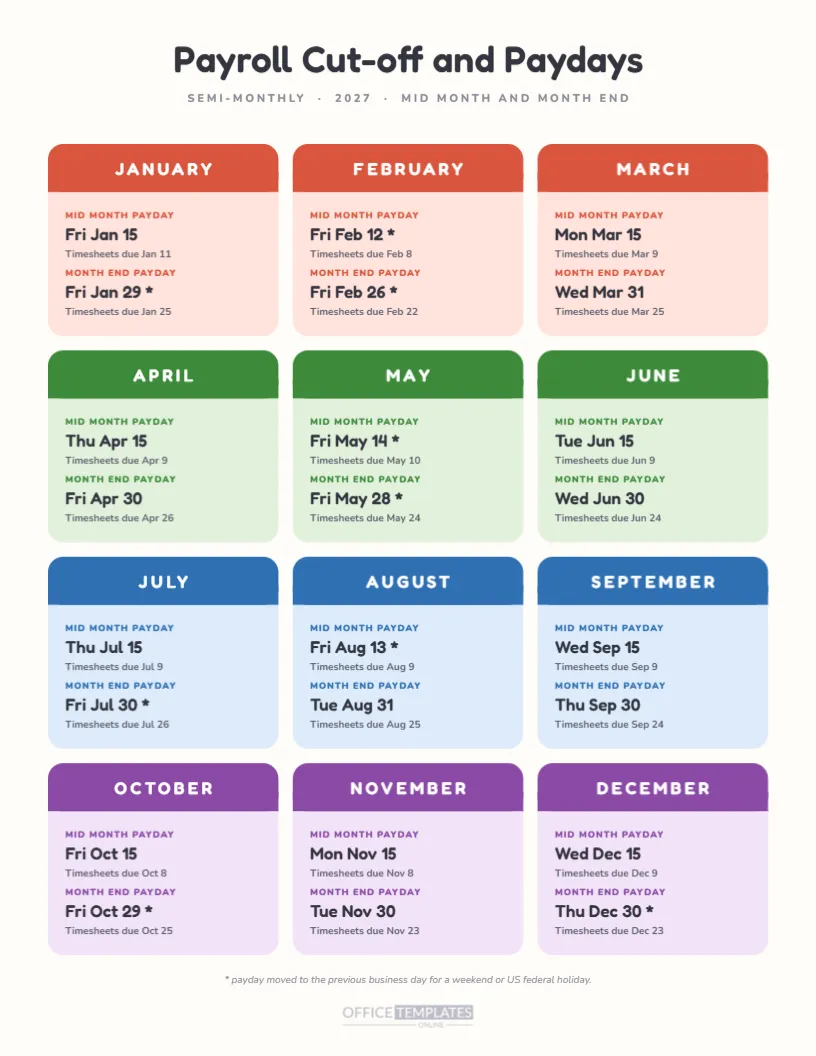
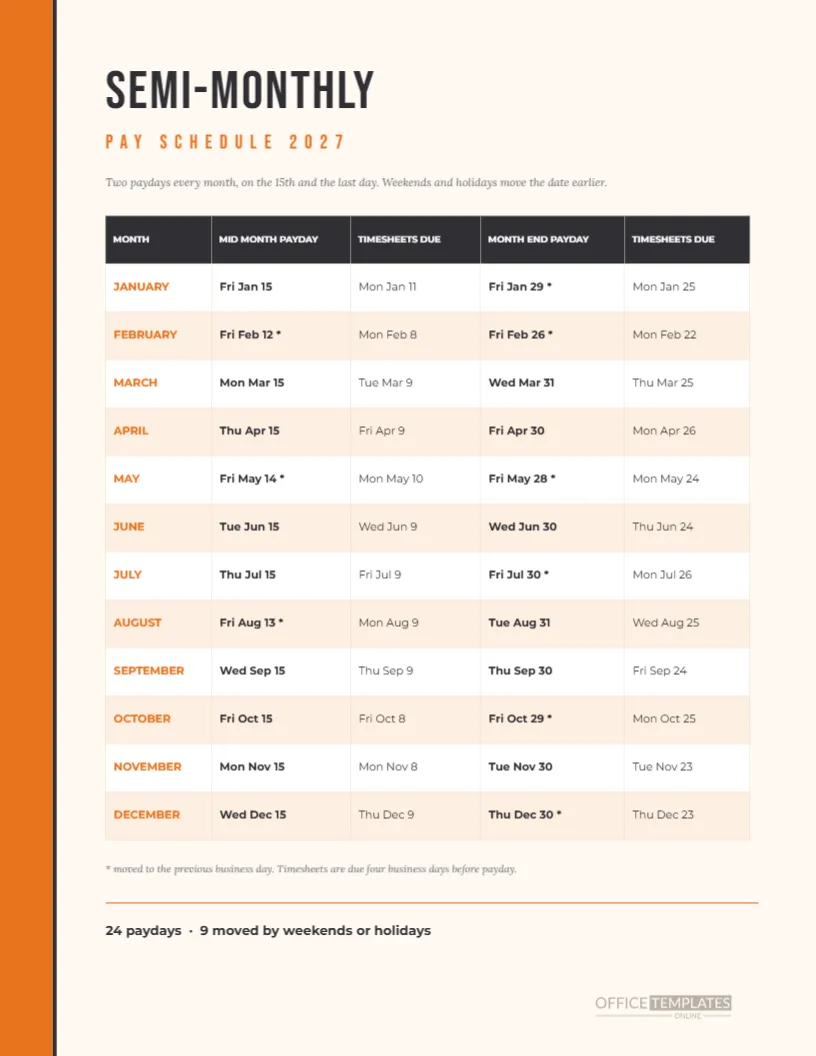
The July to December page swaps teal for a rust red and runs the same grid. Paydays in July are the 15th and the 30th. August has the 13th and 31st. September has the 15th and 30th. October has the 15th and 29th. November has the 15th and 30th. December has the 15th and the 30th.
Five Moved Paydays in the First Half
The first half moves January 29, February 12, February 26, May 14, and May 28. Each moves earlier because the 15th or the last day was a weekend or an observed US federal holiday. The other seven paydays fall on their regular dates. A reader can see the moves as rings sitting on Fridays rather than on the 15th or the 31st.
Four Moved Paydays in the Second Half
The second half moves July 30, August 13, October 29, and December 30. July 31 is a Saturday, August 15 is a Sunday, October 31 is a Sunday, and December 31 is the observed New Year’s holiday for 2028. The remaining eight paydays stay on the 15th and the last day.
Larger Cells, More Writing Room
With only six months per page, each month calendar is bigger than in a year grid, with cells of about a third of an inch. There is room to write a short note, such as a leave day, a bonus date, or a reminder. Use a fine pen, or type over the cells in the editor.
Compact Month Names
Months use two-letter day names to save space, centred date numbers, and a spaced capital month name above each grid. The month name is a separate text line, so it can be edited or restyled. Keep the same font as the page title for a coordinated look.
Tan Squares and Teal or Rust Rings
The marker colours follow the page accent. A ring on the payday cell carries a pale fill and a coloured outline. Holidays have a soft tan fill. The two types are different shapes as well as colours, so the page reads well in greyscale.
Using the Pages for Mid-Year Reviews
At the end of June, open the first page and mark which paydays ran on time, which were late, and what changed. Then place the second page on top for the next six months. A visual comparison of the two halves often prompts useful questions about holidays and processing time.
Editing the Calendars
Each month is a Calendar object, so use Calendar Options to change the year, week start, or colours. Rings and squares are grouped shapes laid over the grid and must be moved by hand after any change to the calendar. It is a few minutes of work for a full page.
Changing the Pay Dates
If your paydays are the 10th and 25th, delete the rings and place new ones over those dates. Keep the legend and the title. Adjust the subtitle so it states the rule. The page layout does not depend on the dates being the 15th and the last day.
Printing Two Pages
Print landscape on Letter at actual size, with background graphics on if you want the coloured header. For a mid-year folder, print double-sided so the two halves share one sheet. The pale cream background prints as almost white, which saves ink.
Pairing the Half-Year Pages With the Year Grid
The semi-monthly year at a glance pages in this collection show all twelve months on one sheet. These two pages are the enlarged version, built for writing. Use the year page on the wall and the half-year pages on the desk.
Limits and Cautions
As with every page in this set, dates follow one rule and a US federal holiday list. Confirm them with your payroll provider and adjust for your location. The page is a planning aid, not a statement of what the law requires.
In Short
Two pages. Six months each. Twenty-four paydays. Nine moves. Landscape Letter. Every shape and line of text editable.
A Planning Routine for the First Half
At the start of January, print the first page and sit down with your calendar of leave, audits, and system changes. Write each next to the relevant month. By the time February arrives, you will have seen every date that could collide with a payday, and you will have a conversation to start with your team before problems appear.
A Planning Routine for the Second Half
In July, repeat the exercise on the second page, with extra attention to November and December. Thanksgiving, Christmas, and the year-end close all fall in those months, and the page shows two moved paydays near the end of the year. A written plan for that stretch is worth more than any amount of good intentions.
Sharing the Pages With Part-Time Staff
Part-time and seasonal workers often receive less communication than full-time staff. A clear half-year page, handed out with their schedule, tells them exactly when pay arrives. It is a small courtesy that reduces questions and helps new hires settle into the rhythm of the workplace without chasing anyone for information.
Making a Wall Version
For a bigger display, print the two pages at tabloid size from a print shop and mount them side by side. The vector shapes enlarge cleanly, and the large month grids become genuinely useful for marking leave and deadlines with sticky dots. Remember to replace the pages in January, so nobody reads an outdated plan.