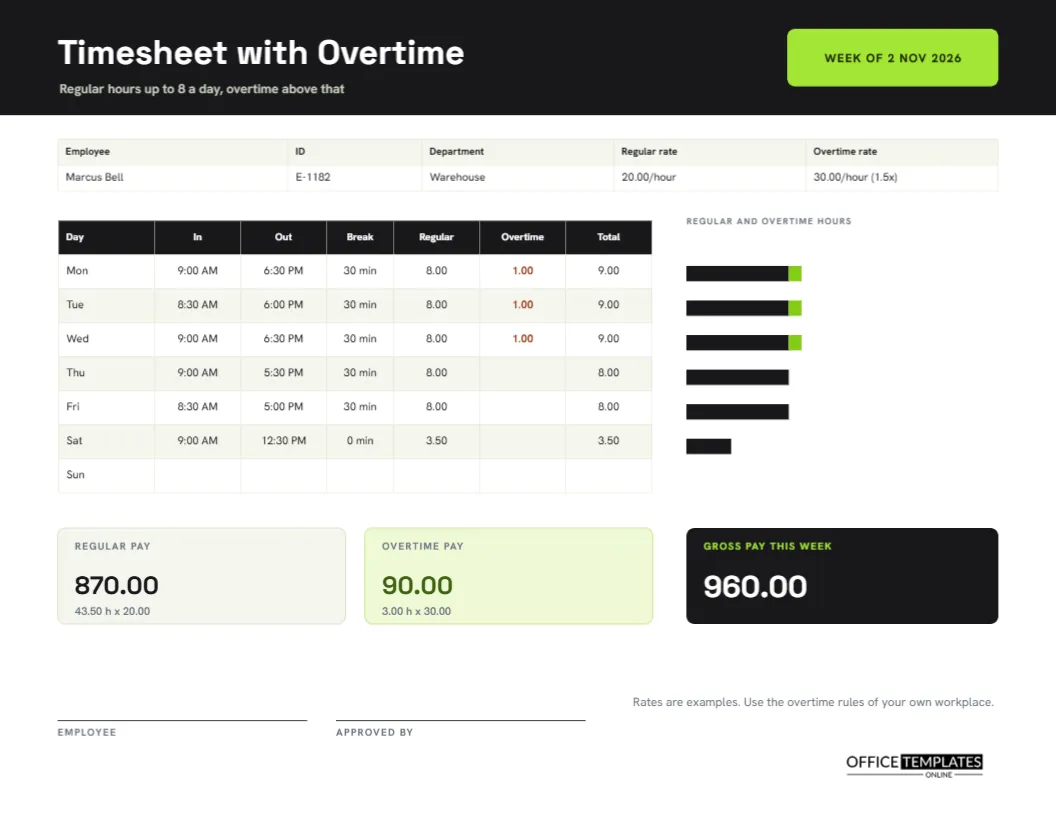
Overtime is where timesheets stop being simple. The moment someone works more than a standard day or week, the pay changes, and the paperwork has to show why. Employers need to separate regular hours from extra hours, and workers want to see that the extra time was counted and paid at the right rate. This landscape timesheet splits every day into regular and overtime hours, draws a small bar for each day, and works out pay at both rates.
Black, Lime and Space Grotesk
The header is a near-black band with the title Timesheet with Overtime in white Space Grotesk, a line below it explaining that regular hours run up to eight a day and overtime above that, and a lime tab at the right that reads WEEK OF 2 NOV 2026. The black and lime palette gives the page a sharp, industrial look that suits warehouses, workshops and delivery depots, though it works equally well in an office.
Rates Written on the Page
A strip under the header lists the employee, ID, department, regular rate, and overtime rate. The sample worker, Marcus Bell, works in a warehouse and earns 20.00 an hour with overtime at 30.00, which is one and a half times the regular rate. Putting the rates on the sheet means that anyone reading it can check the pay without hunting for a contract.
The Seven Column Table
| Column | Purpose | Monday in the sample |
|---|---|---|
| Day | Weekday | Mon |
| In and Out | Start and finish | 9:00 AM and 6:30 PM |
| Break | Unpaid minutes | 30 min |
| Regular | Hours up to eight | 8.00 |
| Overtime | Hours above eight | 1.00 |
| Total | Regular plus overtime | 9.00 |
A Daily Overtime Rule
This template applies overtime by the day: anything above eight paid hours is extra. In the sample, Monday, Tuesday, and Wednesday each have one overtime hour, while Thursday and Friday are eight hours exactly, and Saturday is a short shift of 3.50 hours with no overtime. Many places calculate overtime weekly instead, above forty hours. If that is your rule, change the column headings and retype the figures to match.
A Tiny Bar Chart Beside the Table
To the right of the table, a row of bars shows each day’s hours. The dark part of each bar is regular time, and the lime part is overtime. A glance shows which days ran long and how the week balanced. The bars are drawn from shapes, so you can adjust their lengths by dragging if your own figures differ, though the table itself is always the official record.
Three Pay Tiles
Under the table sit three tiles. Regular pay is 870.00, which is 43.50 hours at 20.00. Overtime pay is 90.00, which is 3.00 hours at 30.00. Gross pay this week is 960.00, in white on a black tile. Each tile shows its calculation in small type, so a reader can verify it. The figures are text, so retype them when you change an hour.
Working Out the Calculation by Hand
- For each day, cap regular hours at eight and put the rest in overtime.
- Add the regular column and multiply by the regular rate.
- Add the overtime column and multiply by the overtime rate.
- Add the two pay amounts for gross pay.
- Retype the three titles so the page matches.
Overtime Rules Differ Widely
The one and a half multiplier is common but not universal. Some countries set minimum overtime rates by law, some industries negotiate their own, and some salaried staff are excluded entirely. The footer of the page says plainly that the rates are examples and that you should use the overtime rules of your own workplace. Treat the layout as a way to show your rules, not as an authority on them.
Approval and Signatures
Lines for the employee and for the person who approved the week sit under the tiles. Overtime often needs advance approval, so the approver should check that the extra hours were authorised before signing. If your workplace uses an overtime request form, attach the approved request to the sheet.
Fitting the Landscape Page in a Folder
The sheet is US Letter landscape, 11 by 8.5 inches. Print on one side, hole-punch the left short edge if needed, and file it by pay period. The wide format gives the numbers room, and a manager can read across a row without losing their place.
Adapting the Page to a Weekly Overtime Rule
To switch to weekly overtime, rename the Regular column Standard and the Overtime column Extra, and in the notes explain that the first forty hours are standard. Then fill the columns from the running weekly total, so that the first hours of the week are standard and later hours are extra. The tiles work in the same way.
Checking Overtime Entries Before Payroll Runs
Overtime mistakes are expensive in both directions. Before approving a sheet, check that every day above eight hours is split correctly, that the regular and overtime columns add up to the total column, and that the two pay figures use the right rates. A two-minute check by the approver prevents arguments about short pay or overpayment after the money has moved.
Keeping Overtime Records for Audits and Disputes
If a worker later claims unpaid overtime, a dated sheet with hours, rates, and an approver’s signature is the best defence and the best proof. File each week in order, keep the originals for the period your local rules require, and store a scanned copy somewhere safe. Clear records protect honest employers and honest workers equally, which is why they are worth the small effort.
Common Overtime Timesheet Questions
Can I add a double time column?
Yes. Add a column through the table panel for double time hours, and add a matching pay tile.
Does the page work out the bars automatically?
No. The bars are shapes you adjust by hand. The table remains the source of truth.
Is this suitable for salaried staff?
Only where your contract or local law gives them overtime. Otherwise, use a standard timesheet for hours only.