A weekly timesheet tells you how many hours someone worked. A daily work log tells you what they did with them. Consultants, assistants, support staff, and anyone who bills time against tasks often need the second kind. This US Letter page records a single working day in blocks: when each task started, when it ended, what it was and how many hours it took, then adds up the paid hours at the bottom.
A Tear-off Calendar Tile for Today
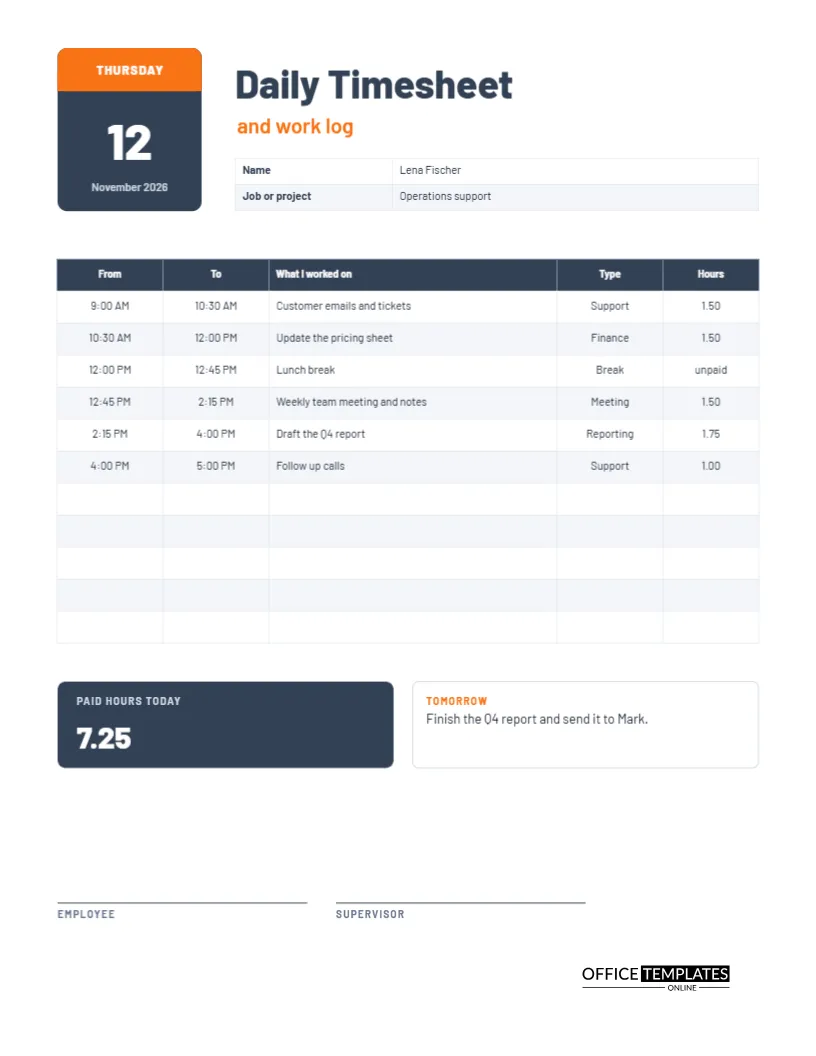
At the top left, a slate tile imitates a tear-off calendar. An orange strip carries the weekday, THURSDAY, and below it stands the date number 12 in large white type with November 2026 underneath. The date is the first thing you see, which suits a page that belongs to one day. Next to it, the title Daily Timesheet is set in heavy Barlow with the words and work log in orange.
Name and Job Details
A small table beside the date title asks for the employee name and the job or project. The sample is an operations support employee called Lena Fischer. Writing the project on the page means the log can be filed against the right client or cost centre, which matters when time is charged to customers.
The Six Blocks of the Sample Day
| From | To | What was done | Type |
|---|---|---|---|
| 9:00 AM | 10:30 AM | Customer emails and tickets | Support |
| 10:30 AM | 12:00 PM | Update the pricing sheet | Finance |
| 12:00 PM | 12:45 PM | Lunch break | Break |
| 12:45 PM | 2:15 PM | Weekly team meeting and notes | Meeting |
| 2:15 PM | 4:00 PM | Draft the Q4 report | Reporting |
| 4:00 PM | 5:00 PM | Follow-up calls | Support |
The table has room for eleven blocks, so a busy day with many small tasks still fits.
Unpaid Time Is Marked, Not Hidden
The lunch break appears in the log with the word unpaid in the hours column instead of a number. That keeps the day complete from start to finish while making clear that it is not counted. Many people prefer this to leaving gaps, because a gap invites the question of what happened between twelve and a quarter to one.
Paid Hours at the Bottom
A dark slate tile under the table shows the paid hours for the day, 7.75 in the sample. That is the sum of the five working blocks: 1.50, 1.50, 1.50, 1.75 and 1.00. The figure is typed text, so retype it when your blocks differ. Showing the total in a large tile means a supervisor can check the day at a glance.
Looking Ahead in the Tomorrow Box
An orange-titled box next to the total reads Tomorrow, with the sample note to finish the Q4 report and send it to Mark. Ending the day by writing the first task for tomorrow is a small habit with a big effect. You start the next morning with a plan, and your manager sees continuity from one log to the next.
How Detailed Should the Descriptions Be
Write enough that a colleague or a client would understand the line, but not so much that logging becomes a job of its own. An updated pricing sheet is clear. What it is not. For billable time, include the task and the client name so the log can be copied directly into an invoice description.
Using the Log for Billing and Reviews
A daily log becomes more useful over time. At the end of a week, you can group the type column to see how much time went to meetings, reporting, or support. At review time, a month of logs gives you real examples of what you delivered. Many professionals find that the log pays for itself the first time a client queries an invoice.
Starting a New Day From the Same File
Keep the file open and retype the date title and the blocks each morning, or save a copy with blank rows for the next day. Rename the file with the date first, such as 2026-11-12 Lena Fischer Daily Log, so the pages are easy to find later.
When the Supervisor Signs the Daily Log
The bottom of the page carries lines for the employee and the supervisor. Not every workplace needs daily approval, and weekly is more common. If you only need a signature on Friday, leave the lines blank on other days and sign the final page of the week.
Printing the Daily Page
US Letter, portrait. The slate tiles print well in colour, and in black and white they become dark grey blocks with white numbers, which still read clearly.
Building a Habit of Logging as You Go
The most accurate logs are written during the day, not from memory at five o’clock. Keep the page open or printed beside you and fill in each block when it ends. It takes ten seconds. People who try to reconstruct a whole day from memory usually lose meetings, interruptions, and small tasks, and the log ends up flattering rather than true.
Choosing Task Types That Mean Something
The type column is most useful when the same few words are used every day. Choose five or six categories that match your job, such as support, finance, meeting, reporting, admin, and break. After a few weeks, you will be able to see which type takes the most time, and whether that matches what your role is supposed to be about.
Using the Daily Work Log to Answer Later Questions
A line written at the time is worth ten remembered a month later. When a client asks why a task took a day, or a manager asks where Tuesday went, the work log column answers in the worker’s own words. Keep entries short and specific, naming the task and the result, so that the page reads as a useful record rather than a list of vague phrases.
Daily Work Log Questions
Can I use it for remote work?
Yes. Use the type column for meetings, deep work, and admin, and attach the page to your weekly update.
How many tasks fit in the table?
Eleven rows are included. Add more with Edit Table Data if you need them.
Is the total calculated automatically?
No. Add the hours column yourself and retype the total tile.