Some people are paid once a month, and many employers like to see the whole month at a glance. A monthly timesheet puts every date on a single page, which makes patterns easy to spot: the long Thursdays, the short Fridays, the weekend shift that crept in. This A4 template lists up to thirty-one days in a tidy table, shades the weekends and ends with a bold monthly total for payroll.
One Page, Thirty-One Rows
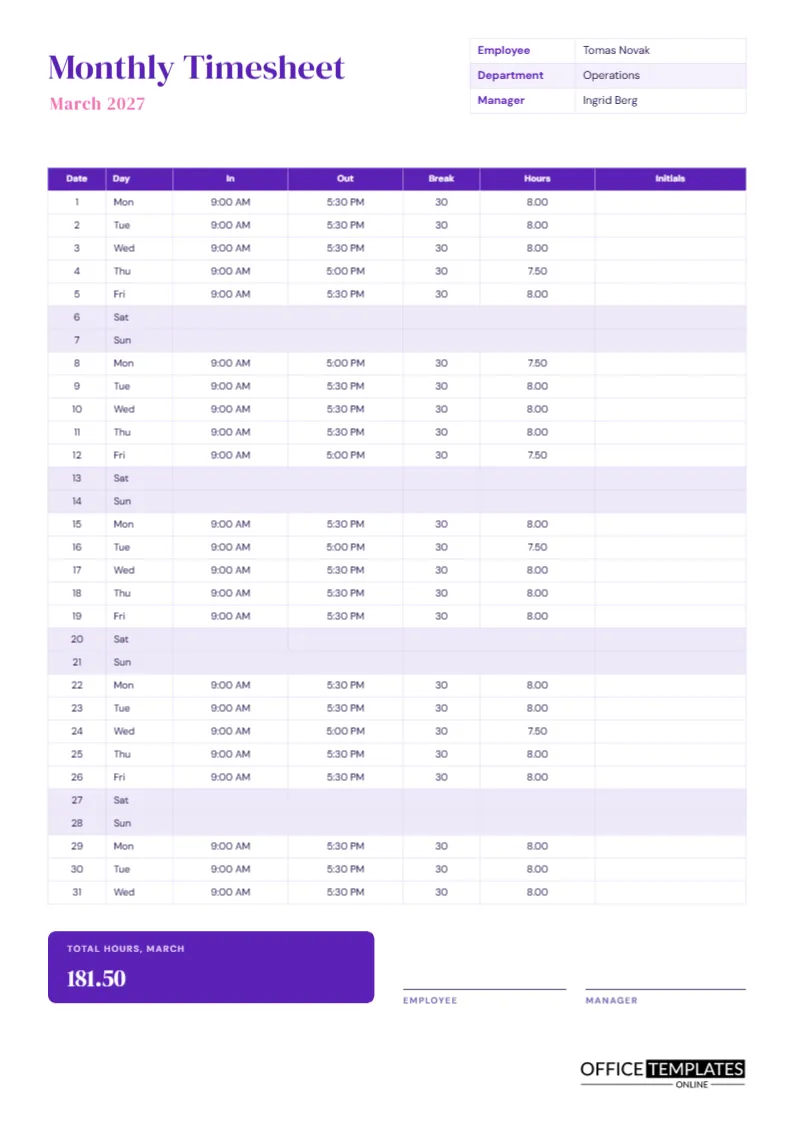
The table runs the full height of the page, with a slim row for each day of the month. Each row is about a quarter of an inch high, so the text is small, around seven points, but it stays crisp when printed at actual size. The sample month is March 2027, which starts on a Monday and has all thirty-one days filled in.
Purple and Pink With DM Serif Display
The title Monthly Timesheet is set in DM Serif Display in deep purple, with March 2027 in pink beneath it. A small table at the top right holds the employee name, department, and manager. The sample employee is Tomas Novak in operations, reporting to Ingrid Berg. The table header repeats the purple, and the rest of the page stays white so the numbers are easy to read.
Seven Columns, Each With a Job
| Column | Use | Example |
|---|---|---|
| Date | Day of the month | 1 |
| Day | Weekday abbreviation | Mon |
| In | Start time | 9:00 AM |
| Out | Finish time | 5:30 PM |
| Break | Unpaid minutes | 30 |
| Hours | Paid hours that day | 8.00 |
| Initials | Supervisor check | Left blank |
Weekends Shaded Lavender
Saturday and Sunday rows are filled with a pale lavender, so the page shows the rhythm of the month. In the sample, these rows are empty because the employee works Monday to Friday. If you work weekends, simply type in the shaded rows. The shading is just a cell colour, and you can change or remove it from the table settings.
Reading the Sample Month
Most weekdays in the sample run from 9:00 AM to 5:30 PM with a thirty-minute break, which is 8.00 hours. A few days finish at 5:00 PM, giving 7.50 hours. Adding all the daily hours gives a month total of 181.50. That figure appears in a purple tile at the bottom left with the label Total hours, March, so it can be copied straight into a payroll system.
A Super Hoursvisor Initials Column
The last column is left blank on purpose. A supervisor can initial each row during the month, or at least each week, to show the hours were checked as they happened. Rolling checks catch mistakes early, when everyone still remembers what happened. A page that is checked once at month end often turns into guesswork.
Filling It In Without Mistakes
- Enter the time you start and finish each day, ideally the same day.
- Write the break in minutes so subtraction is easy.
- Convert the day to decimal hours, such as 7.50.
- Add a weekly total in the margin if you want a running check.
- Add all rows at month end and type the total.
Reusing the Sheet Each Month
Keep one master copy. At the start of each month, retype the month name, the dates, and the weekdays, which shift every month, and clear the times. A calendar beside you avoids a wrong weekday label. For months with fewer than thirty-one days, delete the extra rows or write n/a in them.
Marking Leave and Public Holidays in the Month
If you take annual leave, mark the row with the word Leave in the in column and put the paid hours in the hours column, for example 8.00. Public holidays can be marked PH. Make sure you keep the same method each month, so a reader can always tell a day off from a forgotten entry.
Who Uses a Monthly Sheet
Monthly sheets suit salaried staff whose employers still want hours recorded, contractors who invoice monthly, project staff whose time is charged to a client, and managers who review a month of work in one meeting. For hourly staff paid every two weeks, the biweekly template is usually more convenient.
Printing and Saving as PDF
The page is A4 portrait. Print at actual size, and keep the margins as they are so that the table does not run off the page. Download a PDF when the month is finished and file it with the signed copy. A consistent file name such as 2027-03 Tomas Novak Timesheet keeps your folder tidy.
Spotting Patterns in a Month of Hours
One benefit of a full month on one page is that patterns jump out. Do hours creep up in the last week? Is the same day always short? Are there weekends that nobody planned for? A manager who reviews a month of timesheets can see burnout risk, uneven workloads, and recurring delays long before a single weekly sheet would reveal them. The weekend shading makes unusual entries stand out at once.
Cross-Checking Against the Calendar
Before you sign, hold the page against a calendar. Check that every weekday label matches, that public holidays are marked, and that the number of working days looks right for the month. March 2027, for example, has twenty-three weekdays, so a full-time employee at eight hours should land close to 184 hours before holidays. A quick comparison catches a missing day.
Checking a Thirty-One-Day Month Before Handing It In
A monthly sheet has more rows to go wrong. Before signing, scan down the date column for missing days, check that weekends are marked consistently, and add the hours in weekly blocks as well as in one long column. If the blocks and the total agree, the month is almost certainly right. Correct any slip with a clear note rather than overwriting.
Monthly Timesheet Questions
Can I use this for a thirty-day month?
Yes. Leave the thirty-first row empty or delete it.
Why are the totals typed rather than calculated?
The editor tables hold text, not formulas. The printed page is the same either way, and you retype one number at month-end.
Can I add a column for project codes?
Yes. Add a column in the table panel and narrow the others a little.