Not every workplace needs a form with a dozen fields. Many small businesses, offices, and households just want a plain page where someone writes five start times, five finish times, and a total. This timesheet is built for that. It covers Monday to Friday only, uses one large table with generous row heights, and puts the total hours and the pay for the week in a dark panel at the foot of the page where nobody can overlook them.
Large Type and Plenty of Space
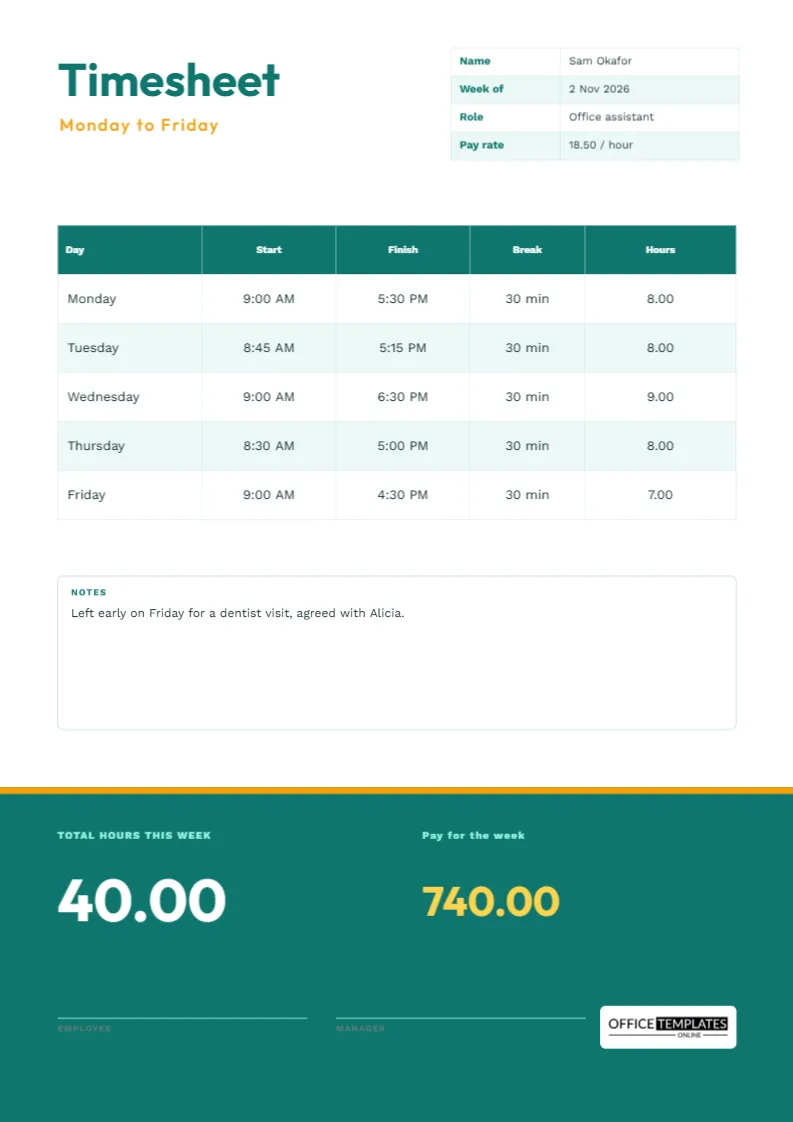
The word Timesheet is set large in Outfit, in deep teal, with Monday to Friday in spaced amber capitals beneath it. A small table in the top right holds the name, the week, the role and the pay rate. Because there are only five rows, each one is tall, around half an inch, which suits people who fill in forms by hand with a thick pen or a shaky hand.
The Four Details That Matter
The sample is an office assistant called Sam Okafor, paid 18.50 an hour. The detail table lists the name, week of 2 November 2026, role, and rate. Putting the rate on the page means the pay calculation can be checked by anyone who reads it. If your rate is confidential, delete the row and keep the hours total only.
Five Rows, Four Columns
| Day | Start | Finish | Break | Hours |
|---|---|---|---|---|
| Monday | 9:00 AM | 5:30 PM | 30 min | 8.00 |
| Tuesday | 8:45 AM | 5:15 PM | 30 min | 8.00 |
| Wednesday | 9:00 AM | 6:30 PM | 30 min | 9.00 |
| Thursday | 8:30 AM | 5:00 PM | 30 min | 8.00 |
| Friday | 9:00 AM | 4:30 PM | 30 min | 7.00 |
These are the actual sample rows on the page. They add up to forty hours exactly.
The Dark Footer Panel
The bottom third of the page is a solid teal block with an amber line across its top. On the left, it shows the total hours this week in huge white numerals, 40.00, and on the right the pay for the week in amber, 740.00, which is forty hours at 18.50. Two signature lines for the employee and the manager sit underneath, drawn in a pale mint so they stay visible against the teal.
Working Out Pay in Three Steps
- Add the five daily hours to get the total.
- Multiply the total by the hourly rate.
- Retype the result in the pay figure so the page matches your calculation.
The figures on the page are plain text, so they do not change when you edit a cell. Always retype both the total and the pay after you change the times.
A Notes Box for Real Life
A white box with a teal title holds notes. The sample says that the employee left early on Friday for a dentist visit, and the manager. A written note like that explains a short day without anyone having to remember the conversation, and it protects both sides if the hours are queried later.
Who This Page Suits
It works for part-time office staff, receptionists, teaching assistants, personal assistants, tutors and any worker paid by the hour on a regular weekday pattern. If you work weekends or odd shifts, choose the seven-day weekly template instead. If you are a household employer, the housekeeper and nanny timesheets add tasks and payment details.
Adding a Saturday or Changing the Rows
The table is a real Table object. Double-click it to open Edit Table Data, and retype any cell. To add a Saturday, use the Add Row button, and reduce the row height slightly so the page keeps its proportions. The footer panel is a plain rectangle, so you can recolour it to match your business.
Saving Ink on a Home Printer
The teal footer uses a lot of toner. For draft copies, change its fill to a light tint and the white numerals to dark teal. For the final signed copy, print the full colour version. A black and white print is still perfectly legible, because the total hours and the pay appear as large numbers on a dark grey panel.
Keeping Weekly Sheets Together
Put each signed sheet in a folder per employee and per year, and keep them in date order. At the end of the month, add the weekly totals to check that they match the pay slips. If there is ever a dispute, a stack of signed sheets is far stronger than anyone’s memory.
Why Simple Often Beats Complicated
A form with twenty fields invites errors, because people skip what they do not understand. A form with five rows and four columns is finished in a minute, and a finished form is worth more than a perfect one that never gets filled in. If your needs grow, such as project codes or overtime splits, move to a fuller template. Until then, this page does the whole job on one side of one sheet.
Giving the Page to Household and Casual Staff
The plain layout suits people who rarely use forms: a part-time gardener, a tutor, a cleaner who comes twice a week or a student who helps in a family business. Fill in the name and rate once, print a handful of copies and leave them in a folder. Each week, the worker writes their times, totals them and signs, and the employer checks and pays. The tall rows make handwriting easy to read.
Why a Plain Monday to Friday Sheet Still Works
Not every workplace needs overtime columns, project codes or pay maths. A plain five-day sheet is quick to fill in, quick to check and hard to get wrong. Small offices, shops and family businesses often prefer it because anyone can understand it in seconds, and a manager can scan a stack of them at the end of the week without a calculator.
Common Questions About Monday to Friday Sheets
Can I add weekend days?
Yes. Add rows through the table panel, or use the full weekly template, which already has Saturday and Sunday.
Why are the breaks in minutes and the hours in decimals?
Minutes are easy to write on the day, and decimals are easy to add and multiply when you work out pay.
Is the pay figure legally binding?
No. It is a convenience for checking. Your contract and payroll records decide what is actually paid.