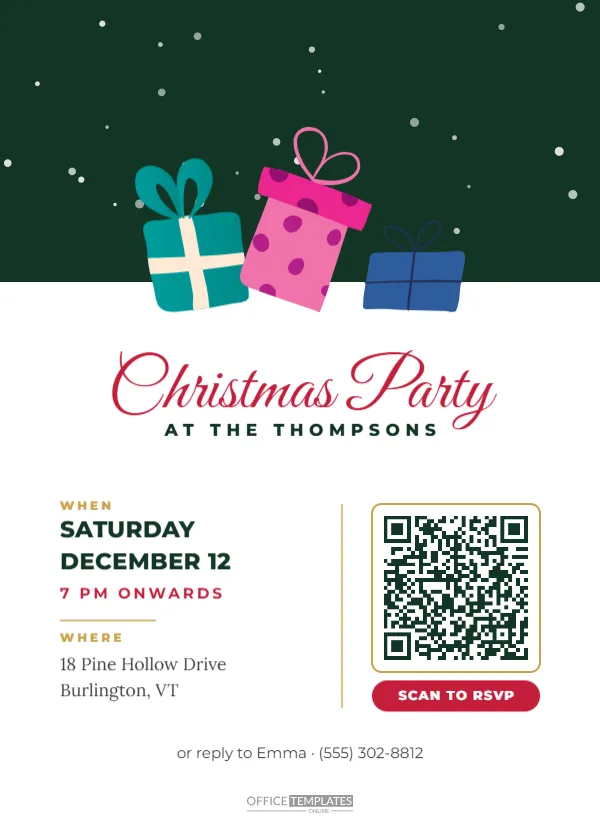
Collecting replies is the most tedious part of hosting. Guests mean to reply, forget, and you end up chasing them by text a week before the party. A QR code on the invitation makes replying almost effortless: guests point their phone camera at the code, a form opens, and they reply in seconds. This 5 x 7 inch invitation combines a festive design with a practical SCAN TO RSVP code. An evergreen band with falling snow sits at the top, three colourful gift boxes in teal, pink and blue sit on its edge, and the party details sit beside the QR code on a clean white panel.
How the QR RSVP Works
The QR code is the editor’s own QR object, set to a URL. When scanned, it opens the link, typically an online RSVP form. You can create a free form with any popular form or survey tool, asking for the guest’s name, number attending, dietary needs and a message. Copy the form’s link, select the QR code in the editor, open the QR panel and paste your link. The code updates automatically. Test it with your own phone before printing.
What to Ask on Your RSVP Form
Keep the form short so guests finish it. Useful questions include the guest’s name, whether they can attend, the number of adults and children, any dietary requirements or allergies, whether they will bring a dish or a gift if relevant, and an optional message for the host. Most form tools collect responses in a spreadsheet, so you can see numbers at a glance.
Gifts, Snow and the RSVP Panel
The top third of the card is a deep evergreen band with soft snow falling. Three gift boxes, a teal one, a pink one with polka dots and a blue one, sit on the band’s lower edge with bows on top. Below, Christmas Party appears in red Great Vibes and AT THE THOMPSONS in spaced green capitals. On the left, two small gold labels organise the details: WHEN, with SATURDAY DECEMBER 12 in bold green capitals and 7 PM ONWARDS in red beneath it, and WHERE, with the address in Lora serif. A thin gold line divides the details from the QR code, which sits on a white tile with a gold border above a red SCAN TO RSVP pill. A final line offers a phone number for guests who prefer to reply by text.
Always Offer a Backup
Not everyone is comfortable scanning QR codes, and some older relatives may not have a smartphone. That is why the invitation includes the line or reply to Emma with a phone number. Always keep a simple alternative, such as a phone number or email, so everyone can reply.
Printing QR Codes That Scan
QR codes need to be printed clearly to scan. Print at actual size without stretching, use good quality paper, and avoid glossy finishes that create glare. Keep the code at least 2.5 cm wide; on this card it is larger, about 3 cm. Keep the white border around the code clean, because scanners need that quiet zone. Test a printed copy with two or three different phones before printing the full batch.
Editing the QR RSVP Card
Change the host line, the date block, the address and the backup reply line. Edit the QR link in the QR panel. The gift boxes are editable vectors; recolour or rearrange them. Click the green band to change its colour, and update the snow if you wish.
Other Uses for the QR Code
The QR code can link to more than an RSVP form. It can open a map to your home or venue, a shared photo album where guests upload pictures after the party, a playlist where guests add songs, a Secret Santa name drawing tool, or a wish list for a gift exchange. Change the label text to match, for example SCAN FOR DIRECTIONS.
Office Parties and Large Events
QR RSVPs are especially useful for office parties, school events and community gatherings with many guests. A form keeps replies organised and saves the organiser hours of messages. Add the company or school name to the host line and use the same QR link in the email invitation.
Privacy Considerations
If your form asks for personal information, such as dietary needs, keep the responses private and only share them with those who need them, such as the caterer. Choose a form tool with sensible privacy settings, and delete the data after the event if it is no longer needed.
Sharing the QR Invitation by Message
If you send the invitation digitally, guests cannot scan a code on their own screen easily. Include the RSVP link as text in your message as well, so they can tap it directly.
Reminder Messages
A week before the party, check your form responses and send a friendly reminder to anyone who has not replied, with the link again. Most guests reply promptly when reminded.
QR Invitation Questions
Can the QR code link to a text message?
Yes. In the QR panel, choose the SMS type and enter your number and a pre filled message.
Will the code still work if I change the link later?
Printed codes keep the link they were printed with, so finalise the link before printing.
Can I make the code a different colour?
Yes, in the QR panel, but keep strong contrast with the background so it scans.
Tracking Numbers for Catering
One of the biggest benefits of a QR RSVP is accurate numbers. Because each reply lands in a spreadsheet, you can total adults, children and dietary needs in seconds and give the caterer or your shopping list a precise count. Sort replies by dietary requirement to plan vegetarian, vegan or gluten free dishes, and note anyone bringing a plus one. Share a read only view of the response sheet with a co host so you can both keep track without passing messages back and forth. A few days before the party, close the form or add a note that replies are closed, so late answers come to you directly.
Testing Before You Print
Scan the code on screen first, then print one card and scan it again with an older phone. If either fails, enlarge the code slightly and check that the link is complete.
Make Replying Effortless
Set up your RSVP form, paste the link into the QR code and send the invitation. Guests will reply in seconds, and you can spend your time planning the fun instead of chasing answers.