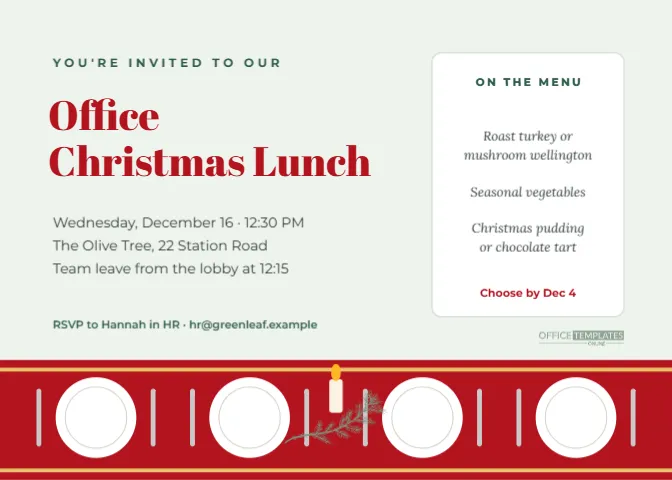
Not every workplace wants an evening party. Many teams prefer a Christmas lunch: a long table at a local restaurant, a few hours away from desks in the middle of the working day, and everyone home in time for the evening. Lunches are easier for colleagues with families, cheaper than evening events, and more inclusive for people who do not drink. This landscape invitation is made for exactly that. It shows a festive table runner set with plates and cutlery along the bottom, a clear invitation on the left, and a menu card on the right where colleagues can see the choices they need to make in advance.
Why a Lunch Instead of a Party
An office Christmas lunch has many advantages. It happens during working hours, so nobody has to arrange childcare or travel late at night. It is calmer than an evening party, which suits quieter colleagues and new starters. It is usually less expensive, and restaurants often offer set Christmas lunch menus at good prices. It also feels like a genuine thank you, a pause in a busy month to sit down and eat together. For teams that are mostly remote, a lunch can be the one day everyone comes into the office.
The Table Runner Design
The background is a soft sage green, calm and fresh. Along the bottom edge runs a red table runner with thin gold stripes, set with four white plates, each with a knife and fork beside it, and a small candle and sprig of pine in the middle. It looks like the table is waiting for the team to sit down. On the left, YOU’RE INVITED TO OUR sits in spaced green capitals above Office Christmas Lunch in large red Abril Fatface. The date, restaurant, address and meeting point follow in Montserrat. On the right, a white rounded card headed ON THE MENU lists the starter, main and dessert choices, with a red note asking colleagues to choose by a set date. The RSVP line names the HR contact and email.
Collecting Menu Choices
Most restaurants ask for pre-orders for group Christmas lunches, often a week or two in advance. The menu card on the invitation shows the choices clearly so colleagues can decide early. The sample offers roast turkey or a mushroom wellington, seasonal vegetables, and Christmas pudding or chocolate tart. To collect choices, ask people to reply by email with their selections, or create a simple online form and add the link in your email. Make sure every main course list includes at least one vegetarian option, and ask about allergies and dietary needs at the same time.
Editing the Lunch Details
Click each line to change it. The sample reads Wednesday, December 16, 12:30 PM, The Olive Tree, 22 Station Road, and Team leave from the lobby at 12:15. The meeting point line is useful when everyone walks together from the office. Update the menu card by clicking each dish line; keep dishes short so they fit the narrow card. Change the choose-by-date to match your restaurant’s deadline. Edit the RSVP line with your organiser’s name and email.
Choosing a Restaurant for a Team Lunch
Book early, because December lunch slots fill fast. Look for a restaurant within walking distance or a short taxi ride, with a private area or a long table for your group, a set menu with a vegetarian choice, and step-free access. Ask how long the lunch will take; two hours is typical for three courses. Check whether a service charge is included and how the bill will be split or paid by the company.
Who Pays?
Many companies pay for the team lunch as a thank you, sometimes with a set budget per person. Others subsidise part of it, and some teams pay for themselves. Make this clear in your email so nobody is surprised. If drinks are not covered, say so. A simple line such as Lunch and soft drinks are on the company is enough.
Remote and Hybrid Teams
For teams spread across locations, consider several local lunches on the same day, each with the same invitation adjusted for the venue, and a short video call to raise a toast together. Colleagues who cannot attend in person could receive a voucher for a festive lunch delivered to their home.
Recolouring the Lunch Invitation
Click the sage background to change it. Pale blue, warm cream and soft grey all work with the red runner. The runner and plates are grouped; select the group to change the runner colour. The candle and pine sprig are separate and can be moved or removed. The title colour can be changed to match your brand.
Printing and Posting
Download a PDF and print at 7 x 5 inches for a desk drop, or print a larger copy for the staff kitchen notice board. The light background prints well on office printers. Many teams also send the image by email and in the team chat, which is quicker and greener.
Sending the Lunch Invitation by Email
Paste the image into an email with the subject: Office Christmas lunch, December 16: please choose your menu. List the menu options in the email text too, so people can reply with their choices directly. Add a calendar invite with the restaurant address.
Christmas Lunch Questions
Can I add more menu choices?
Yes. Add lines on the menu card and reduce the font size slightly, or use Add Page for a full menu.
Can I add our logo?
Add a shape from the Elements panel above the title and use Replace Image to place your logo.
What day is the sample lunch?
Wednesday, December 16, 2026, a midweek day when restaurants are often less busy than on Fridays.
Finally, remember the colleagues who keep things running during lunch, such as reception or support staff, and arrange cover so they can join too.
Gather the Team Around the Table
Book the restaurant, fill in the menu choices, and send the invitation. A relaxed lunch together can be the warmest thank you of the year.