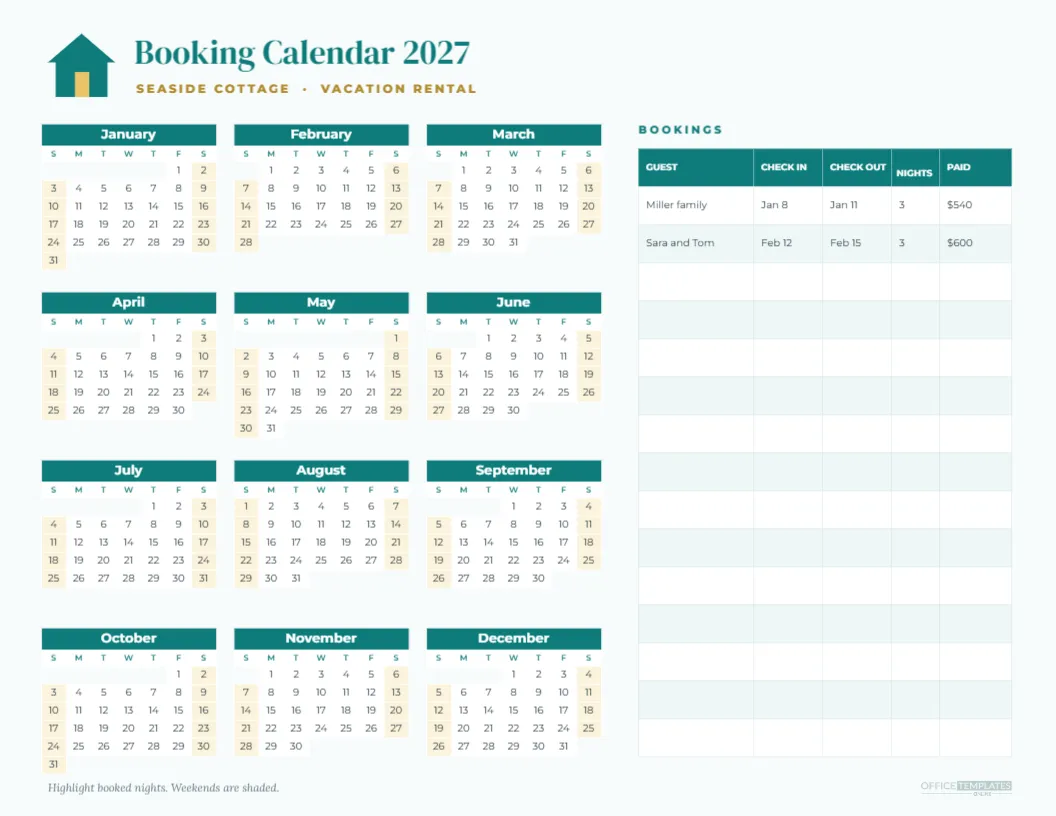
Managing a holiday let means keeping track of who is staying, when, and whether they have paid. This Vacation Rental Booking Calendar for 2027 brings it all together on one landscape page. A teal and sand house icon sits beside the title Booking Calendar 2027 and the property name Seaside Cottage, Vacation Rental. On the left, a full year calendar shows all twelve months in three columns with teal month bands and sand coloured weekend shading, ready for you to highlight booked nights. On the right, a Bookings table logs the guest name, check-in date, check-out date, number of nights, and amount paid, with two sample bookings and space for many more.
Why Use a Paper Booking Calendar
Booking platforms each have their own calendar, but owners who list on several sites, take direct bookings, or share management with family often need one master view. A printed booking calendar on the office wall or in a folder makes double bookings easier to spot and gives everyone involved a clear picture of the year.
Marking Booked Nights on the Year View
Highlight each booked night on the year calendar with a coloured pen. Use different colours for each booking platform, such as one for direct bookings and another for online listings, or for confirmed and pending stays. At a glance, you will see busy seasons, gaps to fill, and blocked dates.
The Bookings Log
The table on the right records each guest, their check-in and check-out dates, the number of nights and the amount paid. Keeping these details together helps with cleaning schedules, key handovers, tax records, and repeat guest marketing.
Weekend Shading for Pricing
Weekends are shaded in soft sand, making it easy to see Friday and Saturday nights, which often command higher rates. Use the year view to plan seasonal pricing and minimum stay rules around weekends and holidays.
Planning Cleaning and Maintenance
Mark changeover days for cleaners, deep cleans between seasons, and maintenance tasks such as boiler checks or garden work. Blocking these dates on the calendar ensures they do not clash with guest stays.
Calendar for Airbnb and Vrbo Hosts
Hosts who list on several platforms can use the printed calendar as a master record, copying bookings from each site. Regularly comparing the paper calendar with each platform helps catch sync errors before they cause double bookings.
Calendar for Cabins, Cottages and Holiday Homes
Families who share a holiday home can use the calendar to divide weeks between relatives, track who is staying and plan maintenance. Write family names on the year view to keep everything fair and transparent.
Calendar for Campsites and Glamping
Small campsites, glamping pods and caravan owners can print one calendar per unit, track bookings and plan the busy summer season.
Editing the Property Name and Icon
Replace Seaside Cottage with your property name. The simple house icon is drawn from editable shapes, so you can recolour it or replace it with your own logo.
Changing the Booking Calendar Year
The year view is an editable Calendar object. Change the year in Calendar Options to create booking calendars for future seasons, which is helpful when guests book a year or more in advance.
Teal and Sand Coastal Design
The teal and sand palette suits beach houses and coastal rentals. For a mountain cabin, try forest green and wood brown, or for a city apartment, try charcoal and soft grey.
Printing the Booking Calendar
Print in landscape on US Letter at actual size, or on A4 with Fit to page. For a wall planner, ask a print shop to enlarge it so each day box is easier to mark.
Sharing the Booking Calendar With Co-Hosts
Download a PDF to annotate in a tablet app, or a PNG to share with a co-host, cleaner, or property manager so everyone sees the same schedule.
Tracking Occupancy and Income
At the end of each month, count booked nights on the year view and total payments in the log. Comparing occupancy and income across months helps you set better prices and spot slow periods for promotions.
Matching Templates for Hosts
Pair the booking calendar with welcome signs, house rules, Wi Fi cards, and guest checklists from our collection to create a polished experience for your guests.
Saving the Booking Calendar Template
Save the calendar in your account and keep an updated copy each month as a backup record of your bookings.
Booking Calendar File Formats
Download a PDF for printing or an image for sharing. The year view and bookings table keep their layout in every format.
Record Keeping for Tax Time
Rental income is usually taxable, and many tax rules depend on the number of days a property was rented or used personally. A complete booking log with dates and payments makes tax preparation far easier and gives your accountant the details they need at the end of the year.
Seasonal Planning for Rental Owners
Use the year view to plan your seasons: peak summer weeks, school holidays, local festivals and quiet winter months. Mark events that drive demand in your area, such as concerts, sports tournaments or holiday markets, and adjust prices or minimum stays accordingly. Planning helps maximise income in busy periods and fill gaps with offers during quieter months.
Repeat Guest Records
Your bookings log is also a list of past guests. Note anyone who stayed more than once, their preferred dates and any special requests. Contacting happy past guests before peak season with an early booking offer is one of the easiest ways to fill your calendar, and returning guests tend to treat the property with extra care.
Noting Guest Arrival Times
Write expected arrival times beside each booking in the log so cleaners know how long they have between guests on changeover days.
Blocking Personal Use Days
If you use the property yourself, mark those days in a different colour on the year view so they are never booked by mistake, and so you can report personal use accurately if required.