A rangoli competition is one of the most joyful parts of a community Diwali celebration. Children kneel with bowls of coloured powder, teams of friends debate whether the peacock needs more blue, and by noon the courtyard is covered in colour. Running one smoothly takes clear information up front: who can enter, what size the space is, what materials are allowed, how judging works, and what the winners receive. This US Letter flyer gives every one of those answers in one bright, organised page.
What Organisers Need to Decide First
Before editing the flyer, settle these questions with your committee. The flyer has a place for each answer.
- Date, time window and venue, including whether it is indoors or outdoors.
- Categories and age groups.
- The size of each entry’s square.
- Allowed materials: powder, chalk, flowers, rice, diyas, stencils.
- Judging criteria and who the judges are.
- Prizes for each category.
- How to register and by when.
The Flyer Layout
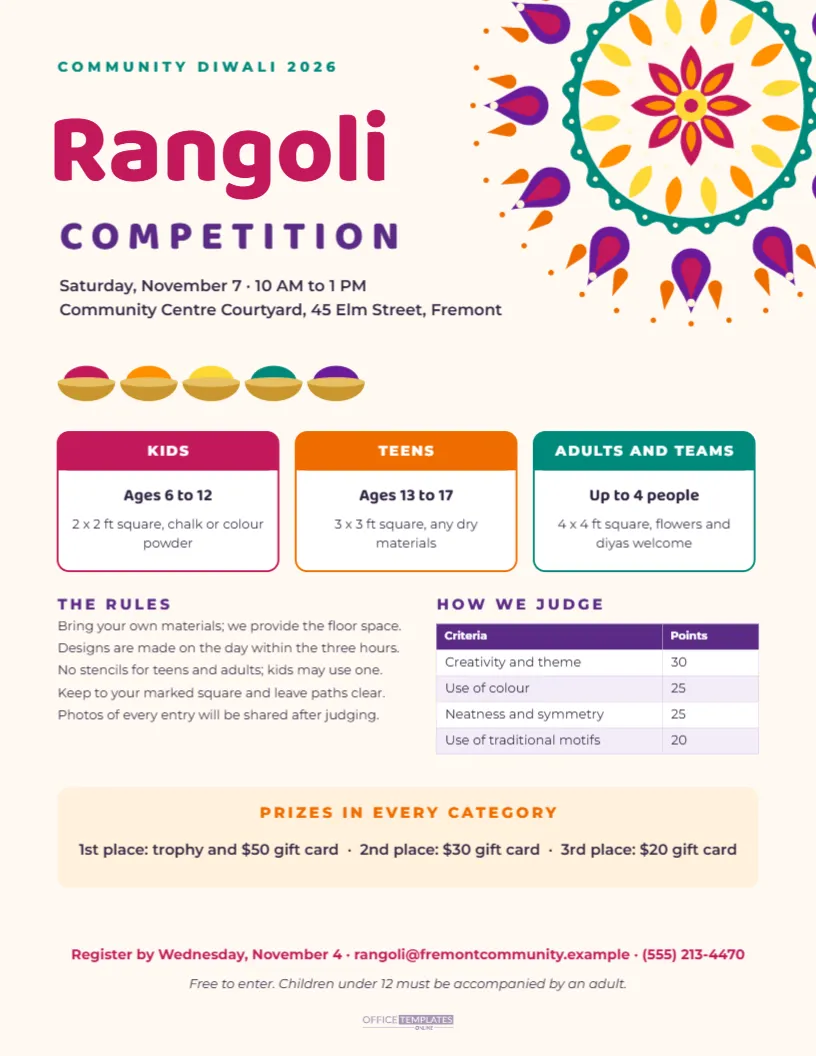
The page is warm white with a large, bright rangoli in magenta, purple, saffron, yellow, and teal sweeping in from the top right corner and bleeding off the edge. On the left, a small teal line reads COMMUNITY DIWALI 2026, then Rangoli in big magenta Baloo 2 and COMPETITION in spaced purple capitals. The date, time, and venue follow. A row of five brass bowls heaped with coloured powder sits beneath, like the materials laid out at the start of the contest.
The middle of the page holds three category cards, each with a coloured header: KIDS in magenta, TEENS in orange and ADULTS AND TEAMS in teal. Below them, THE RULES lists five short rules on the left, and HOW WE JUDGE shows a real table of criteria and points on the right. A soft peach panel announces the prizes, and the registration line, a short note and the Office Templates Online mark close the page.
Setting the Categories
The sample uses three categories that work for most communities:
- Kids, ages 6 to 12: a 2 x 2 foot square with chalk or colour powder. Small squares are realistic for young children to finish.
- Teens, ages 13 to 17: a 3 x 3 foot square with any dry materials.
- Adults and teams, up to 4 people: a 4 x 4 foot square, with flowers and diyas welcome.
Click the text in each card to change ages, sizes, or materials. If you need a fourth category, such as Families or Seniors, reduce the card width and copy one card.
Writing Fair Rules
Clear rules prevent disputes on the day. The sample lists five: bring your own materials, design within the three hours, no stencils for teens and adults (kids may use one), stay within your square and keep paths clear, and photos will be shared after judging. Other rules communities often add:
- No pre-drawn outlines on the floor before the start time.
- Only registered team members may work on an entry.
- Materials must be cleaned up by a set time, or the organisers will charge a cleaning deposit.
- Entries must follow the theme, if you set one, such as Festival of Lights or Our Planet.
Judging Criteria
The HOW WE JUDGE table is an editable Table. The sample weights are creativity and theme 30 points, use of colour 25, neatness and symmetry 25, and use of traditional motifs 20, for a total of 100. Double-click the table or choose Edit Table Data to change criteria or points, and use + Row to add one, such as Use of eco-friendly materials. Publishing the criteria in advance helps participants plan and makes results feel fair.
Choose at least three judges, ideally including someone with an art or design background and someone who knows traditional rangoli forms. Give them simple score sheets with the same criteria.
Prizes
The prize panel lists trophies and gift cards for first, second, and third place in every category. Adjust it to your budget. Many communities also give participation certificates to every child, which keeps the event encouraging; the rangoli competition winner certificate in this collection can be used for winners and edited for participants.
Date and Timing
The sample date is Saturday, 7 November 2026, from 10 AM to 1 PM, the day before Diwali, which falls on Sunday, 8 November. A morning slot avoids the evening rush of family pujas and lets judging and prizes happen by lunchtime. If your competition is outdoors, have a plan for wind and rain, which can ruin powder rangoli in minutes: a covered area or a backup date.
Registration Details
The registration line gives a deadline, an email, and a phone number in magenta. Ask registrants for the entrant’s name, category, team members, and a contact number. A registration deadline a few days before the event lets you plan the floor layout and mark squares. The small italic note says entry is free and children under 12 must be accompanied by an adult; change it if there is an entry fee.
Editing the Look
The rangoli and powder bowls are editable vectors. Select the rangoli to change its colour swatches, for example to match your organisation’s colours. The category card colours are set by the card outline and header shapes; click each to change them. If you want a calmer flyer for a school notice board, change the background to pale yellow and reduce the size of the rangoli.
Printing and Sharing the Competition Flyer
Download a PDF to print on US Letter for notice boards at community centres, temples, schools, and Indian grocery stores. Download a PNG to share in WhatsApp groups and on social media. The portrait page displays well on phones, and the large headline is readable even as a small preview.
Rangoli Competition Flyer Questions
Can I use the flyer for a school competition?
Yes. Change the categories to class groups, such as Grades 1 to 3, and the venue to the school hall or playground.
Can I add a theme?
Add a line under the title, such as This year’s theme: Lights of Hope, in the same purple capitals.
Can I add a registration QR code?
Use the editor’s QR tool to create a code for your online form and place it near the registration line.
Bring Colour to Your Courtyard
Set your categories and rules, add the date and prizes, and share the flyer early. The more people who know the details in advance, the more beautiful the courtyard will look on Diwali morning.