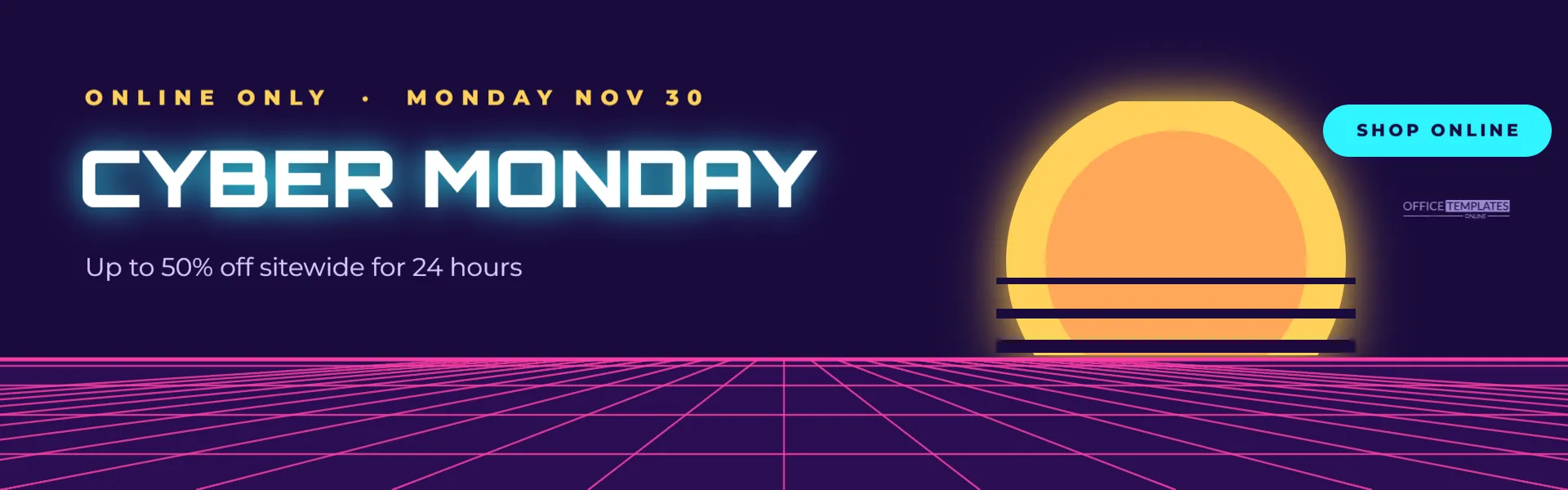
Cyber Monday deserves a look of its own. Instead of repeating your Black Friday graphics, mark the shift to online shopping with a bold digital style. This 1920 x 600 pixel banner uses synthwave, the retro-futuristic look of 1980s computer graphics and music videos: a striped sunset, a glowing grid floor, and neon type.
Synthwave Banner Design
The banner is a wide strip, 1920 x 600 pixels, ideal for a website header or homepage section. The background is a deep purple night. On the right side, a large sun glows in yellow and orange, sliced by horizontal stripes in the background colour, a signature synthwave motif.
Across the bottom, a pink perspective grid floor stretches towards the horizon, with lines converging towards the centre and horizontal lines getting closer together as they recede. A bright pink horizon line divides sky from floor.
On the left, ONLINE ONLY · MONDAY NOV 30 appears in small yellow capitals. CYBER MONDAY is set in bold white Orbitron, a geometric, futuristic font, with a soft cyan glow. Underneath, Up to 50% off sitewide for 24 hours explains the offer. A cyan pill in the top right reads SHOP ONLINE, with a small logo mark below it.
Why Synthwave Suits Cyber Monday
- It feels digital: grids and neon suggest screens and technology.
- It is eye-catching: glowing colours on dark backgrounds stand out.
- It separates the days: customers can tell Cyber Monday deals from Black Friday deals.
- It has broad appeal: the retro look is popular with many age groups.
Editing the Synthwave Banner
Change the kicker to your date and timing, the headline if you want your store name in it, and the offer line to your discount. The sun and grid are grouped shapes; you can recolour them or move the sun. The SHOP ONLINE pill can become SHOP NOW or SEE DEALS. Keep the headline short so it stays on one line in the large font.
Synthwave Colour Palettes
| Sky | Grid | Sun | Feel |
|---|---|---|---|
| Deep purple | Hot pink | Yellow to orange | Classic synthwave |
| Navy | Cyan | Pink | Cool and electric |
| Black | Lime | Magenta | Gaming and tech |
| Dark teal | Orange | Peach | Warm retro |
Website Header Placement
Place the banner at the top of your homepage on Cyber Monday, linking to your sale collection. Because the banner is wide and short, it works well above product grids. On mobile, wide banners shrink; consider a taller mobile version, or let your theme crop the sides, since the main text sits on the left.
Using the Banner in Emails
For a Cyber Monday email, resize the banner to 600 pixels wide and increase the font sizes so they stay readable on a phone. A matching subject line, such as Cyber Monday: up to 50% off for 24 hours, completes the theme.
Synthwave Social Media Versions
Create a square version for Instagram by placing the sun in the centre, the grid below, and the headline above. For stories, a tall version with the sun at the top and the grid at the bottom looks striking. Keep the same palette across all versions.
Glow Effects and Readability
The cyan glow on the headline is a soft shadow. A little glow adds atmosphere, but too much can blur letters. If you change the colours, check that the headline remains sharp and readable, especially on smaller screens.
Cyber Monday Offers That Work Online
- sitewide percentage discounts;
- free shipping with no minimum;
- bundle deals that increase order value;
- digital gift cards with a bonus;
- exclusive online-only products.
Preparing for Cyber Monday Traffic
Online sales can spike quickly once your banner and emails go out. Check your website speed, test discount codes, and prepare customer service for questions about delivery times. Being ready makes the most of the attention your banner brings.
Banner Accessibility
Add alt text such as Cyber Monday sale: up to 50% off sitewide for 24 hours, online only. Make sure the offer is also written in real text on the landing page for people using screen readers.
Using the Style Beyond Cyber Monday
Synthwave works for gaming launches, tech product drops, music events, and retro-themed parties. Change the headline and offer, and the sunset and grid set the scene.
Writing the Cyber Monday Headline
The headline is short and loud, which suits the style. If you want to add your store name, put it in the kicker rather than the headline, so CYBER MONDAY stays large. For a twist, try CYBER WEEK if your sale runs for several days, or GLITCH SALE for a playful tech theme.
Animating the Synthwave Banner
Synthwave looks great with gentle movement, such as a slowly scrolling grid or a pulsing glow. If your website supports animated images or video headers, you can export the banner and add simple motion in a video or animation tool. Keep any animation subtle so it does not distract from the offer or slow the page.
Matching the Banner to Product Pages
Carry the theme onto product pages with a small sale badge in the same pink and cyan. When shoppers see the colours on the banner and the products, the sale feels coherent and easy to follow. Consistency also reassures customers that the price they see is part of the Cyber Monday offer.
Removing the Banner at Midnight
Schedule the banner to come down when Cyber Monday ends. A neon sale header still showing on Tuesday morning confuses visitors who arrive expecting the deal, so set a reminder or use your website’s scheduling feature.
Cyber Monday Banner Questions
Can I change the font?
Other futuristic Google Fonts, such as Audiowide or Michroma, also suit the style.
Can I add a product photo?
Place a product cut-out in front of the sun for a striking effect.
What size is best for my website?
Check your theme’s header size and change the canvas dimensions to match.
Cyber Monday is your chance to shine online. Set your offer, light up your homepage, and ride the synthwave into the final day of the sale.