For many small businesses, especially home bakers, boutiques, beauty sellers, and local shops, customers come through messaging apps rather than websites. A status update is seen by everyone in your contacts, and on Black Friday, it is a simple way to announce a sale. This template uses a friendly chat bubble style that feels personal and invites customers to reply and order.
Chat-Style Status Design
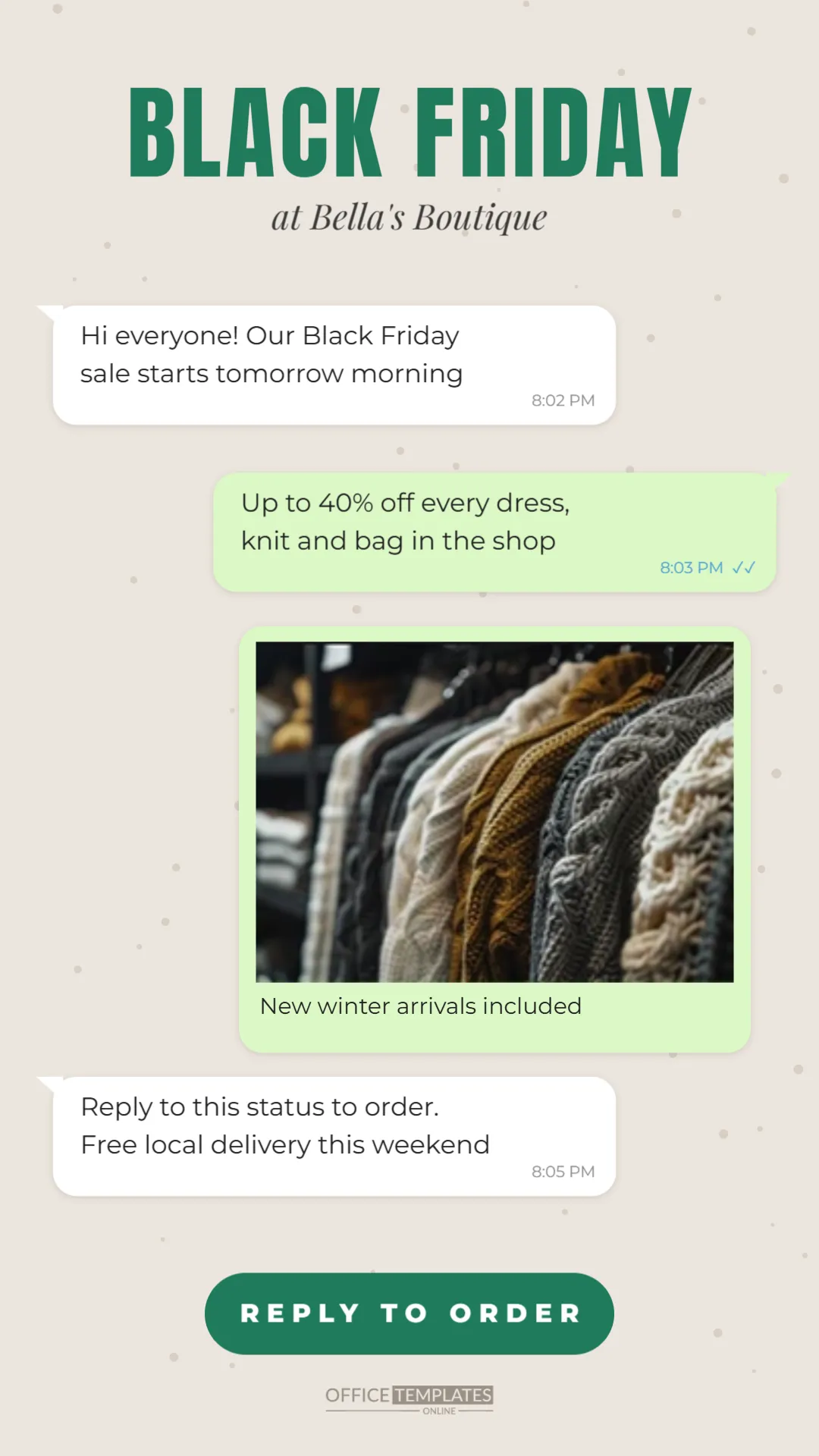
The status is 1080 x 1920 pixels, the tall format used for status updates and stories. The background is a soft beige like a chat wallpaper, with small darker dots scattered across it. At the top, BLACK FRIDAY is written in dark green Anton letters, with at Bella’s Boutique in italic serif beneath.
Below, a conversation unfolds in message bubbles. A white bubble on the left says the Black Friday sale starts tomorrow morning. A light green bubble on the right adds that dresses, knits, and bags are up to 40% off, with blue double ticks and a time. A larger green bubble holds a product photo and a caption about new winter arrivals. A final white bubble invites customers to reply to the status to order, with free local delivery. A dark green pill at the bottom reads REPLY TO ORDER, followed by a small logo mark.
Why Chat Style Works for Small Sellers
- It feels personal: customers see a conversation, not an advert.
- It invites replies: the format suggests messaging back.
- It suits mobile: bubbles are easy to read on a phone.
- It matches how you sell: many small businesses take orders by message.
Editing the Message Bubbles
Click the text in any bubble to change the message. Keep each message short, two lines at most. The times and ticks are decorative; change them or delete them. The product photo bubble can show a best seller, a new arrival, or a group of products. Click the photo and use Replace Image.
Message Ideas for the Bubbles
| Business | Bubble messages |
|---|---|
| Home baker | Black Friday box: 12 cookies for $15/Order by Thursday |
| Beauty seller | All lip kits 30% off/Free delivery in town |
| Phone repair | Screen repairs $20 off this weekend/Walk-ins welcome |
| Tailor | Alterations 25% off until Monday/Book your fitting |
| Plant shop | Buy 2 plants, get a pot free/Reply with your favourites |
Posting the Status
Download the design as a PNG or JPG and save it to your phone. In your messaging app, open the status or updates tab, add the image, and post it. You can add a short caption with your phone number, website, or opening hours. Status updates usually disappear after 24 hours, so repost during the sale.
Handling Replies and Orders
A chat-style status will bring messages. Prepare quick replies for common questions: prices, sizes, delivery areas, and payment methods. Many business messaging apps let you save quick replies and set an away message for busy times. Answering quickly is often what turns a reply into a sale.
Respecting Customers’ Privacy
Only message customers who have contacted you or agreed to hear from you, and respect people who ask not to receive promotions. Status updates are a gentle way to share offers, because only people who have saved your number and choose to view statuses see them.
Changing the Chat Bubble Colours
The beige wallpaper and green bubbles feel familiar for chat. You can change the bubble colours to your brand colour, such as pink bubbles for a beauty brand or blue for a tech service. Keep the bubbles light and the text dark for readability.
Using the Design on Other Platforms
The chat style works as an Instagram story, a Facebook story, or a printed sign in your shop window. A printed version makes a fun counter sign: Message us to order your Black Friday box.
A Status Sequence for the Weekend
- Thursday evening: this status announcing the sale.
- Friday morning: a photo status of your best deal.
- Friday afternoon: a status saying what has sold out.
- Sunday: a last chance status with the remaining stock.
Business Messaging Features
Business versions of messaging apps often include catalogues, labels for orders, and automated greetings. If you use a catalogue, add your Black Friday products with sale prices, and mention see our catalogue in a bubble. Labels help you track which customers have ordered and which are still deciding.
Keeping Orders Organised
A busy messaging weekend can get confusing. Keep a simple order list on paper or in a spreadsheet with names, items, prices, and delivery times. Confirm each order by message before you prepare it. Organised orders mean fewer mistakes and happier customers.
Status Accessibility Tips
Keep the text in the bubbles large and the contrast strong. If you add a caption, repeat the key offer in words, because some customers may have images turned off or use screen readers.
Writing in Your Own Voice
The power of a chat-style status is that it sounds like you. Write the bubbles the way you talk to customers: warm, short, and natural. If you usually greet customers by name or use a friendly sign-off, include it. Avoid stiff advertising phrases; We have restocked your favourite cardigans sounds more personal than New inventory available. Customers who know you will recognise your voice and feel comfortable replying.
Photos That Work in a Chat Bubble
The photo bubble is small on a phone, so choose a clear, simple image. A single product on a plain background, a neatly folded stack of clothes, or a tray of baked goods shot from above all work well. Natural daylight makes colours look true, which matters when customers order from a photo.
WhatsApp Status Questions
Can I add more bubbles?
Copy an existing bubble and paste it, then move it into place and edit the text.
Can I use a video status instead?
Yes. Use the design as the first frame or overlay it on a short video in a video editor.
Does it work for groups and broadcasts?
You can share the image in groups or broadcast lists, following each group’s rules about promotions.
Your customers are already chatting with you. Set your message, add a photo, and let your Black Friday sale start a friendly conversation.