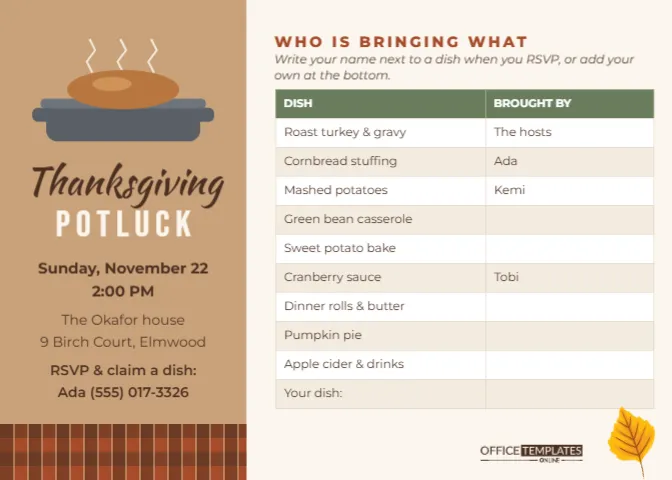
A potluck succeeds or fails on one question: who is bringing what. Leave it to chance, and you get five pies and no potatoes. This Thanksgiving Potluck Invitation answers the question on the card itself. The left side carries the invitation, and the right side is a real sign-up table where every dish has a row, and every guest can claim one.
Step 1: Decide the Menu Before You Edit the Potluck Table
Start on paper, not in the editor. Count your guests, then decide which dishes you, the host, will cover. Most hosts keep the turkey and gravy because they need the oven, and hand out everything else. A balanced potluck for twelve to sixteen people usually needs:
- one main (turkey, ham or a vegetarian roast);
- two starches (stuffing, mashed potatoes or rice);
- two vegetables (green beans, roasted carrots, a salad);
- one sweet side (sweet potato bake or cranberry sauce);
- bread (rolls, cornbread or biscuits);
- two desserts;
- drinks and ice.
The sample table follows almost exactly this list, so you may only need to rename a few rows.
Step 2: Edit the Sign-Up Table
The table is the editor’s real Table object, not loose boxes, which means it behaves like a small spreadsheet. Double-click it, or choose Edit Table Data, to type into the cells. The first column lists dishes and the second shows who is bringing each one. The sample already has the hosts down for the turkey and three guests (Ada, Kemi, and Tobi) holding stuffing, mashed potatoes, and cranberry sauce, with the rest left open. The last row says Your dish, so a guest with a family recipe can add something new.
Need more rows? Use the + Row button in the table tools. Need fewer? Remove the last row. The header colour (sage green), the alternating cream and white body rows, and the thin beige borders all live in the table settings, so you can change them for the whole grid at once rather than cell by cell. If your guest list is long, keep the font size readable; on a 7 x 5 card, eight-point text is about as small as you should go.
Step 3: Write the Party Details in the Sidebar
The kraft-brown sidebar on the left holds everything that is not about food. At the top is a little drawing of a covered roasting dish in steel grey with a golden turkey peeking out and three wisps of steam rising above it. Under it, Thanksgiving is written in Kaushan Script, a brushy handwritten face, and POTLUCK sits beneath in wide cream Bebas Neue capitals. The details follow: the date and time, the host’s house and street, and a line asking guests to RSVP and claim a dish by phone or text.
Keep the sidebar lines short. It is about one and three-quarters inches wide, so an address that runs to two lines is fine, but a full paragraph will crowd the roasting dish.
Step 4: Choose How Guests Claim Their Dish
A sign-up table on an invitation can work three different ways, and it is worth deciding which before you send anything.
| Method | How it works | Best for |
|---|---|---|
| Pre-filled | You assign dishes, type names in, then send | Small families who like a plan |
| Reply and update | Guests text you a dish, you update the table and resend the image | Groups that chat a lot |
| Printed sheet | Print the card large and pin it on the office fridge for people to write on. | Workplaces and clubs |
| Hybrid | Fill the main dishes, leave sides and drinks open | Most potlucks |
Step 5: Send or Print
The invitation is a 7 x 5 inch landscape card. As a PNG, it fits neatly in a text message or a group chat, and the table text stays legible when someone zooms in. Printed on Letter paper, two cards fit per sheet. If you are using the office-fridge method, scale it up to a full Letter page when you print, because people need room to write names in pen.
A Closer Look at the Potluck Card Design
The page splits into two zones. The left sidebar is a warm kraft-paper brown, finished at its foot with a short band of rust and brown buffalo-check plaid that looks like a picnic blanket folded under the dish. The right side is a pale cream panel with a rust heading in spaced capitals, WHO IS BRINGING WHAT, and a short italic instruction underneath. A yellow autumn leaf drifts in at the lower right, beside the brand mark in dark brown.
The roasting dish, steam, and turkey are drawn from simple shapes and grouped, so you can recolour the pan to enamel blue or copper. The leaf is editable vector art with its own colour swatches.
Potluck Etiquette Worth Adding to the Card
- Ask guests to bring their dish ready to serve, with its own serving spoon.
- Say whether there will be oven space. Usually there will not be, so warm dishes should arrive warm.
- Label dishes that contain nuts, dairy, or meat. A small folded card next to each dish is enough.
- Mention containers for leftovers if you would rather not keep five half-eaten pies.
You can fit one of these as a second instruction line under the table heading, or simply include them in the message you send with the image.
Potluck Card Questions
Can I add a third column for dietary notes?
Yes. Open the table settings and increase the column count, then type V, GF, or N in the new column. Narrow the dish column a little so the table still fits the panel.
Can I use it for a church or office potluck?
Absolutely. Swap the house address for the hall or break room, and change The hosts to the organiser’s name.
Will the table stay editable after I download it?
The downloaded PNG or PDF is a flat picture. Keep the editor version so you can update names and download a fresh copy whenever someone claims a dish.
With the menu planned and the table filled, the only surprise left on Thanksgiving Day should be how good everything tastes. Edit your potluck invitation and send it while people still have time to plan their dish.