Holiday catering orders arrive by phone, email, text and in person, often from the same customer. Without a proper order form, details slip: the wrong pie, the wrong pickup time, a forgotten second tray of stuffing. This Thanksgiving Catering Order Form puts every order on one page, in the same layout, so the kitchen, the front counter and the customer all see exactly the same thing.
Who Uses a Catering Order Form
- restaurants and cafes taking holiday takeout orders;
- caterers and personal chefs offering Thanksgiving menus;
- bakeries selling pies, rolls and sides;
- grocery delis and butcher counters;
- church kitchens and community groups selling meals as fundraisers.
What Is on the Order Form
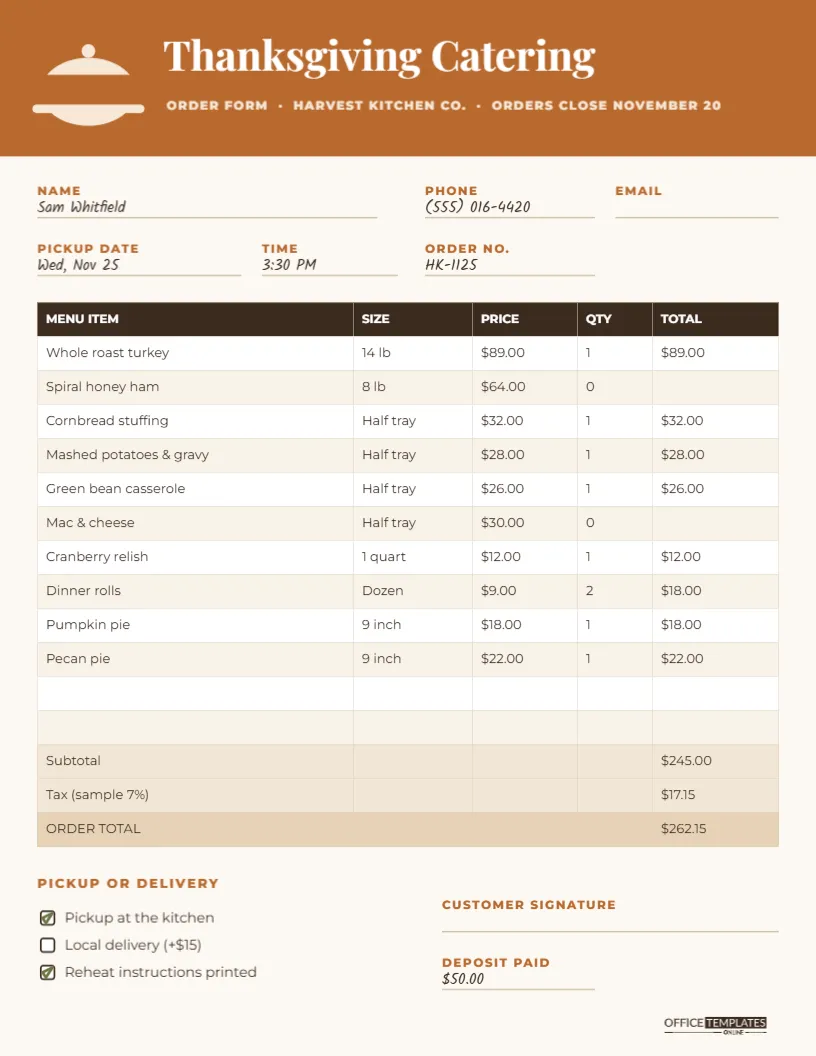
The form is US Letter, 8.5 x 11 inches, portrait, on a warm off-white page. A copper band runs across the top with a small cream serving-dome icon, Thanksgiving Catering in bold white Playfair Display and a line of small capitals with the business name and the order deadline (Harvest Kitchen Co. and November 20 in the sample).
Below the band are six customer fields, each a small copper label above a thin line: NAME, PHONE, EMAIL, PICKUP DATE, TIME and ORDER NO. The sample shows a filled order written in Kalam, a handwriting-style font, so you can see how a completed form looks.
The heart of the form is a real editable table with five columns: MENU ITEM, SIZE, PRICE, QTY and TOTAL. Ten Thanksgiving items are listed, from a whole 14 lb roast turkey and a spiral ham to half trays of sides, a quart of cranberry relish, dinner rolls and two pies. Two blank rows follow for extras, then three shaded summary rows: Subtotal, Tax and ORDER TOTAL.
At the bottom left, PICKUP OR DELIVERY offers three tick boxes (pickup at the kitchen, local delivery for a fee and printed reheating instructions). At the bottom right are a customer signature line and a DEPOSIT PAID line, with the brand mark in the corner.
Checking the Sample Catering Order Totals
The sample is a real calculation so you can check the layout. The customer ordered a turkey ($89), stuffing ($32), mashed potatoes ($28), green bean casserole ($26), cranberry relish ($12), two dozen rolls ($18), a pumpkin pie ($18) and a pecan pie ($22). That comes to a subtotal of $245.00. The sample tax line uses 7 percent, $17.15, for an order total of $262.15, with a $50.00 deposit noted at the bottom.
The tax rate is only an example. Use the rate that applies to your business and location, and check with your accountant if you are unsure how to tax prepared food.
Setting Up Your Menu in the Table
The table is the editor’s Table object. Double-click it, or choose Edit Table Data, and type your own menu items, sizes and prices. Clear the QTY and TOTAL cells for a blank form customers fill in by hand, or keep them for orders you type up yourself. Use + Row to add more items, such as a vegetarian main or a gluten-free pie.
The editor’s tables hold text rather than formulas, so totals do not calculate automatically. For typed orders, work out the totals with a calculator and enter them; for handwritten orders, the staff member taking the order fills them in.
Order-Taking Workflow for the Holiday Rush
- Print a stack of blank forms and keep them by every phone and at the counter.
- Number each order in the ORDER NO. field; a simple date-based code such as HK-1125 works well.
- Confirm the pickup slot before writing it down, using a separate schedule sheet to avoid overbooking.
- Take a deposit and write it on the form.
- Give the customer a copy. A phone photo of the form is enough for most people.
- File by pickup time so the kitchen can pull orders in sequence on the day.
Changing the Form to Match Your Brand
Replace Harvest Kitchen Co. and the order deadline in the header. The copper band and labels can be recoloured to your brand colour, and the dark brown table header follows it nicely. The serving-dome icon is a small grouped drawing; delete it and add your logo in the same space if you prefer.
The tick boxes at the bottom are editable too. Change Local delivery (+$15) to your own fee, or replace a line with Add a bottle of wine or Gift card included.
Printing and Digital Use
Download the PDF and print on regular Letter paper. For a carbon-style system, print the form twice per order and staple the copies. If you take orders online, download a PNG of the blank form and attach it to your order confirmation email so customers can check their order.
Planning Kitchen Production from the Forms
Once orders start coming in, the forms double as a production plan. Every evening, tally the quantities of each menu item across all forms for each pickup day. Those totals tell you how many turkeys to roast, how many half trays of stuffing to prepare and how many pies to bake. A simple tally sheet next to the order box, with one line per menu item, keeps the count accurate and lets you close an item early if it is about to sell out.
What to Put in Every Catering Box
Customers judge a holiday catering order by more than the food. Include the printed order form, reheating instructions with oven temperatures and times, serving utensils if you promised them, a card with your contact details and a small thank-you note. These touches cost little and make the order feel complete, which is what earns repeat bookings next year.
Catering Order Form Questions
Can I add a column for notes?
Increase the column count in the table settings and narrow the MENU ITEM column. A notes column is useful for allergies or slice the turkey.
Is the tax rate built in?
No. The 7 percent in the sample is an example; type your own rate and amount.
Can I use it for Christmas orders?
Yes. Change the title and menu, and the same form works for any holiday.
How many items fit?
Twelve item rows fit comfortably at the default size. For a longer menu, reduce the row height slightly.
Clear orders mean happy customers and a calm kitchen. Load your menu into the table, print a stack of forms and take your Thanksgiving orders with confidence.