Continuing professional development is part of every teacher’s working life. Schools run in-service days, districts offer courses, universities run short programmes, and online platforms provide flexible modules. Whatever the format, teachers need evidence of what they completed and how many hours it counted for, often for licence renewal, appraisal, or promotion. A clear completion certificate provides that evidence on a single page.
A Credential-Style Design
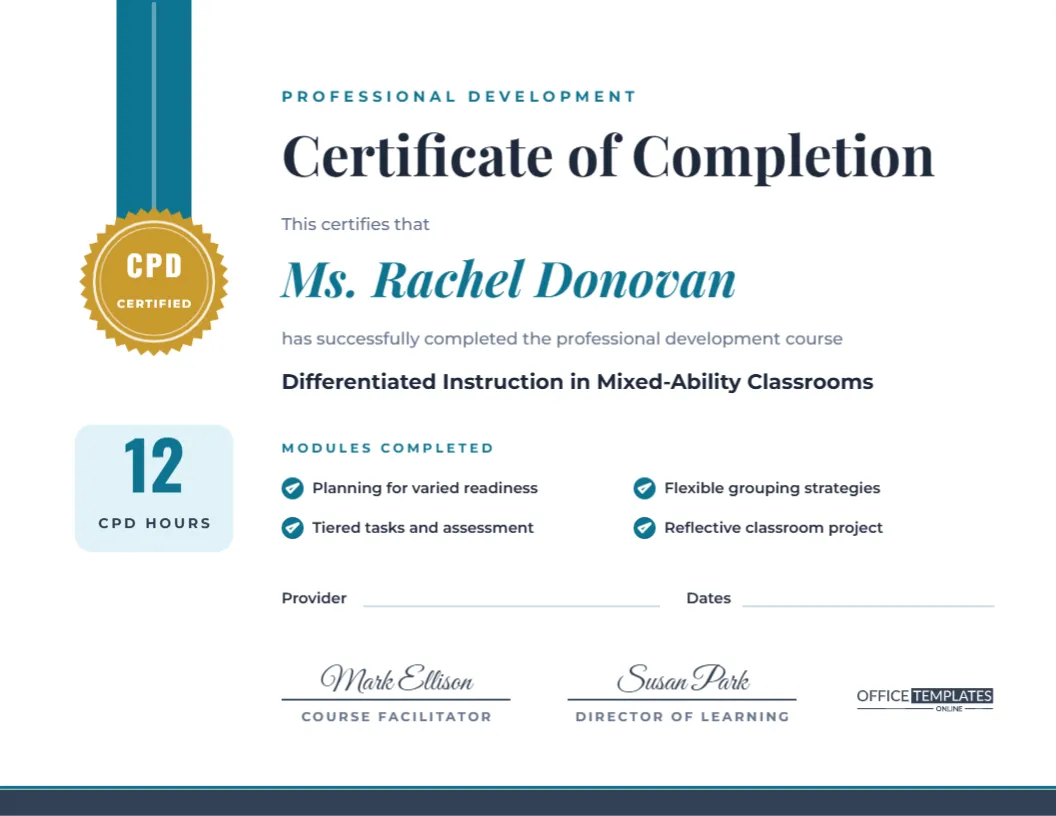
This certificate uses a clean, professional layout on a US Letter landscape page (11 x 8.5 inches). A cyan ribbon hangs from the top edge on the left and ends in a gold rosette seal printed with CPD and Certified, the visual language of accreditation. Directly under the seal, a pale cyan box shows the number of CPD hours in large Oswald numerals.
The main text starts with a Professional Development label, then Certificate of Completion in bold Playfair Display. The teacher’s name follows in cyan italic, then the course title on its own line in bold. A Modules Completed section lists four modules with round tick icons, and lines for Provider and Dates sit below. Two signature lines, for the Course Facilitator and the Director of Learning, and a slate footer band finish the page.
Information to Include on a CPD Certificate
Licensing bodies and employers generally look for the same core details. The template has a place for each:
| Detail | Where it goes |
|---|---|
| Participant’s full name | Under This certifies that |
| Course or programme title | Bold line below the name |
| Number of hours | CPD hours box under the seal |
| Content covered | Modules Completed checklist |
| Provider or organising body | Provider line |
| Dates of attendance | Dates line |
| Authorised signatures | Facilitator and director lines |
If your system uses credits or units rather than hours, simply change the words CPD Hours to Credits or PD Units.
Logging CPD Hours Accurately
Hours should reflect actual learning time, not the total length of the day. A full training day from 9:00 to 3:30 with an hour for lunch typically counts as five and a half hours. Online courses often state an estimated completion time; use that figure, or the time recorded by the platform. Add any required assignment or classroom project if the course formally includes it. When in doubt, check your licensing authority’s guidance, since rules differ between regions.
Editing the Modules List
The four module lines are separate text boxes with tick icons. Replace them with the real units of your course, keeping each to a short phrase. If your course has fewer modules, delete a line and its tick; if it has more, duplicate one line and move it into place, or summarise (Modules 1-6: classroom behaviour strategies). Listing specific content makes the certificate far more useful to a future employer than a title alone.
Setting Up the Course Details
- Type the teacher’s name, the course title, and the hours in the relevant text boxes.
- Edit the modules and fill in the provider and dates lines, or type the details directly onto them.
- Change the signatory names and roles, for example, Workshop Leader and Principal.
- Recolour the ribbon, the hours box, and the footer band to your organisation’s colour. The seal colour can also change, though gold reads as official in most contexts.
- Download as PDF for printing and a PNG copy for the teacher’s digital portfolio.
Issuing Certificates to a Whole Cohort
Training providers often need twenty or thirty identical certificates with different names. Set up the course details once and save the design. Then, for each participant, change only the name and download the file. Name the downloaded files consistently, for example with the participant’s surname and the course code, so they are easy to email and archive.
Printing and Storing
Print on US Letter landscape at Actual size, or on A4 with Fit to page. The design is mainly white with a few areas of colour, so it prints economically. Heavy 200 gsm paper is ideal for certificates handed out at the end of a course. Teachers should keep both the paper copy and a PDF in a professional development folder, since licensing bodies can ask for evidence years later.
Building a CPD Portfolio Around Certificates
A certificate records that learning happened; a portfolio shows what came of it. Teachers who keep a simple CPD log alongside their certificates find appraisals and licence renewals much easier. For each course, note the date, hours, provider, and one or two sentences on how it changed their practice: a new questioning technique, a revised marking policy, a safer lab routine. Attach a photo of a lesson resource or student work that shows the impact. Over a few years, this creates a clear story of professional growth, and the certificates become the anchors of that story rather than a loose pile of paper.
School leaders can encourage the habit by asking for one sentence of reflection whenever a certificate is filed with the office. Those sentences are also a goldmine when planning next year’s training priorities, because they show which courses actually changed classroom practice and which were simply attended.
Where This Certificate Fits
The layout suits a wide range of professional learning: school-based INSET days, district workshops, safeguarding and first-aid training, subject knowledge courses, leadership programmes and online micro-credentials. For attendance at a single seminar, where there is no assessment, you might change the title to Certificate of Attendance.
CPD Certificate FAQs
Is this an accredited certificate?
The template provides the format; accreditation depends on the organisation issuing it. Add an accreditation or approval number in the Provider line if your course has one.
Can I show hours with decimals?
Yes, the hours box is editable text. 5.5 or 7½ fit comfortably.
Can the seal say something else?
Yes. The words on the seal are separate text, so you can change CPD to PD, INSET, or your organisation’s initials.
Evidence Worth Keeping
Professional learning is an investment of time and effort. Give teachers a certificate that records it clearly, looks worthy of a portfolio, and stands up to scrutiny years later.