Bold Black and White Stripes Around a Script Name
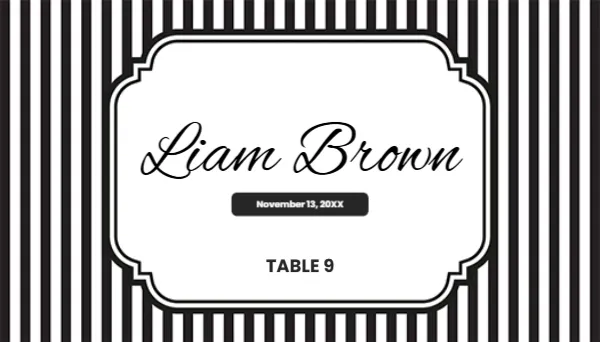
Crisp black and white vertical stripes fill the background of this small card, like an awning on a Paris cafe. A white label with curved bracket corners and a double black outline sits in the middle. The guest name, Liam Brown in the sample, runs in a large black script, a black pill holds the date in small white text and TABLE 9 sits in bold black capitals below. It is graphic, stylish and easy to read.
Business Card Size Place Card
The card is 3.5 x 2 inches, the same as a business card. Ten fit on a letter sheet, and many business card perforated sheets work for clean edges. Lay it flat on a plate or stand it in a holder.
Name, Date and Table
Type each guest’s name in place of Liam Brown, the event date in the pill and the table number. The sample date reads November 13, 20XX, so replace the year. Keep long names to one line by reducing the font size slightly.
Preparing the Striped Cards
- Type each name.
- Set the date.
- Set the table.
- Print ten per sheet.
- Cut or snap apart.
Monochrome Party Themes
Black and white stripes suit monochrome weddings, Parisian themes, circus parties and modern corporate dinners. They pair well with any accent colour, so you can add red roses or gold candles without clashing.
Printing Sharp Stripes
Stripes show any printing problem, so use a good quality setting and smooth card. Check that the lines stay straight and even across the card before printing the whole guest list.
Name Cards for Buffets
The design also works as a food label for buffets. Replace the name with the dish and the table line with notes such as Vegetarian or Contains nuts.
Folding Into a Tent
To make a standing tent card, place two copies on a 3.5 x 4 inch page, flip the top one upside down and fold along the middle. The name then shows on both sides of the table.
Seating Charts in the Same Style
Use the striped border on a large seating chart at the entrance so guests recognise the style when they reach their table.
Using the Striped Place Cards
Sort them by table before the event.
Step by Step Editing of the Black White Stripes Script Design
- On the black white stripes script design, click the main headline and type your own words, keeping a similar length.
- Retype every name, date and contact line on the black white stripes script design, checking each against a trusted source.
- Search the black white stripes script design for the words Lorem and Company so that no placeholder remains.
- Click any logo or photo on the black white stripes script design, choose Replace Image and resize the new picture to fit.
- Zoom the black white stripes script design to full size and read each line aloud before you save it.
- Keep a clean master of the black white stripes script design without private details, so later versions start tidy.
Next to try is the minimalist place card. Have a look at the monogrammed place card. Another option is the hello my name is name tent. Find more designs next to the black white stripes script design in name place card templates.