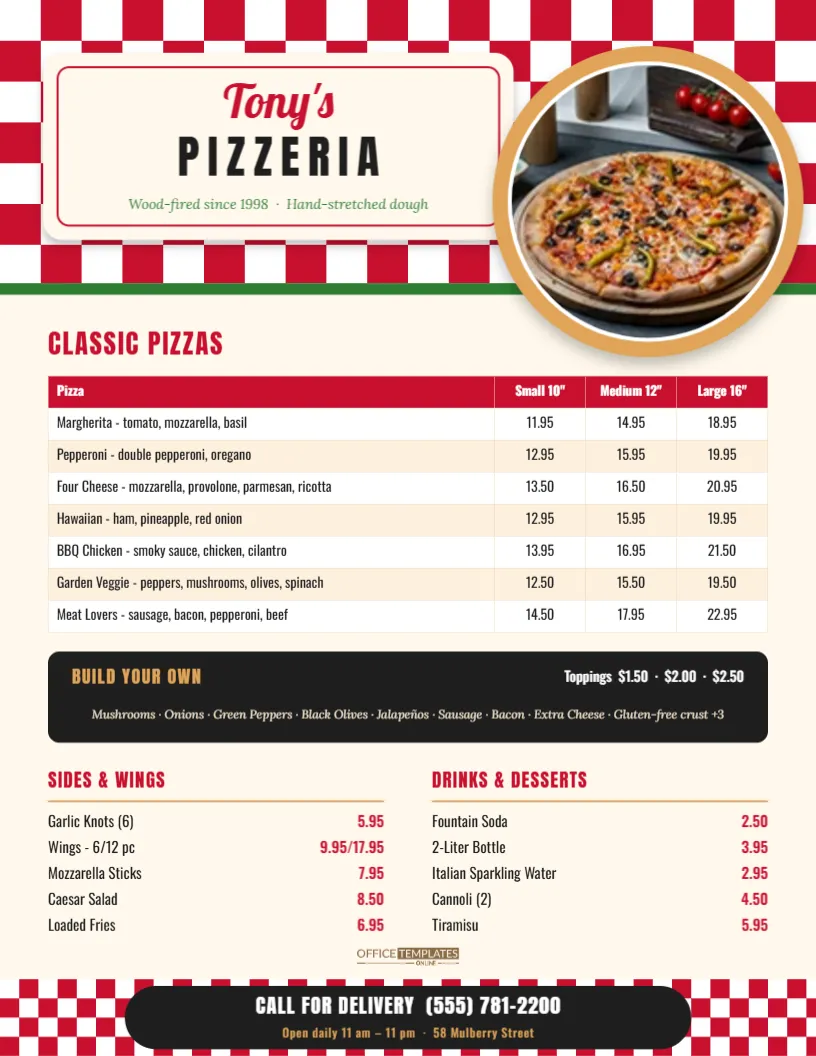
Pizza customers make three decisions: what pie, what size, and what else. A pizza menu that answers those questions in that order sells more and gets fewer phone calls asking, How much is a large pepperoni? This Pizza Menu Template is built around that order. The classic pies go in a grid with a price for each size, then a dark strip for build-your-own toppings, and finally sides, wings, drinks and desserts. The phone number for delivery sits in a big pill at the very bottom, exactly where the eye lands last.
Red Checks, Round Pie, Big Prices
This is a US Letter menu, 8.5 x 11 inches, portrait. The top quarter is a bold red-and-white checkered tablecloth pattern with a thin green stripe underneath, a nod to the Italian flag without spelling it out. On the tablecloth sits a cream label with a thin red inner border. It reads Tony’s in red Lobster script over PIZZERIA in tall, widely spaced Anton capitals, with “Wood-fired since 1998 · Hand-stretched dough” in small green italics.
To the right, a large round photo frame sits on a golden crust-coloured ring and overlaps the bottom of the tablecloth. It is sized for a top-down photo of your best pie. The rest of the menu runs on a warm cream background:
- CLASSIC PIZZAS in red Anton, followed by a price table: a red header row reading Pizza, Small 10, Medium 12 and Large 16, then seven pies from Margherita to Meat Lovers, each with its toppings written after a dash.
- BUILD YOUR OWN, a near-black rounded strip with the heading in crust gold, the three topping prices on the right, and the full topping list in cream italics.
- Two columns, SIDES & WINGS and DRINKS & DESSERTS, each with a gold underline and prices in bold red on the right.
- A checkered footer strip that echoes the header, with a black pill reading CALL FOR DELIVERY and the phone number, plus opening hours and the street address.
Headings and prices use Oswald and Anton, condensed typefaces that fit a lot of information across the page without shrinking the text.
Setting Prices for Three Sizes (With the Math)
New pizzeria owners often price sizes by instinct, $2 more for each step up. The amount of pizza grows much faster than the diameter, though, and it helps to see the numbers:
| Size | Diameter | Area (approx.) | Compared with a 10″ |
|---|---|---|---|
| Small | 10 in | 79 sq in | 1x |
| Medium | 12 in | 113 sq in | about 1.4x |
| Large | 16 in | 201 sq in | about 2.5x |
A 16-inch pie has roughly two and a half times the dough, sauce, and cheese of a 10-inch one, so a large priced at only $7 more than a small is generous. That is also why the large looks like such good value on the menu, and why it tends to be the size families order. Use the area column when you work out food cost per size, then type the finished prices into the grid. If you use different sizes, such as 8, 14 and 18 inches, just edit the header row.
Making the Grid Yours
The Classic Pizzas grid is a real editor table, so it behaves like a small spreadsheet:
- Double-click it (or choose Edit Table Data) to rename pies, rewrite toppings, and change prices.
- Press + Row for each new specialty pie. Seven rows fit comfortably, and nine still fit if you tighten the row height slightly.
- Paste a whole price list from a spreadsheet with Import CSV when you update prices across the board.
- Change the header colour, stripe colours, or font from the table options if your brand colour isn’t red.
Keep each pie description short, three or four toppings at most. The description is there so people can tell pies apart at a glance. It doesn’t need to list every herb.
Other Quick Edits
- Your pizza photo: click the round frame and use Replace Image. Shoot the pie from directly above in daylight, right after slicing, so the cheese still looks glossy.
- Your name: double-click Tony’s and PIZZERIA. A short name works best in the script; for longer names, put the long part in the capitals line.
- Toppings strip: retype the topping list and the three prices in the black box. If you offer vegan cheese or cauliflower crust, add it at the end of the list with its surcharge.
- Sides and drinks: each line is a name on the left and a price on the right. Retype them, or delete a line and nudge the rest up.
- Footer: put your delivery number, hours, and street in the pill. This is the line people photograph for later, so double-check every digit.
Where Pizza Menus Earn Their Keep
Pizzerias hand out more paper menus than almost any other kind of restaurant. A few ways this one design can work for you:
- Take-home menus tucked into every pizza box, so the next order comes straight to you rather than an app.
- Counter and wall menu printed larger at a copy shop. The text and shapes are vectors, so the Letter page enlarges to 11 x 17 inches cleanly; just use a high-resolution pizza photo.
- Door-hanger drops in nearby neighbourhoods. Print on card stock and staple a coupon to the corner.
- Online ordering pages and social posts, using a PNG or JPG download.
Printing Notes for a Checkered Design
The checkered header and footer reach the edges of the page, so a full-bleed print from a copy shop gives the cleanest result. If you print at home, the white border that most printers leave looks like a neat frame around the tablecloth, which is perfectly acceptable for box inserts. For menus that get handled with greasy fingers, use a gloss or laminated finish: the cream background wipes clean and the red stays bright. Download a PDF for the printer and a JPG for social media from the same design.
Pizzeria Owners Often Ask
Can I show a price for slices as well as whole pies?
Add a column to the grid titled Slice and fill it in for the pies you sell by the slice, leaving the rest blank or marked with a dash.
Is there room for combo deals?
The simplest spot is the black Build Your Own strip. Retitle it FAMILY DEAL, for example, 2 Large 1-Topping + Garlic Knots $32.95, and move the topping list into the Sides column.
Can I change the checkered colours?
Yes. Each checkered band is one group of squares. Select it and pick new colours from its colour swatches: green and white for a garden-style pizzeria, or black and white for a New York slice shop.
What if I don’t have a good pizza photo yet?
Use your logo in the round frame for now, or a photo of your oven. Replace it later in a few seconds when you have a better shot.
Fire It Up
Swap in your photo, set your three sizes and prices, and put your delivery number where everyone can see it. Print a stack for your pizza boxes, save a PDF for the print shop, and post a JPG online. Your pizza menu is ready to go.