A Yellow Camera Lens Inside a Photography Raffle Ticket
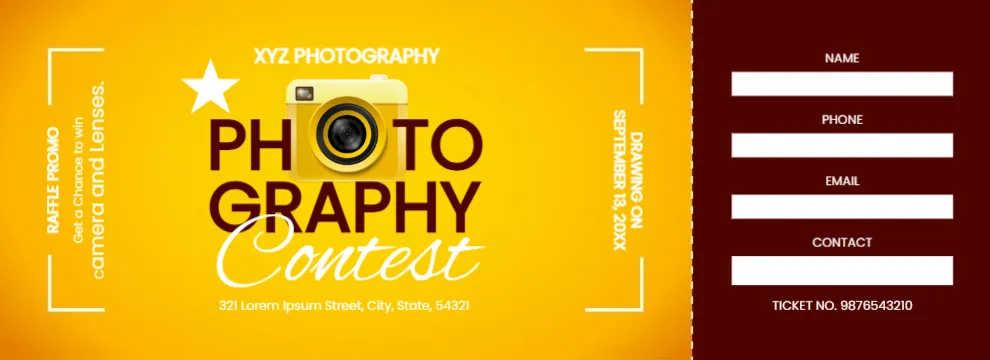
A glowing orange ticket with white corner brackets like a camera viewfinder carries XYZ PHOTOGRAPHY at the top and PHOTOGRAPHY in big dark letters, with a yellow camera replacing the first O. Contest runs in a white script below, with an address under it. Vertical text on each side reads RAFFLE PROMO, Get a Chance to win Camera and Lenses and DRAWING ON SEPTEMBER 13, 20XX. A maroon stub has white boxes for name, phone, email and contact and a ticket number.
Viewfinder Brackets
The design is 990 x 360 pixels. The corner brackets frame the title like a camera screen, which suits a photography theme.
Business Name, Prize and Date
Replace XYZ PHOTOGRAPHY and the address with your studio. The prize line promises a camera and lenses, so keep it only if that is your prize. Set the drawing year. The stub has a CONTACT box as well as PHONE, so use it for a social handle or delete it.
Preparing the Photography Tickets
- Type your studio name.
- Check the prize line.
- Set the date.
- Edit the stub boxes.
- Number each ticket.
Studio Promotions and Open Days
Photography studios can hand out tickets at open days, wedding fairs or with each booking and draw a free session or a camera at the end. The contest theme invites people to think of the studio when they need photos.
Camera Clubs and Exhibitions
Camera clubs can sell tickets at exhibitions to raise money for equipment or venue hire. Prizes such as a lens, a photo book or a framed print suit the audience.
Printing the Orange Glow
The orange background glows from the centre. Print on satin card to keep the glow smooth, and check that the white vertical text on the sides is readable.
Rules for Prize Contests
A photography contest with a raffle draw may be treated differently from a skill based contest. Check local rules for prize draws before selling tickets.
Asking Before Sending Emails
The stub collects email addresses. Ask buyers if they want to hear from you, and only send marketing to those who agree.
Using the Photography Tickets
Draw at the end of the event.
Step by Step Editing of the Photography Contest Camera Orange Design
- On the photography contest camera orange design, click the main headline and type your own words, keeping a similar length.
- Retype every name, date and contact line on the photography contest camera orange design, checking each against a trusted source.
- Search the photography contest camera orange design for the words Lorem and Company so that no placeholder remains.
- Click any logo or photo on the photography contest camera orange design, choose Replace Image and resize the new picture to fit.
- Zoom the photography contest camera orange design to full size and read each line aloud before you save it.
- Keep a clean master of the photography contest camera orange design without private details, so later versions start tidy.
Have a look at the movie premiere ticket. Another option is the business raffle ticket. A related layout is the music gala raffle. Looking beyond the photography contest camera orange design? See all ticket templates.