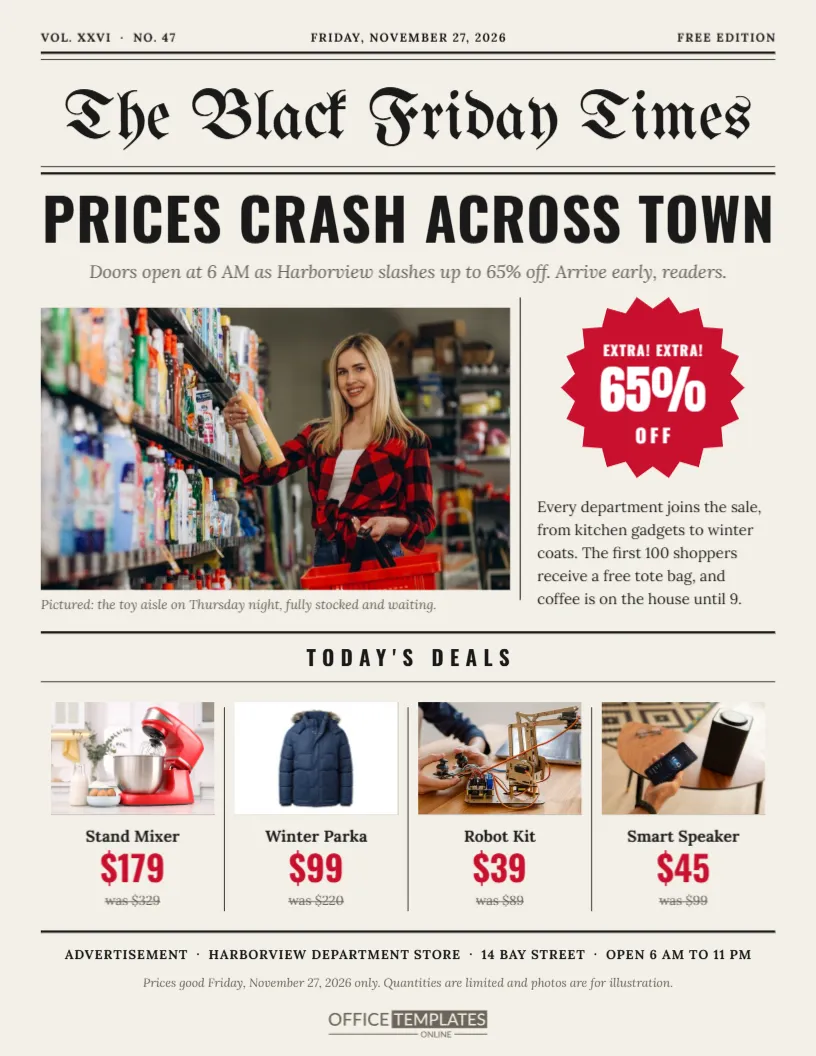
For decades, Black Friday meant one thing: a thick stack of newspaper circulars on Thanksgiving morning. Many shoppers still remember spreading them across the kitchen table and circling deals with a pen. This flyer recreates that feeling as a single front page. A blackletter masthead, a bold headline, a lead photo with a caption, and a row of deals divided by column rules make your sale look like the news of the day.
The Front Page Masthead
The top of the page carries small details like a real newspaper: volume and issue number on the left, the date in the centre and FREE EDITION on the right, all between thick and thin rules. Then comes the title, The Black Friday Times, set in UnifrakturMaguntia, a blackletter font that echoes classic newspaper nameplates. Change the title to your own, such as The Maple Street Herald.
A Headline That Reads Like News
PRICES CRASH ACROSS TOWN runs across the full width in heavy Oswald capitals. An italic subhead follows: Doors open at 6 AM as Harborview slashes up to 65% off. Arrive early, readers. Writing a sale as a news story is playful, and it encourages people to read the details. Keep your headline short and dramatic, in the style of a tabloid.
Lead Photo and Caption
A large photo slot fills the left column, with a small italic caption beneath: Pictured: the toy aisle on Thursday night, fully stocked and waiting. Captions are read more often than body text, so use yours to make a specific promise, such as the number of televisions in stock or the new arrivals on display.
The EXTRA EXTRA Burst and Column Copy
In the right column, a red starburst shouts EXTRA! EXTRA! with 65% OFF in the centre. Under it, a short paragraph in Lora explains the sale in friendly newspaper prose: every department joins in, the first hundred shoppers get a free tote bag, and coffee is on the house until nine. A thin vertical rule separates the columns.
Today’s Deals Row
| Product | Sale price | Regular price |
|---|---|---|
| Stand Mixer | $179 | $329 |
| Winter Parka | $99 | $220 |
| Robot Kit | $39 | $89 |
| Smart Speaker | $45 | $99 |
Each deal has a small photo, a name in Lora, the sale price in red Oswald, and the old price struck through. Thin column rules divide the four deals, just like ads in a newspaper.
The Advertisement Footer
A strip at the bottom reads ADVERTISEMENT, followed by the store name, address, and opening hours, with a small italic line about prices and quantities. Labelling it as an advertisement is part of the joke and part of the honesty: the reader knows it is a sale, presented in a fun way.
Who Should Use the Newspaper Circular
Department stores, hardware shops, family businesses, and local chains with a long history suit this style best, because it hints at tradition and community. It also works for any shop that wants to appeal to older customers who remember paper circulars, and to younger ones who find the retro look charming.
Editing the Newspaper Flyer
- Rename the masthead and change the issue line.
- Write your own headline and subhead.
- Replace the lead photo and write a caption.
- Edit the burst discount and the column paragraph.
- Retype the four deals and the advertisement footer.
Writing in a Newspaper Voice
Use the past and present tense like a reporter: shoppers are advised, doors open, prices crash. Add a quote if you like, such as our manager said, We have never had more stock. Keep sentences short. The fun is in the contrast between serious newspaper language and the cheerful subject of shopping.
Keeping the Columns Neat
Newspapers rely on alignment. When you edit, keep text inside its column and leave the rules where they are. If a paragraph runs too long, shorten it rather than shrinking the font. Neat columns are what make this layout look authentic instead of cluttered.
Printing on Newsprint Style Paper
The background colour imitates newsprint, but you can print on actual recycled or uncoated paper for extra authenticity. A slightly rough, off-white stock makes the blackletter masthead and the red prices look perfectly at home. Print at actual size on US Letter.
Sharing the Front Page Digitally
Post the flyer as an image with a caption like hot off the press. You can also send it as a PDF in your email newsletter, styled as this week’s edition. Readers enjoy the joke, and the clear deals row makes it easy to act on.
Creating a Series of Editions
If your sale runs several days, issue a new front page each day with a different headline and deals: Saturday edition, Sunday edition, Cyber Monday edition. Customers start looking forward to the next issue, and you get fresh content for every day of the weekend.
Choosing Deals for the Front Page Row
The four deals under the masthead should cover different kinds of shoppers: one kitchen item, one clothing item, one toy, and one gadget, as in the sample. Variety makes the front page feel like a full edition, and it gives every member of a household something to circle, which is exactly how paper circulars were used.
Writing a Caption That Sells the Newspaper Photo
Captions are among the most read words in any newspaper. Use yours to add a specific, true detail that the photo cannot show: the number of items in stock, the time the shelves were filled, or a staff member’s favourite product. A good caption turns a nice picture into a reason to visit.
Adding a Store Coupon in the Classifieds Style
Real newspapers carried small classified ads and clip-out coupons. You can add one at the foot of the page, framed by a dashed line, with a short offer like bring this page for a free coffee. It adds to the newspaper joke and gives readers a practical reason to carry the flyer to your store.
Newspaper Circular Flyer Questions
Can I use a different masthead font?
Yes. Any blackletter or bold serif gives a newspaper feel.
Can I add more deals?
Yes. Reduce the lead photo height and add a second row of deals.
Is the burst editable?
Yes. Change its text and colour, or delete it if you prefer a plainer page.