Electronics buyers compare specifications before they compare prices. A flyer that only shouts 60% OFF does not tell them whether the laptop has enough memory or the monitor refreshes fast enough. This tech deals flyer gives every product a spec line, so customers can judge the value at a glance. The design borrows from circuit boards and code editors, which makes it feel at home in an electronics store, a computer repair shop, or an online gadget retailer.
Circuit Board Styling for Tech Deals
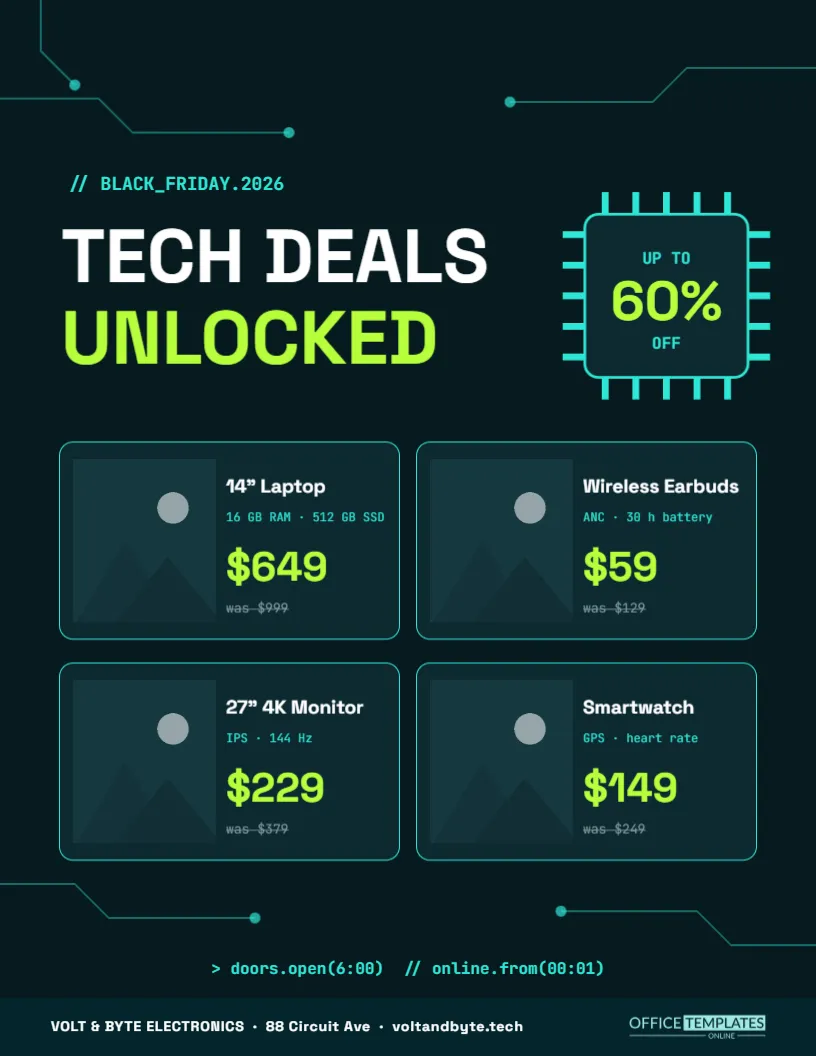
The background is a deep teal close to black. Thin cyan traces run in from the edges with right-angle turns and small round nodes, like the copper tracks on a circuit board. They frame the page without crowding it. The top line reads // BLACK_FRIDAY.2026 in a monospaced font, the way a comment looks in programming code.
The Tech Deals Headline
TECH DEALS appears in white Space Grotesk and UNLOCKED in bright lime below it. Space Grotesk is a modern geometric typeface with a technical feel. The word unlocked suggests access and opportunity, and it fits the language of games and devices. Keep the headline to two short lines.
The Chip Badge
To the right of the headline sits a square chip with pins on all four sides, like a processor. Inside, it reads UP TO, then 60% in large lime figures, then OFF. Drawing the discount inside a chip is a playful way to keep the theme consistent. The pins and the chip are editable shapes.
Four Spec Cards
| Product | Specs line | Sale price | Was |
|---|---|---|---|
| 14″ Laptop | 16 GB RAM, 512 GB SSD | $649 | $999 |
| Wireless Earbuds | ANC, 30 h battery | $59 | $129 |
| 27″ 4K Monitor | IPS, 144 Hz | $229 | $379 |
| Smartwatch | GPS, heart rate | $149 | $249 |
Each card has a photo on the left and text on the right: product name in white, specs in small cyan monospace, the price in large lime figures, and the old price struck through.
Writing Useful Spec Lines
A spec line should answer the first question a buyer asks. For a laptop, that is memory and storage. For earbuds, noise cancelling and battery life. For a monitor, panel type and refresh rate. Keep it to two short facts separated by a dot, so it fits the card without wrapping.
Showing Real Savings on Electronics
Electronics shoppers check prices online in seconds. Use real regular prices and realistic reductions. If a product is a previous-generation model, say so in the spec line, for example, 2025 model. Honest information builds trust and reduces returns after the holidays.
The Code Style Opening Times
A line near the bottom reads doors. open(6:00) and online.from(00:01), written like code. It tells customers when the store opens and when the online sale starts, in a way that makes tech fans smile. Change the times, or rewrite the line in plain English if your audience prefers.
Editing the Tech Deals Flyer
- Replace the four product photos.
- Retype names, spec lines, and prices.
- Change the chip discount to your headline figure.
- Edit the code-style opening times.
- Update the store name, address, and website in the footer.
Photographing Electronics for Dark Cards
Products photographed on a dark background blend perfectly into the teal cards. If you only have photos on white, they will still work, but crop them tightly. Avoid reflections on screens by shooting at a slight angle, or use the manufacturer’s official images if you are allowed to.
Colour and Contrast on a Dark Flyer
Lime and cyan are bright enough to read on the dark background, which is why they carry the prices and details. White is used for the most important text. If you change colours, keep strong contrast; mid-tone colours disappear on dark teal, especially in print.
Printing the Tech Flyer
A dark background is best printed by a print shop or on a good laser printer. Thin cyan lines can look faint on cheap printers, so check a proof. For in-store use, print a few copies on heavy matte paper and display them near the relevant products.
Posting the Tech Deals Flyer Online
The dark theme suits social media and email, where many tech buyers browse at night. Post the full flyer, then share each spec card separately as its own image. Add a link to the product page so customers can order directly.
Other Stores That Fit the Tech Style
Besides electronics retailers, the design suits phone shops, gaming stores, computer repair services, smart home installers, and software companies offering licence discounts. Replace the products with services, such as screen repairs or setup packages, and keep the spec line for what is included.
Bundling Accessories With Tech Deals
Customers buying a laptop often need a bag, a mouse, or a warranty. Mention a bundle offer in the code line or replace one card with a bundle, such as laptop plus sleeve. Bundles raise the average order and help customers get everything in one trip.
Adding Warranty and Return Information
Electronics buyers worry about faults and returns, especially for gifts. A short line such as extended holiday returns until January 15 or a two-year warranty included answers those concerns. Put it in the code-style line at the bottom or in a spec line, and keep it accurate to your actual policy.
Choosing Products for the Tech Spec Cards
Pick four products from different categories so the flyer appeals to several types of buyers: a computer, an audio item, a display, and a wearable, as in the sample. Avoid four similar products, such as four laptops, unless you are a laptop specialist. Variety gives more people a reason to visit.
Tech Deals Flyer Questions
Can I show six products?
Yes. Make the cards shorter and add a third row, or narrow them into three columns.
Can I change the monospaced font?
Yes. JetBrains Mono can be replaced by any monospace font in the editor.
Are the circuit lines images?
No. They are editable lines and circles you can move or delete.