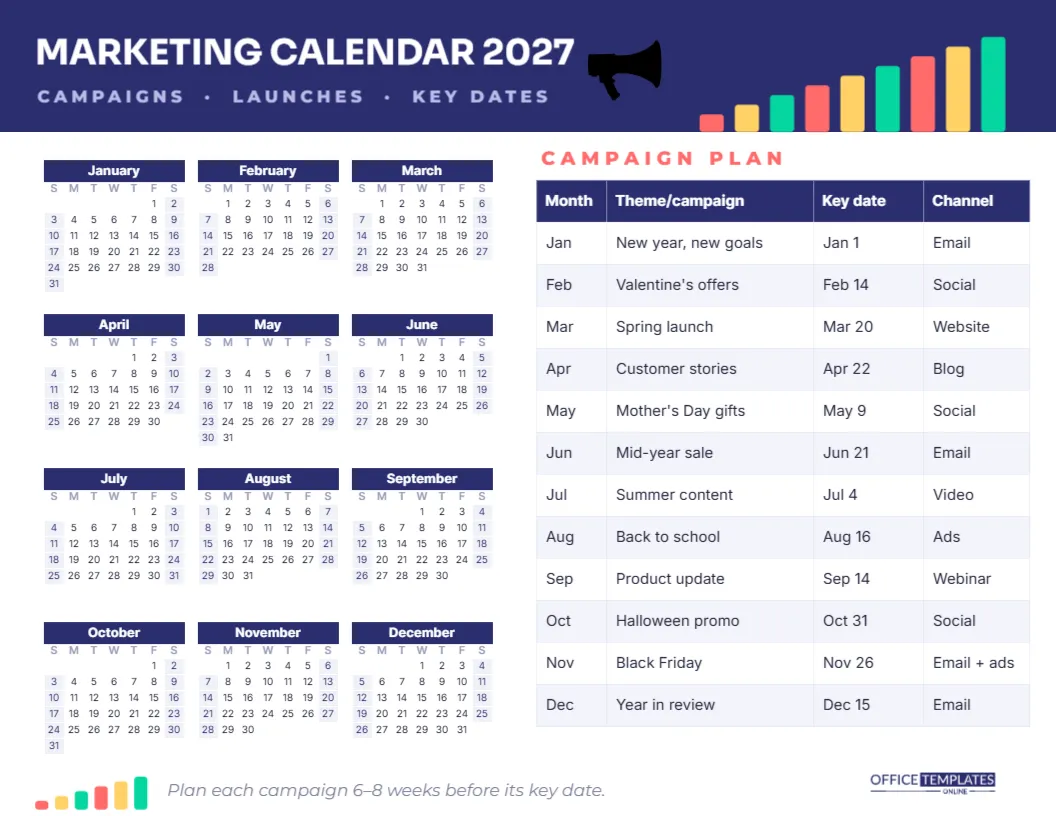
A marketing plan that lives in twenty browser tabs is not a plan. This one-page marketing calendar puts the whole of 2027 next to a month-by-month campaign table, so the team can see every launch, promotion, and key date in one glance. Below is the full specification, followed by notes on how the layout was designed and how to get the most from it.
Marketing Calendar Specification
| Element | Detail |
|---|---|
| Format | US Letter landscape, 11 x 8.5 inches, one page |
| Year view | Twelve mini months, three across and four down |
| Campaign plan | Editable table with Month, Theme/campaign, Key date, and Channel |
| Rows | One per month, January to December |
| Palette | Deep indigo with coral, sunflower yellow and mint accents |
| Fonts | Sora for the title, Inter for the calendar and table |
| Editable | Year, week start, colours, and font in Calendar Options; every table cell |
Designer’s Notes: A Header That Grows
The top of the page is a deep indigo band with MARKETING CALENDAR 2027 in white Sora and CAMPAIGNS · LAUNCHES · KEY DATES in pale lavender capitals. Along the lower right edge of the band, nine bars rise from left to right in coral, yellow and mint, like a growth chart, with a black megaphone just before them. The bars are the motif of the page: marketing is about growth, and the chart says so without a word. A shorter version of the same bars appears in the bottom-left corner, next to a reminder to plan each campaign six to eight weeks before its key date, so the footer echoes the header.
Designer’s Notes: Year on the Left, Plan on the Right
People read left to right, so the calendar comes first: the whole year as twelve compact months with indigo month bars and softly shaded weekends. The campaign table sits on the right, where the eye lands next. Each row of the table lines up with a month, so you can glance from Black Friday in the table to late November in the calendar and see how many working days you have before it. Keeping both on one page stops the plan drifting away from real dates.
Designer’s Notes: The Sample Campaign Plan
The table is filled with a realistic year for a small online business, so you can see how it works before replacing it:
| Month | Theme/campaign | Key date | Channel |
|---|---|---|---|
| Jan | New year, new goals | Jan 1 | |
| Feb | Valentine’s offers | Feb 14 | Social |
| Mar | Spring launch | Mar 20 | Website |
| Apr | Customer stories | Apr 22 | Blog |
| May | Mother’s Day gifts | May 9 | Social |
| Jun | Mid-year sale | Jun 21 | |
| Jul | Summer content | Jul 4 | Video |
| Aug | Back to school | Aug 16 | Ads |
| Sep | Product update | Sep 14 | Webinar |
| Oct | Halloween promo | Oct 31 | Social |
| Nov | Black Friday | Nov 26 | Email + ads |
| Dec | Year in review | Dec 15 |
Mother’s Day falls on May 9 and Black Friday on November 26 in 2027, so the sample dates are real. Replace the themes with your own, and keep one main campaign per month; more than that and nothing gets proper attention.
How Marketing Teams Use the Page
At the annual planning meeting, print a large copy and fill in the themes together. Mark product launches, trade shows, and seasonal peaks on the year calendar with coloured dots, then decide which campaign supports each one. After the meeting, pin a copy by the team’s desks and save the PDF in the shared drive. Every month, review the next row of the table and start production on the campaign two months ahead. The single page keeps the conversation focused on priorities rather than on spreadsheets.
Freelancers and small business owners can use it alone in the same way. Even a one-person business benefits from deciding in January what December’s big push will be, instead of discovering Black Friday on November 20.
Adding Columns for Budget, Owner, or Results
The campaign plan is the editor’s Table object. Use the Table options to add a column for Budget, Owner, or Goal, or a column for Results that you fill in after each campaign ends. Comparing the planned goal with the actual result each month turns the calendar into a simple marketing report. If you need more than one campaign per month, add rows under that month.
Choosing Key Dates Worth Planning Around
Good key dates are ones your customers already care about. Retail businesses build around holidays and paydays; B2B companies around budget seasons, trade shows, and the end of each quarter; local services around school terms and the weather. Industry awareness days can work well when they genuinely relate to your product. Write the date in the Key date column and circle it on the year calendar so the deadline is visible.
Changing the Year, Colours and Brand
The year calendar is a single Calendar object in the editor’s Full Year style. Open Calendar Options to change the year, start weeks on Monday, or recolour the month bars and weekends. Recolour the header band and bars to your brand colours, and replace the title with Acme Co. Marketing Plan 2027 if you share it with clients. The megaphone is an editable vector illustration, so you can change its colour from its colour swatches or ungroup it. Any Google font can be chosen for the title and table.
Reviewing the Plan Every Quarter
A yearly plan should bend, not break. At the end of each quarter, look at the three rows just finished and ask what worked, what did not, and what you learned about your audience. Then look at the next three rows and adjust them while there is still time. A campaign that flopped in spring might be reworked for autumn; a channel that performed well might deserve more of next quarter’s budget. Mark the review dates on the year calendar so they actually happen.
Printing and Sharing the Campaign Calendar
Download the PDF and print in landscape on letter paper, or scale up to tabloid for a wall version in the office. The white background and small solid areas keep printing costs low. Share a PNG in the team chat at the start of each quarter as a reminder of what is coming. Fonts stay crisp at small sizes, so the table remains readable even on a phone screen.
Twelve months, twelve campaigns, and one page the whole team can follow. Plan the year once, then simply work the plan.