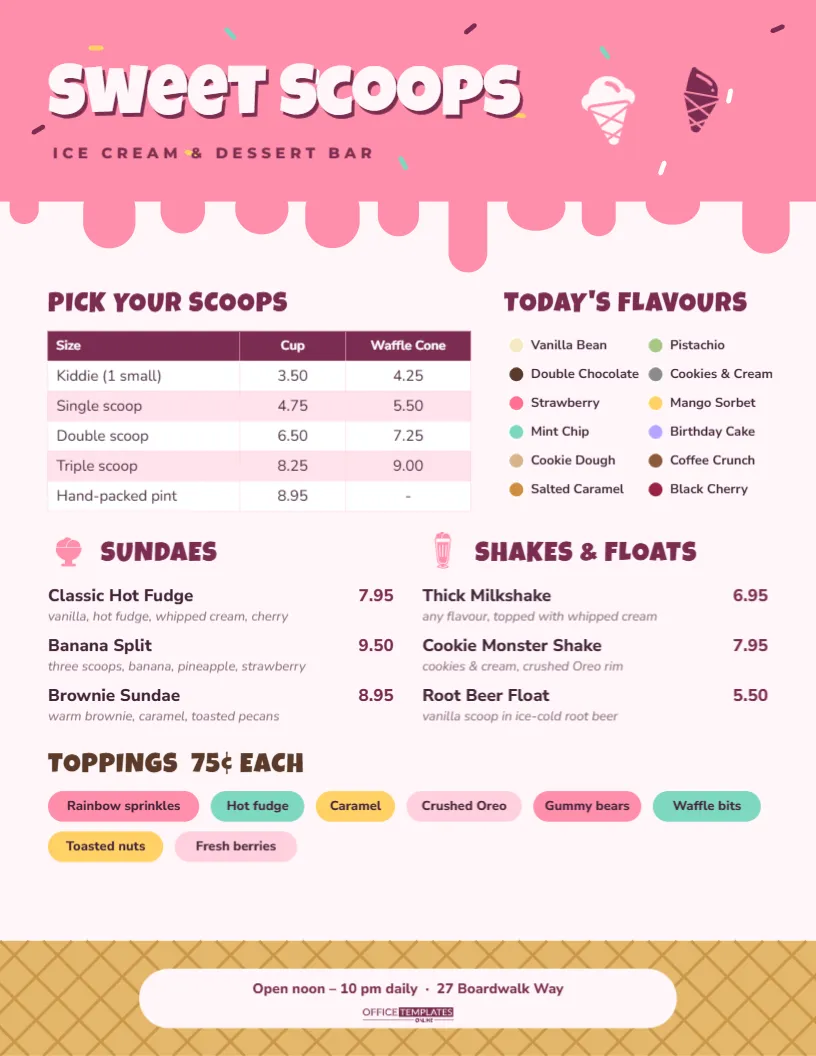
Nobody walks into an ice cream shop in a bad mood, and your menu shouldn’t look like it belongs in one either. This Ice Cream and Dessert Menu Template is pure fun. Pink icing drips down from the top of the page, sprinkles are scattered across the header, and the bottom of the sheet is a golden waffle-cone pattern, so the whole menu reads like one giant cone. It also works hard, with scoop prices in a clear table, the day’s flavours as a colour-coded list, and sundaes, shakes and toppings all easy to find.
A Menu Shaped Like a Cone
The page is US Letter, 8.5 x 11 inches, portrait, with a pale strawberry-milk background. Across the top is a bright pink band whose lower edge melts into drips of different lengths, each ending in a rounded drop. Tiny sprinkles in yellow, mint, white, and berry sit on the pink. The shop name, Sweet Scoops, is set in chunky cream Luckiest Guy lettering with a berry-coloured drop shadow, above “ICE CREAM & DESSERT BAR” in spaced-out berry capitals. On the right, two ice cream cone icons (one cream, one berry) tilt towards each other.
The middle of the menu is organized into five blocks:
- PICK YOUR SCOOPS: a table with Size, Cup and Waffle Cone columns, running from a kiddie scoop to a hand-packed pint.
- TODAY’S FLAVOURS: twelve flavours in two columns, each with a coloured dot that matches the ice cream (brown for chocolate, mint green for mint chip, yellow for mango sorbet).
- SUNDAES and SHAKES & FLOATS: three items each, with a price and a one-line description, introduced by small pink sundae and milkshake icons.
- TOPPINGS 75¢ EACH: eight rounded pills in pink, mint, yellow, and blush, one per topping, like sweets in a jar.
At the foot of the page, the waffle-cone band has a crisscross pattern in darker gold. A cream pill in the middle holds the opening hours, the address, and our logo.
Plan Your Flavour Board Through the Year
A rotating flavour list keeps regulars coming back to see what’s new. Because TODAY’S FLAVOURS is plain editable text, updating it takes seconds. Here is a seasonal rotation many scoop shops use as a starting point:
| Season | Flavours to feature | Dot colour idea |
|---|---|---|
| Spring | Strawberry rhubarb, lemon curd, honey lavender | Pink, pale yellow, lilac |
| Summer | Mango sorbet, peach cobbler, watermelon sherbet | Orange, apricot, coral |
| Autumn | Pumpkin pie, apple crumble, maple walnut | Pumpkin, caramel, amber |
| Winter | Peppermint bark, gingerbread, eggnog | Red and white, spice brown, cream |
| All year | Vanilla bean, chocolate, cookies and cream | Cream, dark brown, grey |
To change a flavour’s dot colour, click the dot and choose a new fill. It is a simple circle with a white edge.
How to Customize the Scoop Shop Menu
- Name and tagline: double-click Sweet Scoops and type your shop’s name. Short, punchy names suit the chunky font best.
- Scoop prices: double-click the table or choose Edit Table Data to set prices. Add a column for Waffle Bowl or Sugar Cone, or press + Row for a quart.
- Flavours: retype the twelve names. Delete a few if you carry fewer flavours, or add a third column if you carry more.
- Sundaes and shakes: each item has a name, price, and description. Keep descriptions to one line so the blocks stay balanced.
- Toppings pills: each pill is a coloured shape with a text label on top. Retype the label and widen or narrow the shape to fit.
- Icons and header: the cones, sundae and shake are editable vectors, so you can recolour them from their colour swatches. The drips and sprinkles are one group, so the whole header changes colour together, for example, chocolate brown for a gelato shop.
Little Details That Sell More Scoops
- Mark the favourites: Add Staff picks! or a small star beside one or two flavours. It helps customers who can’t decide.
- Offer a kid-size scoop: A cheaper kiddie scoop brings families in, and parents often upgrade their own order.
- Price toppings clearly: A single 75¢ each makes add-ons feel easy.
- Name your sundaes:Brownie Sundae sells better than Sundae #3. A local name, such as your street or a nearby landmark, makes a signature dish.
- Tell people about pints: Take-home pints extend your sales into evenings and colder months.
Taking the Menu Beyond the Shop
A scoop shop menu can travel. Print a half-size copy for birthday party packages, where parents choose a sundae bar for a group of children, and add a line such as Party tubs for 10 · 45.00. Food trucks and summer kiosks can use the same design with fewer flavours and a bigger price table. If you cater weddings or school fairs with an ice cream cart, remove the address pill and write Book our cart for your event with a phone number. The waffle-cone band and the drips stay recognisable wherever the menu goes.
Printing for a Sticky Counter
Ice cream shops are sticky places. Laminate the counter copy or put it in a wipe-clean acrylic menu holder. For the wall, print the PDF larger at a copy shop, since the Letter page enlarges well to 11 x 17 or 18 x 24 inches. Pinks and golds look best on bright white paper; natural or cream stock makes the pink look peachy. At home, choose your printer’s vivid or photo colour setting for the drips and pills.
Scoop Shop FAQs
Can this menu work for a frozen yogurt or gelato shop?
Yes. Change the heading to Frozen Yogurt or Gelato, swap the scoop sizes for cup sizes by weight, and recolour the drips to suit.
Is there room for cakes and pies?
Replace SHAKES & FLOATS with CAKES & PIES and list slices with prices. The SUNDAES block can stay as it is.
Can I show dairy-free options?
Add “(DF)” after dairy-free flavours, or give sorbets a different dot style, such as a mint ring, and explain it with a small note under the flavour list.
Do the sprinkles move if I edit the header?
No. The drips and sprinkles are grouped, so they stay together. Ungroup them only if you want to move individual sprinkles away from your text.
Serve It Up
Put your shop name on the drip, set your scoop prices, and fill the flavour board. Print it for the counter, post it online, and let the menu do what ice cream does best: make people smile.