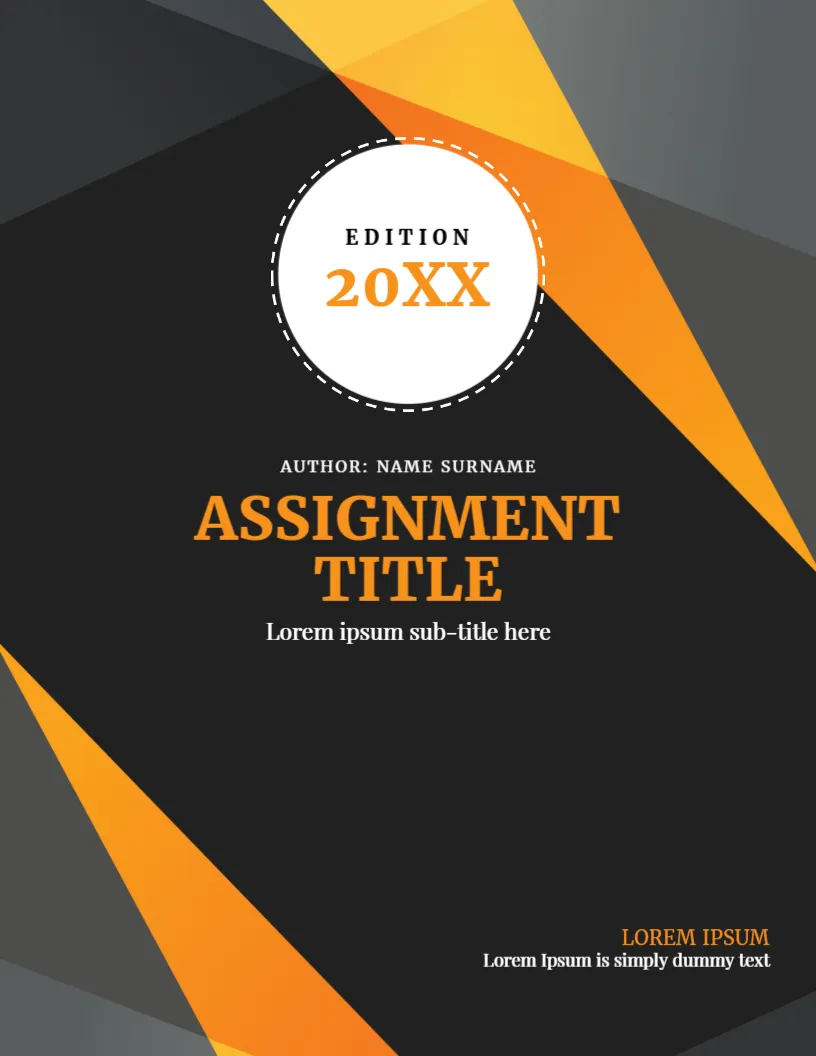
A Dark Cover With Beams of Orange Light
Not every assignment needs a subject label. This generic cover uses a charcoal page crossed by translucent orange beams, with a round white badge at the top that holds the word EDITION and the year. It suits any course, any level and any kind of paper, from an essay to a report, and it prints well because the shapes are bold and simple.
Charcoal Page, Beams and Edition Circle
The page is 8.5 x 11 inches, portrait, one page. Orange and amber triangles cross from the corners and overlap in the middle. A white circle with a dashed outline sits near the top and holds E D I T I O N and 20XX in orange. The title block is centred under it.
Author, Title and Footer Lines
AUTHOR: NAME SURNAME sits in small capitals above ASSIGNMENT TITLE in large orange serif capitals, with Lorem ipsum sub-title here in white. At the lower right, LOREM IPSUM in orange and Lorem Ipsum is simply dummy text in white are two lines for the course and the lecturer. Replace each. The word EDITION suits drafts and revised versions; change the year to the current one.
Making a Generic Cover Specific
- Replace the title with your own.
- Use the subtitle for the course unit.
- Add the lecturer in the footer lines.
- Change the year in the circle.
- Delete the edition word if not needed.
Why Dark Covers Need a Test Print
A charcoal page uses a lot of toner and can look flat. Print one copy before you print many, and consider a draft grayscale print for proofing. For submission by email, a dark cover looks sharp on screen.
Choosing the Right Title Length
The title is in large capitals, so long titles wrap quickly. Keep the main title to six words and put the rest in the subtitle. A short title looks confident and is easier to read from a distance.
Printing the Charcoal Orange Cover
Print on 120 gsm paper. A laser gives an even charcoal, and orange stays bright. If your printer shows streaks, switch to the best quality setting.
Step by Step Editing of the Generic Charcoal Orange Design
- On the generic charcoal orange design, click the main headline and type your own words, keeping a similar length.
- Retype every name, date and contact line on the generic charcoal orange design, checking each against a trusted source.
- Search the generic charcoal orange design for the words Lorem and Company so that no placeholder remains.
- Click any logo or photo on the generic charcoal orange design, choose Replace Image and resize the new picture to fit.
- Zoom the generic charcoal orange design to full size and read each line aloud before you save it.
- Keep a clean master of the generic charcoal orange design without private details, so later versions start tidy.
Planning Revisions Under an Edition Label
If you submit drafts, change the edition word to Draft One, Draft Two or Final. A clear label stops confusion about which file is current, and your supervisor can compare versions quickly.
Our favourite alternative is the assignment cover page design. Related reading is the assignment cover page. Also worth a look: academic assignment cover page. Find more designs next to the generic charcoal orange design in assignment cover pages.