Slanted Bands for a Paper That Surveys the Field
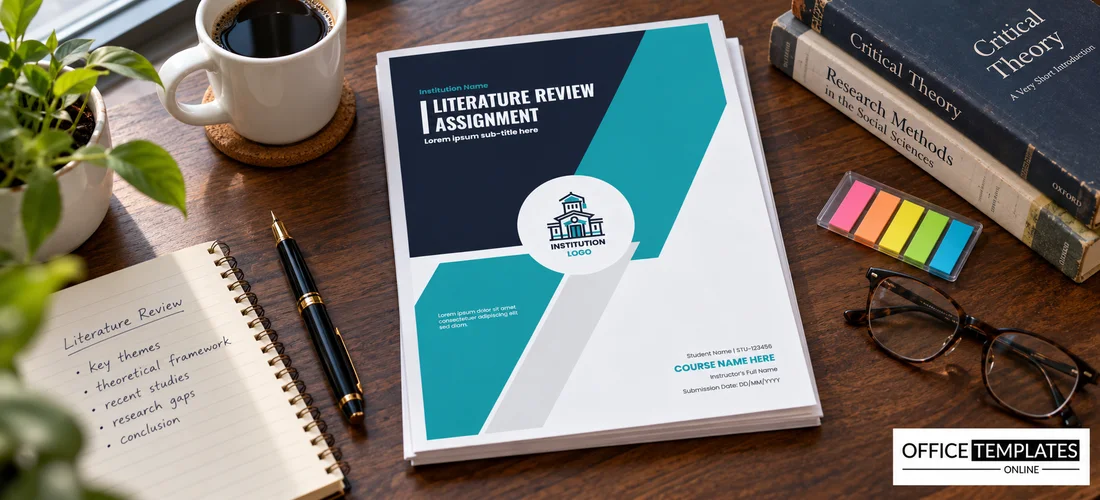
Bold navy and teal slants cross this cover from the upper right to the lower left, with a round logo at the centre. There is no photograph, so the page looks clean and academic. It suits Literature Reviews in any subject, from psychology to engineering, where the work is to survey and compare existing studies.
Navy and Teal Slants and Logo Circle
The page is 8.5 x 11 inches, portrait, one page. The navy area sits at the upper left with the title in white. A teal band runs diagonally to the right, and a grey strip follows. The logo circle overlaps the bands. The student block sits at the lower right.
Literature Review Title and Student Details
Institution Name in teal sits above LITERATURE REVIEW ASSIGNMENT with a white vertical bar and a bold subtitle. A small paragraph sits on the teal band on the left. At the lower right, Student Name | STU123456, COURSE NAME HERE in teal, Instructor’s Full Name, and Submission Date: DD/MM/YYYY complete the page. Use the subtitle to name the topic you review.
Literature Review Cover Details
- The topic and the years covered.
- The databases you searched.
- The course and code.
- The instructor.
- The word count and date.
Choosing a Clear Review Topic
A review needs a narrow question, such as Mobile Learning in Secondary Schools, 2015 to 2024. State your inclusion rules and the search terms you used, so readers can repeat your search.
Organising by Theme, Not by Author
Group studies by theme, method, or finding. Compare them in each section, noting where they agree and where they conflict. A review that lists studies one by one reads like a catalogue and loses marks.
Keeping a Reference Manager
Use a reference manager to save every source with its details as you read. It builds the bibliography for you and prevents the last-night scramble to find a page number.
Printing the Navy and Teal Cover
Print in colour on 100 gsm paper. The large navy area benefits from a laser printer.
Step-by-Step Editing of the Literature Review Teal Design
- On the literature review teal design, click the main headline and type your own words, keeping a similar length.
- Retype every name, date, and contact line on the literature review teal design, checking each against a trusted source.
- Search the literature review teal design for the words Lorem and Company so that no placeholder remains.
- Click any logo or photo on the literature review teal design, choose Replace Image, and resize the new picture to fit.
- Zoom the literature review teal design to full size and read each line aloud before you save it.
- Keep a clean master of the literature review teal design without private details, so later versions start tidy.
For comparison, open the psychology assignment cover. Consider the history assignment cover. Similar designs include the sociology assignment cover. The rest of the series around the literature review teal design is in the assignment cover pages.