A Purple Panel and Gold Bow for Employee Gift Certificates
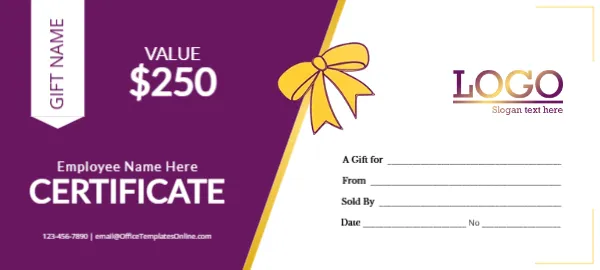
A deep purple panel with a diagonal gold edge fills the left side of this certificate. A white tab at the top left holds GIFT NAME written vertically, and VALUE and $250 sit in white beside it. Employee Name Here and CERTIFICATE sit in white below, with a phone and email at the foot. A gold bow sits on the gold edge, and the white right side has a purple and gold LOGO and lines for A Gift for, From, Sold By, Date and No inside a thin gold corner frame.
A Corporate Reward Voucher
The certificate is 5.28 x 2.38 inches. The employee name line makes it ideal for staff rewards, bonuses and recognition gifts.
Gift Name Tab and Employee Line
Replace GIFT NAME with the type of reward, such as Spa Day or Dinner for Two, and Employee Name Here with the employee’s name. Change the value and replace the template site’s email in the footer.
Preparing the Employee Certificate
- Type the gift name.
- Type the employee name.
- Set the value.
- Swap the logo.
- Sign and present.
Rewarding Staff With Gift Certificates
Gift certificates make flexible rewards for employee of the month, long service or holiday bonuses. A personal certificate with the employee’s name feels more thoughtful than a simple card.
Tax and Payroll Considerations
In some places, staff gifts may count as taxable benefits. Check with your accountant, since this layout is not tax advice.
Presenting the Purple Certificate at Work
Present the certificate at a team meeting or in a short one to one chat, with a few words about why the employee is being thanked. Public recognition often means as much as the gift itself.
Printing the Purple Panel and Gold Bow
Purple prints richly on smooth card. Check that the gold edge and bow stay bright.
Partnering With Local Businesses
Companies can buy certificates from local restaurants or spas and present them with this certificate as a cover card.
HR Records for Staff Gifts
HR can log each certificate issued, with the employee name, value and reason, which helps keep rewards fair across teams.
Using the Employee Certificate
Present it at the next team meeting.
Step by Step Editing of the Employee Purple Gold Bow Design
- On the employee purple gold bow design, click the main headline and type your own words, keeping a similar length.
- Retype every name, date and contact line on the employee purple gold bow design, checking each against a trusted source.
- Search the employee purple gold bow design for the words Lorem and Company so that no placeholder remains.
- Click any logo or photo on the employee purple gold bow design, choose Replace Image and resize the new picture to fit.
- Zoom the employee purple gold bow design to full size and read each line aloud before you save it.
- Keep a clean master of the employee purple gold bow design without private details, so later versions start tidy.
Similar designs include the gold seal certificate. Compare it with the brown and gold gift card. You may also like the silver gift card. Every employee purple gold bow style alternative sits in gift certificate and voucher templates.